During the play eg audio, subtitle menu etc. The Kodi blue colors become washed for example.
We improved that when dealing with subtitles. If you update to staging you should get better colours.
Btw, after update to staging now I get dropped frames when overlaying the UI, known issue? is safe to back to the previous stable version?
Known issue. Should be sorted early next week.
If you can’t wait, remove the staging repo
apt-get update
apt-get install –reinstall vero5-mediacenter-osmc
apt-get install –reinstall vero564-image-osmc
reboot
1 Like
Thanks, I can wait. Btw, is there a place where you can see what’s being tested on the staging environment?
You can browse commits on Github…
1 Like
Btw, just to have a clear idea, what that means? update from staging repo again or regular update?
It doesn’t work anyway and I’m not feeling confortable enough with the idea of back to previous version since I also have different kernel version too.
vero5-mediacenter-osmc |
21.3.0-11 | 21.3.0-7 |
|---|---|---|
vero564-kernel-osmc |
3.9.346 | 3.9.336 |
vero5-secureosmc-osmc |
2.3.0-1 | 2.1.0-1 |
vero5-userland-osmc |
2.0.0 | 1.9.0 |
vero5-libcec-osmc |
6.0.2-5 | 6.0.2-5 |
Hi again, I’d like to bump this thread because I tried LibreELEC Hades 1.0 RC3 on my HTPC the other day and got a pleasant surprise, which also confirmed what I already suspected and had pointed out when I opened this thread.
Some projectors have trouble mapping the values they receive from the L2 trims, which ends up as washed-out blacks. This LibreELEC build includes an option specifically to avoid sending the L2 trims.
I tried enabling this option and, sure enough, the problem went away.

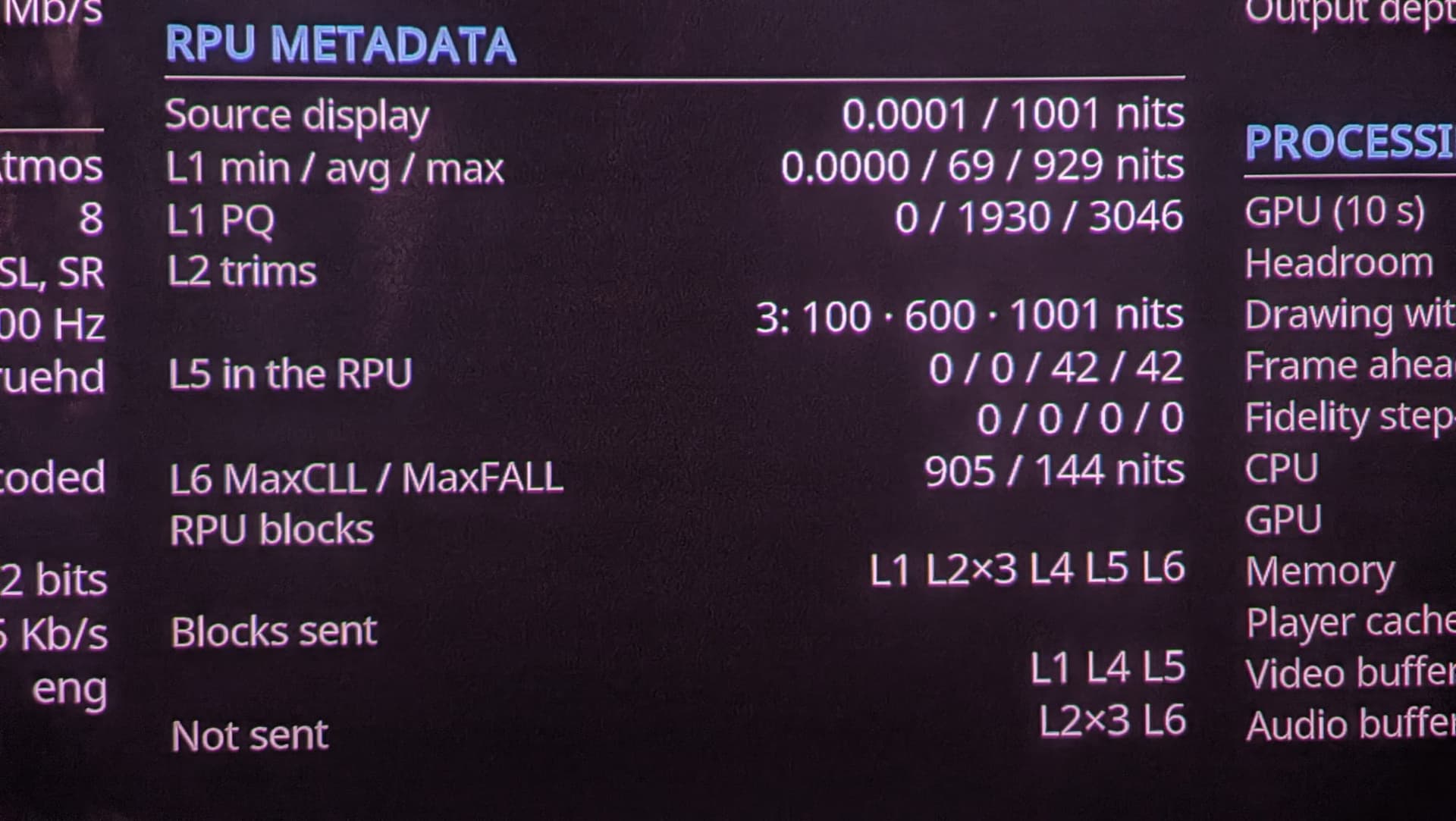
And we know some trims, like L5, are not passed through already…
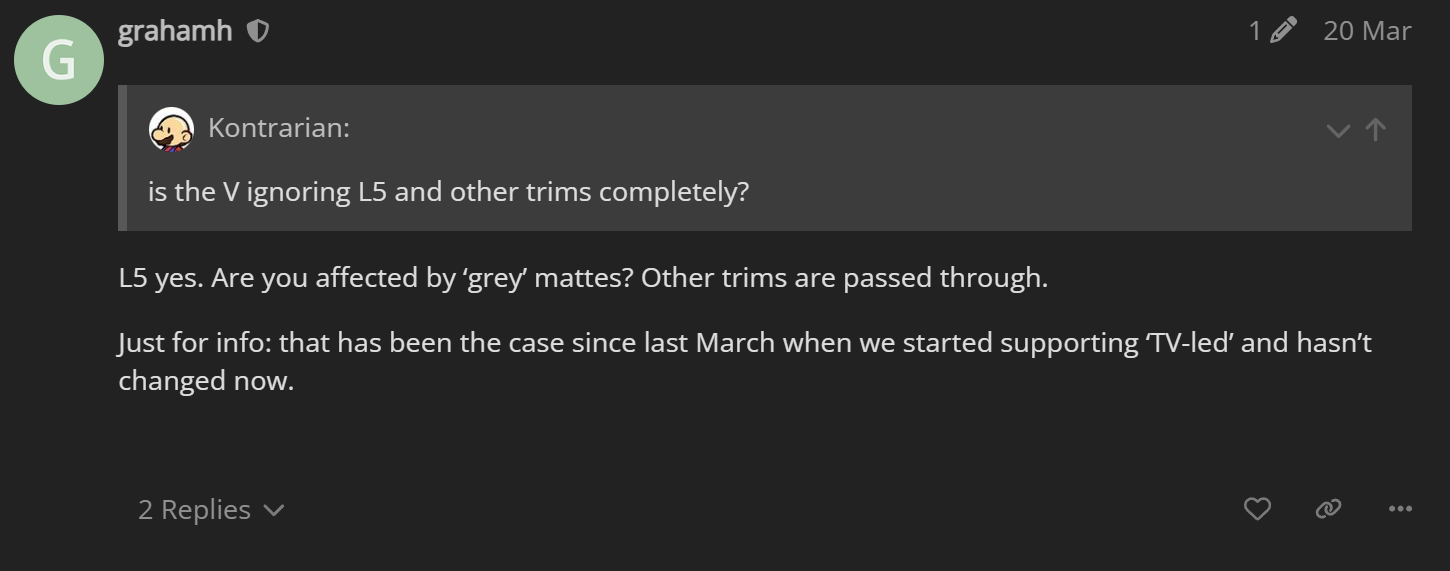
So, what I’m asking for again here, directly, so that I can make my decisions: would you be able to allow trim management in OSMC, given that it already includes some quite specific workarounds for other devices (LG, Philips)?
Yes, no, maybe?
Thanks.
It’s possible but not high on the priority list. Development focus now is on upgrading Debian and linux then preparing for Kodi Piers. Have you got evidence of other displays with this problem (is there some chat about it that prompted Hades to include that option)?
Meanwhile, just turning off Level 2 should not be very different from turning off DV entirely and playing your content as HDR10. Can you actually see a difference with your doctored clips?
A thought: the DV VSDB in the EDID says max 238 nits. What happens if you just take out the 1000 nit L2 trims and leave the 100 and 600 trims?
1 Like
I understand the priorities and I can wait, I’m not expecting a hotfix for that, I trust OSMC team and I value their quality and robustness standards, that’s the reason most people decide to buy a Vero V over other options, robustness and support.
I can’t find any additional details about why LE Hades dev decide to include this option, I tried to find something on the github repository (using Claude) with no luck, but I can ask him on Kodi Forum, this is a small world 
Disabling Level 2 trims doesn’t mean disabling Dolby Vision entirely and it’s not clearly the same that just default to HDR10. You still have the RPU, including the Level 1 metadata, so the dynamic Dolby Vision processing can still be applied. You’re only removing the Level 2 trim adjustments. The most noticable difference are the black levels, which is quite important on a projector.
Regarding your though, I already made two types of test, remove all the trims and also keep only L2 100 trim, which is the case of a lot of movies, most movies only comes with L2 100, probably that’s the reason why a lot of them don’t look washed and others do. Anyway this doesn’t change anything, maybe the way on how to offer the L2 trims managment, I would say that offer to much granularity choosing is not the way, but just a switch to remove all L2 trims, or maybe - I need further investigation - just L2 values above 100. I will make a few more tests and will share them here.
Sam has a Hisense PX2 maybe he could also try.
L5 is another discussion too, but LibreELEC Hades and CoreELEC apply it by default, is not an option to enable/disabe
What you would be doing is substituting the display’s native tonemapping for that prescribed by Dolby using the L1 metadata. I suspect displays do have a certain amount of dynamic adjustment even if their ‘dynamic’ setting is turned off.
I was just thinking it would be relatively easy to filter L2 target luminances which should be irrelevant. No more cockpit controls needed if that does actually solve the problem.
I haven’t compared the lift values for the three L2 entries in the clips you sent. That should be the only parameter that affects black level.
It is an option in CE.
What I understand from your approach is to automatically discard L2 blocks whose target is not relevant to my display based on target_max_pq. If that’s the case I I’ve created a new bunch of test files and I’ve extracted the values for you, I will PM you with the details.