I’m having the same issue and the solution didn’t work. I’ve got a range of 3D files, recognised as 3D on Vero V, using a very high speed HDMI to my projector. Every file I play even if SBS or HSBS it defaults to showing it in 2D.
For context I’m using a BenQ W2710i 4K Projector with active dlp glasses
If I select hardware based it does a weird frame packed that isn’t frame packed, it’s still SBS and glitchy. ISO files work, but I cannot for the life of me get my 3D SBS videos to play correctly.
I’ll follow up with a log of playing but I’ve tried every setting I can find and even followed the instructions attached here too to no luck.
I’m having the same issue and the solution didn’t work. I’ve got a range of 3D files, recognised as 3D on Vero V, using a very high speed HDMI to my projector. Every file I play even if SBS or HSBS it defaults to showing it in 2D.
For context I’m using a BenQ W2710i 4K Projector with active dlp glasses
If I select hardware based it does a weird frame packed that isn’t frame packed, it’s still SBS and glitchy. ISO files work, but I cannot for the life of me get my 3D SBS videos to play correctly.
I’ll follow up with a log of playing but I’ve tried every setting I can find and even followed the instructions attached here too to no luck.
EDIT: LOG - https://paste.osmc.tv/gaqupoqiwo
Photos of when on hardware - https://imgur.com/a/ORSr65A
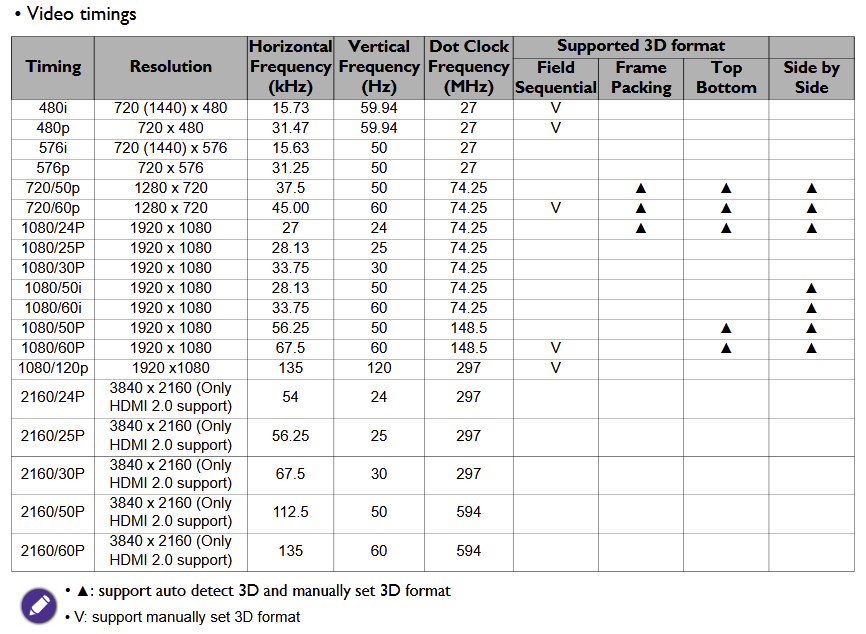
According to the EDID info your projector doesn’t support SBS:
2026-01-10 13:25:25.333 T:2894 info : Found 3D resolution 1280 x 720 with 1280 x 720 @ 50.000000 (FP)
2026-01-10 13:25:25.340 T:2894 info : Found 3D resolution 1280 x 360 with 1280 x 720 @ 50.000000 (TAB)
2026-01-10 13:25:25.340 T:2894 info : Found 3D resolution 1280 x 720 with 1280 x 720 @ 60.000000 (FP)
2026-01-10 13:25:25.340 T:2894 info : Found 3D resolution 1280 x 720 with 1280 x 720 @ 59.940060 (FP)
2026-01-10 13:25:25.340 T:2894 info : Found 3D resolution 1280 x 360 with 1280 x 720 @ 60.000000 (TAB)
2026-01-10 13:25:25.340 T:2894 info : Found 3D resolution 1280 x 360 with 1280 x 720 @ 59.940060 (TAB)
2026-01-10 13:25:25.340 T:2894 info : Found 3D resolution 1920 x 1080 with 1920 x 1080 @ 24.000000 (FP)
2026-01-10 13:25:25.340 T:2894 info : Found 3D resolution 1920 x 1080 with 3840 x 1080 @ 24.000000 (FP)
2026-01-10 13:25:25.340 T:2894 info : Found 3D resolution 1920 x 1080 with 1920 x 2160 @ 24.000000 (FP)
2026-01-10 13:25:25.340 T:2894 info : Found 3D resolution 1920 x 1080 with 1920 x 1080 @ 23.976025 (FP)
2026-01-10 13:25:25.340 T:2894 info : Found 3D resolution 1920 x 1080 with 3840 x 1080 @ 23.976025 (FP)
2026-01-10 13:25:25.340 T:2894 info : Found 3D resolution 1920 x 1080 with 1920 x 2160 @ 23.976025 (FP)
2026-01-10 13:25:25.340 T:2894 info : Found 3D resolution 1920 x 540 with 1920 x 1080 @ 24.000000 (TAB)
2026-01-10 13:25:25.340 T:2894 info : Found 3D resolution 1920 x 540 with 1920 x 1080 @ 23.976025 (TAB)
@grahamh , can you have a look at that EDID, please?
I found this in another thread and it might be my fix but I have no idea how to create the file and implement it. Can I have some noob level guidance please?
I created ~/.kodi/userdata/disp_cap_3d
containing
720p50hz FramePacking TopBottom SidebySide
720p60hz FramePacking TopBottom SidebySide
1080p24hz FramePacking TopBottom SidebySide
1080p30hz TopBottom SidebySide
1080i50hz TopBottom SidebySide
1080p50hz SidebySide
1080i60hz TopBottom SidebySide
1080p60hz SidebySide
and sure enough it’s all playing right.
Thank you in advance.
According to this https://esupportdownload.benq.com/esupport/PROJECTOR/UserManual/W2710i/W2710i_UM_EN_230414114441.pdf the PJ supports SBS but it doesn’t say so in the EDID. That disp_cap_3d needs tweaking though. I think 1080i60Hz is irrelevant as we don’t do interlaced but 1080p50 and 60 do TopBottom as well as SidebySide.
I have no idea what Field Sequential means.
Thank you for confirming and looking this up.
Now I just need instructions how to do that 
I think field sequential is the type of 3D where it’s flicking between eye frame in the file and it decodes it that way, though I’ve never seen or interacted with a file like that before.
Thanks again to both of you for being so helpful and such speedy replies thus far
You need to make a file called disp_cap_3d with these contents
720p50hz FramePacking TopBottom SidebySide
720p60hz FramePacking TopBottom SidebySide
1080p24hz FramePacking TopBottom SidebySide
1080p30hz TopBottom SidebySide
1080p50hz TopBottom SidebySide
1080p60hz TopBottom SidebySide
You can do this on a PC and copy it into /home/osmc/.kodi/userdata on Vero or ssh into Vero and go
nano /home/osmc/.kodi/userdata/disp_cap_3d
Cut and paste the above contents into the nano editor - Ctrl-X to save the file and reboot.
How do I access Vero from my PC?
It’s on my home network but I’ve not used SSH before or anything similiar.
Does it plug into my PC somehow?
Cheers!
I’ve found instructions to access via SMB so I’ll give that a go and if I have any issues I’ll feed back. Either way I’ll update if the fix works. Thanks again for patience!
Sorry, you did say noob level 
If that doesn’t work, to use ssh you need to enable it in the MyOSMC AppStore seem to have ssh enabled already. Then read this Accessing the command line - General - OSMC
But don’t use putty! Just get a command line (terminal) in Windows and go ssh osmc@192.168.7.144
1 Like
I did that, placed it where it belongs and created it as an XML file. I’ve rebooted and still no luck, all just playing in 2D. also when selecting playback mode it only says “preferred” or “2d”. It does let me choose other but it’s not suggesting it’s a side by side film even though it recognises it in the metadata.
Who said you should do that? It’s just a plain text file - no XML tags or anything - no extension in the filename.
I assumed it needed to be a certain file type and saw the others were XMLs!
I’ll try again lol
THAT DID IT!!
Thank you for such speedy help.
Happy to donate for a coffee if you send me your PayPal details @grahamh
I’m not in it for the money or indeed the coffee but thanks anyway.
3 Likes
Sorry to chime back in, hopefully a quick one.
I’ve burned an MVC 3D file myself (MKV from DVD Fab) and it’s not being recognised properly. I’ve tried titling it different things, the same file works as a Full-SBS.
Is there something missing on the disp_cap file that could fix this? I’m fine making all my rips as SBS but for my sanity was hoping to figure it out.
Cheers in advance.
We need logs and you need @tanio99 to look at them.
Leave it with me, I’ll sort! Cheers
@tanio99
new issue for you to look at pretty please!
It seems Half SBS works consistently, but I’ve had issues with MVC and FSBS being inconsistent and choosing if it works correctly! It’s a shame as I’ve started ripping my BluRay collection as FSBS and don’t want to cut down to half if I can help it!
in past, I’ve had 3D FULLSBS play fine, this specific one displays rather strange.
Log is https://paste.osmc.tv/yecivucito
Photo of the issue https://imgur.com/a/2Mm9s87
Thanks in advance
I can’t see any issues in the log. Can you extract a short clip (1 minute should be enough) and send me a link to it?
And of course: check if you can reproduce it with that extracted clip, too .