I am new to Vero V and OSMC, but not new to Kodi, been using it for years. I do have a relatively new HT setup, and having a difficult time getting audio to sync with video. I have gone through the gamut of turning off the Denon built-in lip sync, turning off and on the sync in the OSMC settings, setting passthrough off and on, changing the display mode on the TV from Filmmaker to Game, setting the display processing to bypass in the Denon, etc, and just about every mix and match permutation of all of these combined. This occurs on low-res video with 2.0 channel audio, and 4k UHD HDR + Atmos files. If I can get it close on type of video, it is worse on the others. What am I missing here?
Can you provide a sample?
Do these same files play without sync issues on some other player?
What’s your source path (Vero V → Denon → LG OLED)?
1 Like
I’ve got the same set up and have no issues with lip sync on the Vero, gaming is another matter. Passthrough on TV, lip sync set to auto on avr and no delay set in Kodi work fine for me .
What passthrough are you referring to on the TV? Audio passthrough? I have audio passthrough enabled on the TV, but that should only matter when playing content directly from apps on the TV, not the Vero V, right?
I originally had Kodi side-loaded directly on the LG B4 OLED tv, but every time they pushed an update, it would delete the app, which is why I went with the Vero V for a dedicated device. When it played on the TV, there were only a very few intermittent files that had audio sync issues, but most played just fine, going from TV App => Denon AVR-X3800H through eARC.
Now with the Vero V, it started that I really only had issues with files that had DTS codecs, they would consistently be desynced, but Dolby codecs were fine. But the last week, it seems like everything has gotten out of whack. 720p with AAC 2.0 tracks are off-sync, as well as a UHD 7.1 Atmos w/ Dolby Vision, and everything in between.
My source path yes, is Vero V => Denon AVR-X3800H => LG B4 77” OLED. All connected through 8K capable HDMI cables.
Have you tried doing a soft reset of your Denon AVR? I have to do this to mind every once and awhile when it starts misbehaving. You should just need to hold down the power button for a number of seconds until you see lights start to change and hear the relays inside click. This “soft” reset does not erase any of your configuration but it does do something more than just pulling the power cord.
Just to add to this, I’ve got a vero5k in to a Denon 4800h (in a 11.2.4 set up) in to a Samsung q9fn. Recently the sync has seemed to be roughly 100ms out (audio in front of video) across dts and atmos tracks (more noticeable In DTS) It never used to be. The files play fine elsewhere.
The TV hasn’t had any firmware updates (it’s old, not connected to the internet any more etc) the denon hasn’t had a recent firmware update either. The only thing that has recently updated is the vero5k from the November update.
It’s not consistently out of sync either, it’s quite strange.
Happy to help debug what this could be.
1 Like
Can you give us:
- A sample file or known clip that causes this issue
- A description of you how have ascertained it’s 100ms out (I don’t disbelieve you, just need a metric)
- A log of a file you play that’s affected
Cheers
Sam
Hey @sam_nazarko ,
For the 100ms - was mostly just eyeballing the delay during playback. I honestly don’t know if it’s 100ms out but it made it “feel” more in sync. Especially during fast paced talking etc it just seemed to fit better.
I can provide a log tomorrow for a file - it does appear to be more the DTS tracks rather than the Atmos tracks that are being impacted (or at least to my eyes! but honestly it could just be my brain  )
)
Hi
Did you have a chance to upload a log so we can check this out?
Sam
Were there any further news on this?
Experiencing the same issue for a couple of months.
My chain is Vero V - Denon AVR 4800 - Epson LS12000.
Its also around 50-100ms off (delayed).
I didnt have this in the past with the same movies on RPi3/4 with OSMC, also not with Vero V in the beginning. Lip Sync is off in the Denon AVR and in OSMC. Audio is set to passthrough.
I will try the Soft Reset and if it doesnt help setting Lip Sync to auto on Denon AVR.
If it still doesnt help, I can try to grab a minute from an affected Sample Movie and collect logs while playing it…
Didn’t get what we needed to investigate this further unfortunately
Sam
ooh …
I acticated Lip Sync to Auto in my Denon AVR yesterday, only got time to test two movies.
Rocketman, was 200ms off, after acticating Lip Sync it was fine, as far as I can tell.
LOTR all 3 titles were 100ms off, also seem fine with Lip Sync.
I am not sure, whether this Lip Sync feature is dynamic or not, as I have identified different delays of 50, 100, 200ms in different movie titles. But I will keep an ear on that during the next movie evenings and report back if the issue is solved or needs further work.
The feature is dynamic as all processing devices in your chain will have different delays added to the playback depending on video or audio format - these can be altered/added up by the TV and the AVR in your case.
Our Vero shouldn’t have anything to do with this really: Delaying the audio correctly to match the image on your TV should be the AVR’s job.
I am sorry I went MIA, life happened, and just haven’t even been able to sit down in front of it for 5 minutes, much less troubleshooting.
Is there a link that shows how to pull logs and make a clip of a sample video.
It still is happening, and it is seemingly different delay times with different types of files/audio tracks, but only with OSMC, all my other HDMI devices playback with accurate lip sync. PS5, Switch 2, Xbox, etc.
It’s really about time we saw some logs of the problem; there might be something wrong with your audio settings on the Vero. As @Chillbo already wrote: It’s the job of the HDMI destination device (here, your Denon AVR in the HDMI path) to coordinate the audio and video signals. The first playback device in the chain has nothing to do with it. I think turning off the lip sync function on the Denon is not a good idea.
To get a better understanding of the problem you are experiencing we need more information from you. The best way to get this information is for you to upload logs that demonstrate your problem. You can learn more about how to submit a useful support request here.
Depending on the used skin you have to set the settings-level to standard or higher, in summary:
-
enable debug logging at settings->system->logging
-
reboot the OSMC device twice(!)
-
reproduce the issue
-
upload the log set (all configs and logs!) either using the
Log Uploadermethod within the My OSMC menu in the GUI or thesshmethod invoking commandgrab-logs -A -
publish the provided URL from the log set upload, here
Thanks for your understanding. We hope that we can help you get up and running again shortly.
OSMC skin screenshot:
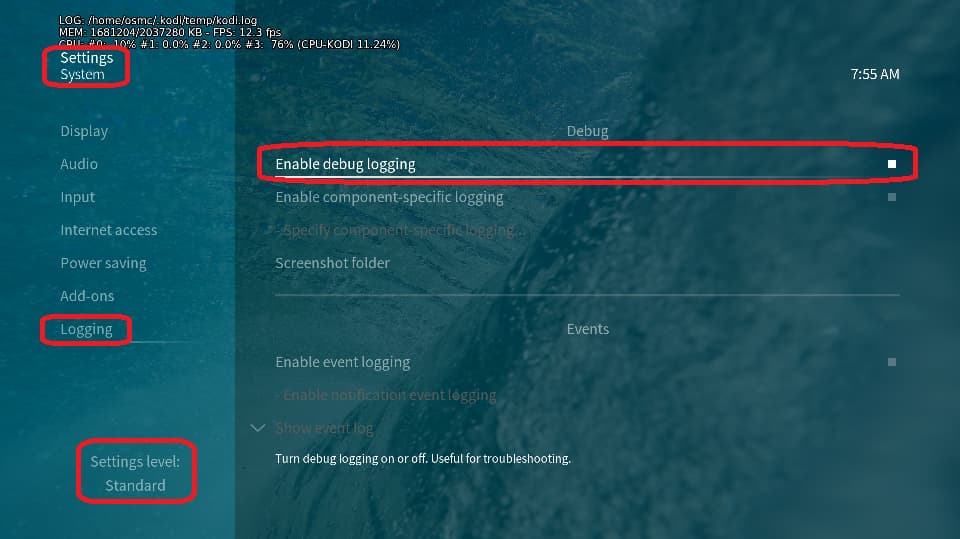

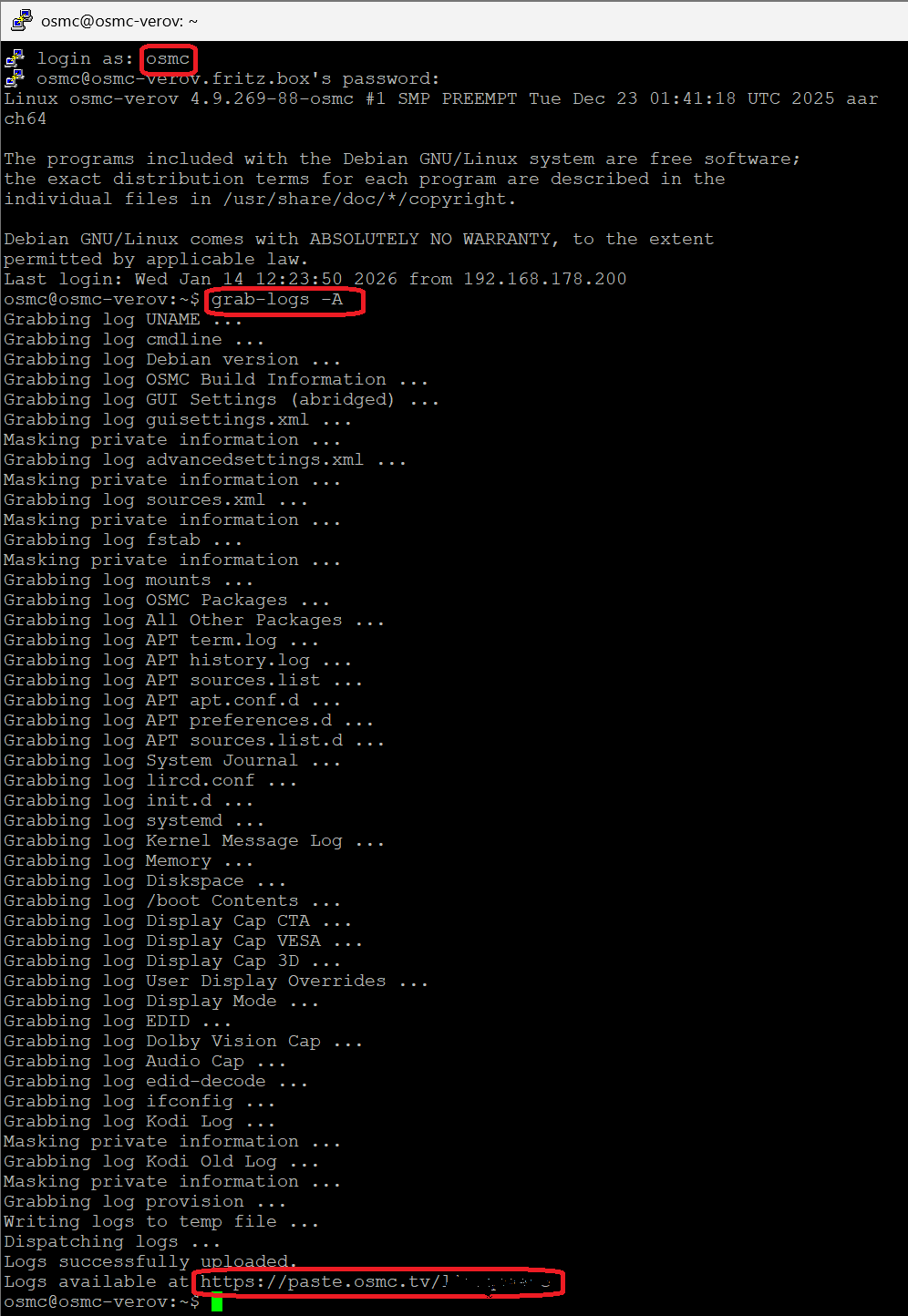
I can’t imagine we need a sample clip from one of your video files. Let’s wait for the logs first and then decide.
https://paste.osmc.tv/apagukefud
Here is the link to my logs. I played two video files, one “A Knights Tale’ which is H.264 MP4 with a 2.0 AAC audio. It has quite a bit of delay. The other video was “Godzilla x Kong - New Empire” which is a H.265 HEVC Dolby Vision and 7.1 Dolby Atmos encode. The delay sync on it is not quite as bad as on Knights Tale, but still there and persistent.
After a brief review of the logs, I can’t find anything unusual at first glance.
I can offer to try to reproduce your issue in my environment (Sony STR-DN 1080 + Philips OLED910) with your video material. For that I need a short video clip from the original (1-2 mins, max. 1 GB).
mp4: You can try to use the Windows built-in photo app to open your mp4 file. In the upper left corner you see a trim button. Use the buttons on the time slider to shrink to an appropriate scene. On the top right there is a button similiar like ‘save a copy’ or so.
mkv: Use the tool mkvtoolnix. In the output tab there are several ways/modes to split a loaded video.
Be sure your clip(s) really reproduce(s) the issue in your environment. Use google drive or Microsoft onedrive to upload and create a link, so one can get access to it.
Hey, just wanted to quickly report back 
For me the issue is still solved successfully after turning on the Denon Lip Sync Feature.
2 Likes