At a loss - have a Seagate 8tb HD which is powered and formatted to ext4 containing my files.
Used Vero V with this hd before and had no issues, but have been using a different media player recently and coming back now to my V.
Vero reads and mounts the hd fine, see my files, but only sees them as 0.00B and I get playback failed message.
Checked and repaired the hd on my Ubuntu laptop and it plays files from there no problem.
Any help would be appreciated.
To get a better understanding of the problem you are experiencing we need more information from you. The best way to get this information is for you to upload logs that demonstrate your problem. You can learn more about how to submit a useful support request here.
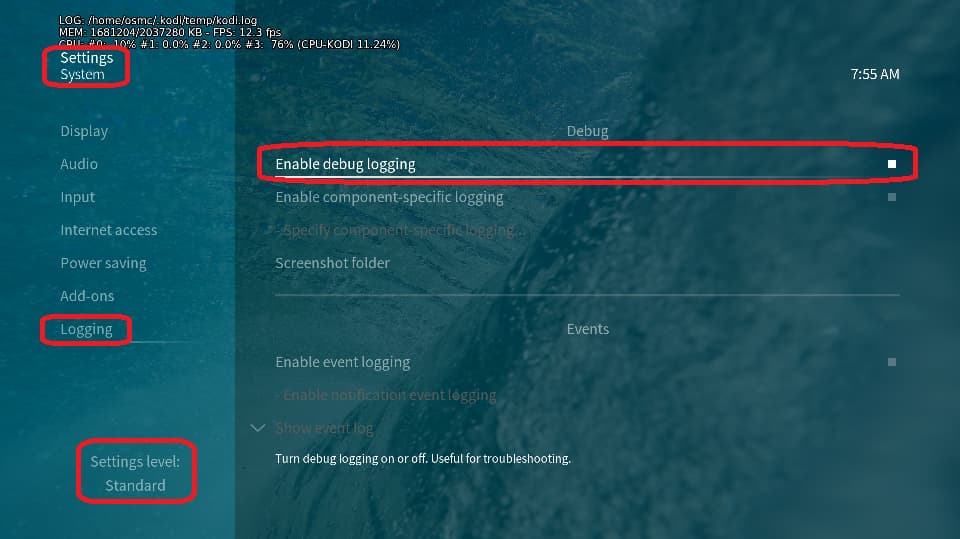
Depending on the used skin you have to set the settings-level to standard or higher, in summary:
-
enable debug logging at settings->system->logging
-
reboot the OSMC device twice(!)
-
reproduce the issue
-
upload the log set (all configs and logs!) either using the Log Uploader method within the My OSMC menu in the GUI or the ssh method invoking command grab-logs -A
-
publish the provided URL from the log set upload, here
Thanks for your understanding. We hope that we can help you get up and running again shortly.
OSMC skin screenshot:
Ok, thanks for response - think I’ve uploaded correctly above.
Hi, please re-verify again on your Ubuntu system: You can play/copy the file
<mountpoint on your Ubuntu system>/Film/Stop.Making.Sense.1984.UHD.BluRay.2160p.TrueHD.Atmos.7.1.DV.HEVC.REMUX-FraMeSToR.mkv
from there?
Does it exists at all? If yes, what size?
If no, is it located in another path on the filesystem on this hdd?
In the logs there is no obvious error visible causing the behaviour except these files do not exist or they are empty files. Tbh, it sounds like the file system got corrupted. It’s possible that your repair on the Ubuntu system restored the integrity of the ext4 file system, but you simply lost data. If there’s a lost+found folder under the file system’s root directory and you find files in it, that would indicate this is exactly what happened.
Lost and found folder is empty - no files.
Trying to play above file from terminal results in “No such file or directory”
Files still play when opening with a video player on Ubuntu, and shows the correct file sizes.
This could be a permissions issue.
I suggest checking ownership of the files.
Sam
Forgive me, but how do I check ownership and then take ownership of the files on the Vero?
Thanks
First check the permissions with ls -l on the device that works and paste the output
1 Like
$ ls -l /mnt/usb-Seagate_Desktop_NA7HWKNT-0:0-part2
total 40
drw-rw-r-- 2 997 984 20480 Jan 6 18:16 Film
drw-rw-r-- 2 997 984 16384 May 10 2025 lost+found
drw-rw-r-- 3 997 984 4096 Jun 25 2025 TV
There is no default user with id 997 within osmc.
What is the output of
ls -al /mnt/usb-Seagate_Desktop_NA7HWKNT-0:0-part2/Film/Stop*
ls -al /mnt/usb-Seagate_Desktop_NA7HWKNT-0:0-part2/Film/Stop.Making.Sense.1984.UHD.BluRay.2160p.TrueHD.Atmos.7.1.DV.HEVC.REMUX-FraMeSToR.mkv
ls: cannot access ‘/mnt/usb-Seagate_Desktop_NA7HWKNT-0:0-part2/Film/Stop.Making.Sense.1984.UHD.BluRay.2160p.TrueHD.Atmos.7.1.DV.HEVC.REMUX-FraMeSToR.mkv’: Permission denied
Well, looks like ‘somewhat’ changed the ownership of all files on this hdd. I suggest the following:
- connect the hdd again to the Vero V
- login to the Vero using ssh (so putty is a good terminal prog for such purpose), user
osmc, use the default password osmc if you haven’t changed this already
- invoke the command
sudo chown -R osmc:osmc "/media/Seagate 8tb"
This should set the user osmc and belonging group to all files and folders on this file system.
Still seeing the files but playback failed message occurs when attempting to open them. All files still read 0.00b also.
Output of ls -l /media
ls -l /media
total 8
-rw-r–r-- 1 root root 232 Nov 15 2023 README
drwxrwxrwx 8 osmc osmc 4096 Sep 5 22:23 ‘Seagate 8tb’
What is the output of
ls -al /media/Seagate\ 8tb/Film/Stop*
?
ls: cannot access ‘/media/Seagate 8tb/Film/Stop.Making.Sense.1984.UHD.BluRay.2160p.TrueHD.Atmos.7.1.DV.HEVC.REMUX-FraMeSToR.mkv’: Permission denied
Are you able to enter root directory of the file system in question?
cd /media/Seagate\ 8tb
ls -al
ls -al
total 60
drwxrwxrwx 8 osmc osmc 4096 Sep 5 22:23 .
drwxr-xr-x 3 root root 4096 Jan 7 15:17 ..
drw-rw-r-- 5 osmc osmc 4096 May 10 2025 .Trash-1000
drw-rw-r-- 3 osmc osmc 4096 May 16 2025 .Trashes
drw-rw-r-- 2 osmc osmc 4096 May 16 2025 .fseventsd
drw-rw-r-- 2 osmc osmc 20480 Jan 6 18:16 Film
drw-rw-r-- 3 osmc osmc 4096 Jun 25 2025 TV
drw-rw-r-- 2 osmc osmc 16384 May 10 2025 lost+found
chmod u+x /media/Seagate\ 8tb/Film
cd /media/Seagate\ 8tb/Film
ls -al Stop*