So, the solution is what I’ve already expected it to be… The HDMI-in ports of that BD player can’t process HD audio. This is from the BDV-E280’s manual:
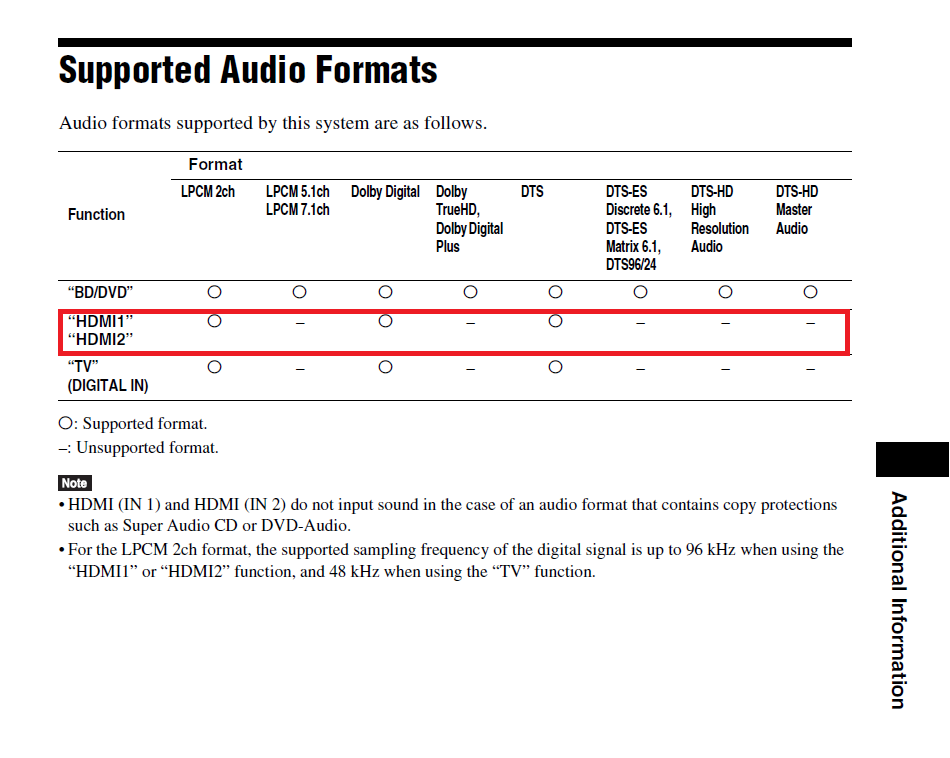
So, you should set you audio settings to the following:
Audio device: HDMI
Number of channels: 2.0
Output configuration: Best match
Passthrough: enabled
DTS/AC3 passthrough: enabled
DTS-HD/TrueHD/E-AC3 passthrough: disabled
AC3 transcoding: enabled
And keep in mind to disable “sync playback to display” under settings/player/videos for passthrough to work.
If you want your TV’s refresh rate to be adjusted according to the source’s frame rate, also set "Adjust display refresh rate” to Always or to On start/stop under settings/player/videos. 
The crackling sound is most likely resolved in the next update. If you want to check it out already now: go with Sam’s advice in post #15.
If this issue is resolved for you with this advice, please mark the corresponding post as the solution for other users to easily see the solution for your initial issue. 