Not too sure if this is a Kodi related question or a OSMC question, please do excuse me if I’m posting in the wrong forum.
I’ve been trying to solve this issue for a few weeks now.
I’ve noticed that quite a few media posters/artwork and or actor information are now missing for a few items. The funny thing is, all the affected items were scanned correctly prior as all the artwork & posters were all working.
I may have affected something, while clearing up a few files on the NAS, or when restoring from a backup not too sure.
I can’t really remember all of the things I had tried but I’ll try to list them; cleaning and rescanning the library, individually refreshing items, removing. There are also no nfo or video files on the NAS source with all the recycle bins being cleared too.
As I know the items scanned properly before, I thought it might be a cache issue and so I looked into and used a python script; MilhouseVH/texturecache.py. However, that didn’t work, I think.
Let me know if I’m missing any infomation that might be useful or I’ve used a terrible example.
In the referenced logs; I’ve used the TV-Show as an example called “Pine Gap” This show had all the correct info and artwork before recently the artwork disappeared
The show for that show appears in the logs, just not too sure on how to understand them and how it might be picking up info from an existing entry?
The file structure is: TV-SHOWS > Pine Gap > Pine Gap Season 1
When Kodi scrapes in a library item it gets artwork from [some location local or on the interwebs] and it then stores that location in the database, downloads the artwork, then resizes and saves the smaller copy in the artwork cache. If at some point the file goes missing from the cache for whatever reason then it attempts to grab the artwork from the location stored in the database so it can make a new cached copy that it can use to display on the screen. If for some reason the link is no longer valid for the artwork then you get no artwork until you update/refresh the item to get updated information in the database. If you only have a few items you can just bring up the information window for the item and click “refresh” and choose the option to ignore local info (assuming your not using local artwork). For TV shows this must be done on the top level of the show, not induvial episodes.
If memory serves there can also be an issue when you had scraped items using TVDB but then updated to Kodi v19 and didn’t install the new TVDB scraper. I think the scraper has to be installed from the respective sources in order to re-download artwork from those locations.
You know what, it sounds pretty similar to the issue you described. I reckon it would probably have to do with the fact when I upgraded to osmc/kodi19 scrapped some items, then decried to reinstall osmc/kodi18 and restore from a previous backup.
I might look into, if its possible, installing the new TVDB on 18, or something else haha
Backups don’t select the cached artwork for inclusion by default as it greatly increases the size of the backup. The downside to this is that any links to artwork that are dead don’t get fixed automatically. If it is an old database that goes back years then there may be lots of dead links from the several times TVDB switched things up. If this is the case it may be most prudent to just go to your sources, context menu, change content, set as “none”, click OK, they say yes to removing the items from your library. You then context menu over the sources again, set content, and then setup the scraper for TMDB as supposedly TVDB is going paid app at some point. Be aware that some shows, mainly ones from the '60-'70’s AFAIKT are prone to having some differences between TVDB and TMDB so they may require some intervention to scrape correctly. My preference for dealing with these currently is to just use TinyMediaManager to create nfo files for these problematic shows so I don’t have to rely on the online sources in the future.
If these is a small number of items missing info then best probably to just bring up the full screen information window and click refresh and save the hassle of the more involved task.
There’s not many effected items, about 15. So the idea of bringing up the full information screen and using refresh is undoubtedly helpful, unfortunately this wasn’t working for me.
You’re first idea sounded interesting which I’ll try a little latter on.
Setting the sources to “none” removing the items from the library and finally changing the “none” value to the media type, TV Shows and trying another rescan with TMDB.
Wouldn’t this process remove all the watched histories, bookmarks and ratings?
TinyMediaManager is definitely something I’ll look into in future.
Thank you very much for the info and ideas!
That is rather odd. Is there a chance that maybe you set some individual source folders to an old scraper or something? Go to video>files and navigate to the top level folder of an item that is not working and do a change/set content and see what comes up.
There was a change in Kodi that, off the top of my head, (which could very well be wrong) cam in maybe Kodi 18.7 that did remove watch status and the like but it was reverted back to the old behavior. I’m not sure when that happened. You can do a test on a single TV show source folder before going after your entire library to find out what happens with the version of Kodi your running (you can set different scraping options on a per folder basis inside a source).
As for TMM be aware that it moved to be a paid app but it you don’t want/need the newest features then they still have available to download the previous version that is free to use.
I’ve had the odd missing stuff a few weeks back (of previously complete information) on Kodi v18 and it turned out it was due to a bug in the scraper. The already installed one won’t be fixed (due to v18 out of support) but fortunately the python version works.
Might not be a fix for your problem but might be worth checking out.
You wouldn’t happen to know off the top of your head if the new scrapper from Matrix can be installed on the previous system K18, would you?
I’m thinking I might just have to install Matrix in the end
I got so tired of artwork issues, not OSMCs fault, that I have done everything with local artwork.
These databases on the internet make changes from time to time, as does Kodi, that impact existing libraries.
If you store your artwork locally that will never be a problem.
<filename>-poster.jpg
<filename>-fanart.jpg
Works perfectly!
You can just go to TMDb/TVDb, or any source, and find the artwork you like and download it from your browser and rename it to match your file before.
I like this method better because you can actually control the size and quality better this way.
In time, I came to just making most of all my artwork myself since these databases tend to have garbage artwork for the discerning eye.
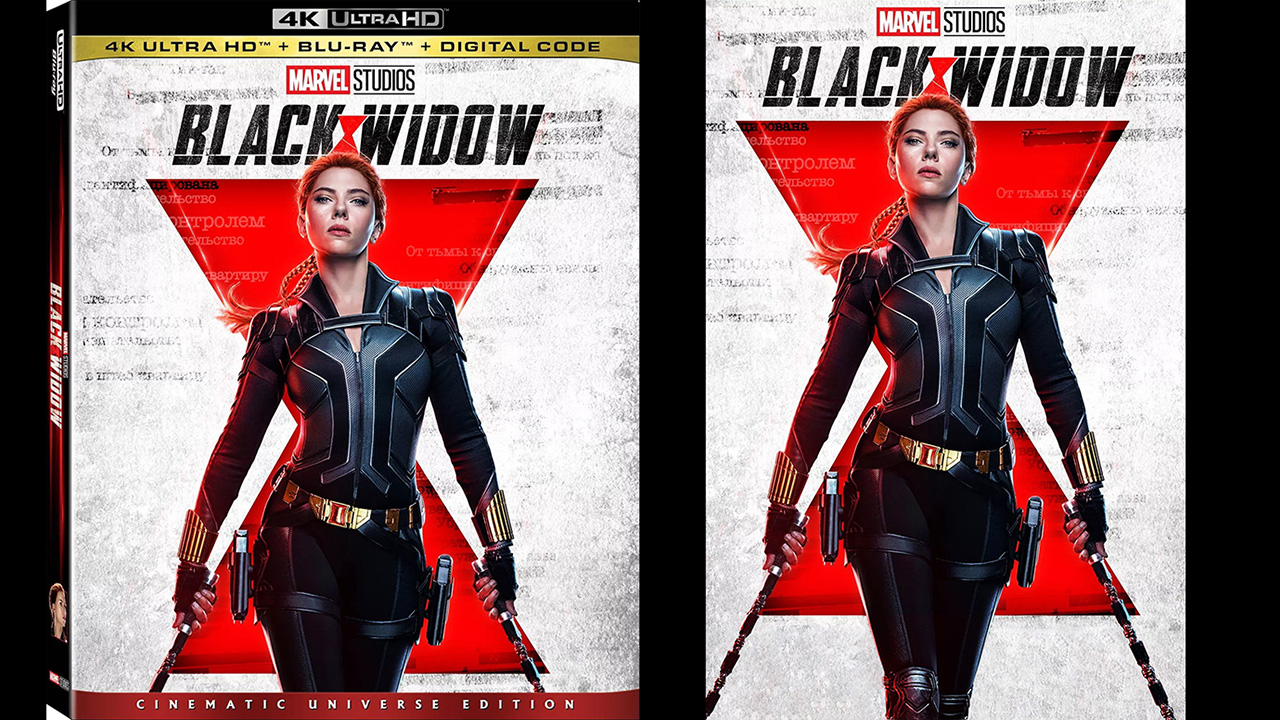
I usually go to blu-ray.com and grab a cover and make the fanart from a screencap I make myself from a favorite scene.
If I feel that the online databases lack good artwork I will upload my artwork to them for others.
I try to keep my artwork to reflect the retail version of the actual disc, that’s my preference, and it’s amazing how many titles don’t actually use the same artwork.
As an example, none of the Black Widow artwork matches the artwork found on the UHD cover.
So I made the poster and uploaded it.
From everyone’s comments I’m getting the feeling that local is much more stable and easier.
Great website to know, their collection is HUGE! I really do like posters as close to the original possible, while going to the extent of editing out unnecessary added infomation like the rating and such.
Brilliant tip for naming media file posters, -poster.jpg
Yeah, I try to use the same artwork as the BD or UHD original covers.
I like keeping the credits like director or actors but remove any ratings or stuff like that.
If you are in search of any covers just shoot me a DM, I have quite the library.
Afraid I don’t. However I wouldn’t expect it to work.
The one that does work for me is Information Providers > TV Information > TMDb TV Shows add-on. You will need to update the Information Provider setting in the library before scanning the library for it to work.
Surprisingly that worked for me, funny enough. The watched history & ratings also carried over.
I suppose the Matrix update broke TMDB and my existing library with it.
All fixed and working now. Thanks for everyone’s feedback and help!


 Thanks for everyone’s feedback and help!