Is it possible to implement the L5 Active Area detection in OSMC?
Especially the parts that p3i build.
See screenshot for example.
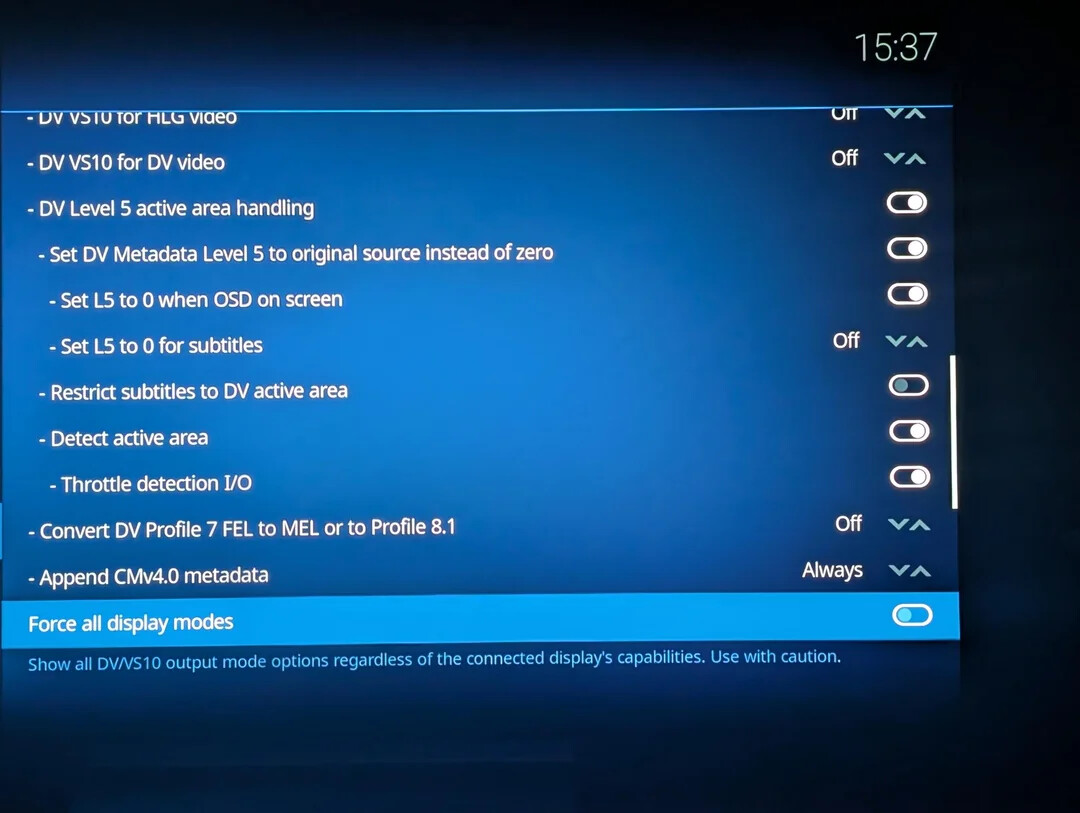
These could be very helpful and make the DV experience even greater 
Thank you.
Is it possible to implement the L5 Active Area detection in OSMC?
Especially the parts that p3i build.
See screenshot for example.
These could be very helpful and make the DV experience even greater
Thank you.
I think these are the commits from pannal:
Implementing level 5 is one thing which has been discussed elsewhere in this forum. We may add that.
Those commits seem to be about generating level 5 by analysing each frame. Is that really something that is needed often? Shouldn’t the rip have the correct level 5 metadata already?
Not every rip has correct L5, from what I recall.
There a reason this is made by pannal  . I’m not sure on this, but it might also work on non DV (and 1080p)?
All those settings to keep subs inside the active area is just awesome as well.
I see. I can’t see any benefit on non-DV video if it does indeed work on that. We do have plans to do something similar but it likely will not happen until Kodi 22.1 and a Debian and kernel upgrade.
It helps keeping black bars that are in the video be black, especially on OLED.
If black isn’t black on your OLED, you need to calibrate it with a PLUGE pattern.
It’s even blacker with this.
Plus it helps for subtitles being in the actual video frame.
Here’s some more info on L5 and these implementations from panni:
Letterboxed Dolby Vision: what the L5 setting can and can’t do
This has been investigated at length this cycle and is worth stating plainly, because
the Level 5 (active area) mode setting has two options and neither is universally
“correct” — the trade‑off is real and cannot be engineered away on this hardware.
Dolby Vision metadata can describe an active area: the part of the frame that’s
actual picture, excluding letterbox bars. When that’s present, the Dolby Vision engine
in the box deliberately refuses to raise black level. That is intentional design,
not a defect — lifting black inside a letterboxed frame would turn the matte bars grey,
which is precisely what the active‑area signal exists to prevent. Only raising black
is blocked; crushing it still works, and the asymmetry is what proves it’s deliberate.
The consequence on player‑led output is a genuine either/or:
L5 mode = Source — bars stay properly black, and a disc’s positive shadow lift is
discarded.
L5 mode = Zero — the shadow lift works, and the letterbox bars lift to grey along
with the picture.
There is no third option. The correct fix would be for the player to mask the bars so
the lift becomes safe, and the Dolby Vision engine does implement exactly that on its
TV‑facing path — but the registers are not implemented on the set‑top path on
either SoC family tested here (S922X/G12B and S6). That was verified directly by
driver instrumentation and confirmed by eye, so it’s a hardware limitation rather than
something a future build can address.
Display‑led (TV‑led) output has none of this. The TV’s own display mapping scopes
trims to the active area correctly, so the picture lifts and the bars stay black — no
choice to make. If you care about shadow detail on letterboxed Dolby Vision, that is
the path to use.
Well, we think some choices might be useful - concerning where you want the OSD and subtitles to be displayed. And whether you want those choices to be fixed or dynamic (eg display the progress bar in the matte by turning off L5 when the OSD is on-screen.)
It’s trivial to just turn on L5, a bit more work to give the user the option, even more work to make L5 depend on whether the OSD is showing and a huge amount of work to detect ‘black’ bars and write L5 metadata automatically. No-one has found time to do any of it, yet.
You are mentioning no one has found time to do any of it. Though, isn’t it already done?
I’m a noob regarding coding, but can’t you pull the code from the Panni builds?
Not that simple. IIRC those use libdovi which we don’t.
What do you use if I may ask?
We wrote our own code.