***EDIT: Regarding the logs, the event happened twice on 03-01-2026, if that helps. Once when initiating playback of a video, once when waking up from screensaver.
I haven no idea what I’m looking at, but maybe it was this log?
2026-03-01 13:21:18.302 T:2827 info : VideoPlayer: OnLostDisplay received***
Does anyone have any idea why the Vero V would be telling my soundbar to switch to its eARC input when I start a video? It does it when I wake the Vero from screensaver too. Maybe the physical address setting defaulting to 0 is what is causing it? Maybe the soundbar considers it’s eARC input to be “HDMI 0”?
In the time between making that post and today, I disabled all of the CEC settings that could initiate an input change and that did seem to stop it (however, it would be nice to use some of those settings).
Regardless, I just enabled HPD Lock, initiated a reboot and as soon as the device woke back up, it immediately switched the soundbar’s input to eARC…
Edit: I enabled HPD Lock, unplugged everything from the wall, and am immediately still getting input switched.
At this point I’m convinced this has more to do with the Connected to HDMI Device + HDMI Port Number constantly disappearing from the CEC Adapter settings (doesn’t matter what settings expertise I set it to). Every CEC command it’s sending to my soundbar, aside from volume, is telling the soundbar a device at Input = eARC (HDMI Zero?) is active and to switch to that input. It reliably does this every time I wake the screensaver and the “Wake devices when deactivating the screensaver” is enabled.
Edit: further convinced, because it just randomly sent my TV to it’s HDMI 2 input and I went back into the CEC settings and the Connected to HDMI Device + HDMI Port Number settings were back with the HDMI Port Number set to 2 and Connected to HDMI Device set to TV
Although the HDMI CEC protocol is a relatively simple shared bus protocol that operates exclusively via pin 13 of the HDMI cable, incompatibilities and incorrect implementations by different manufacturers frequently occur.
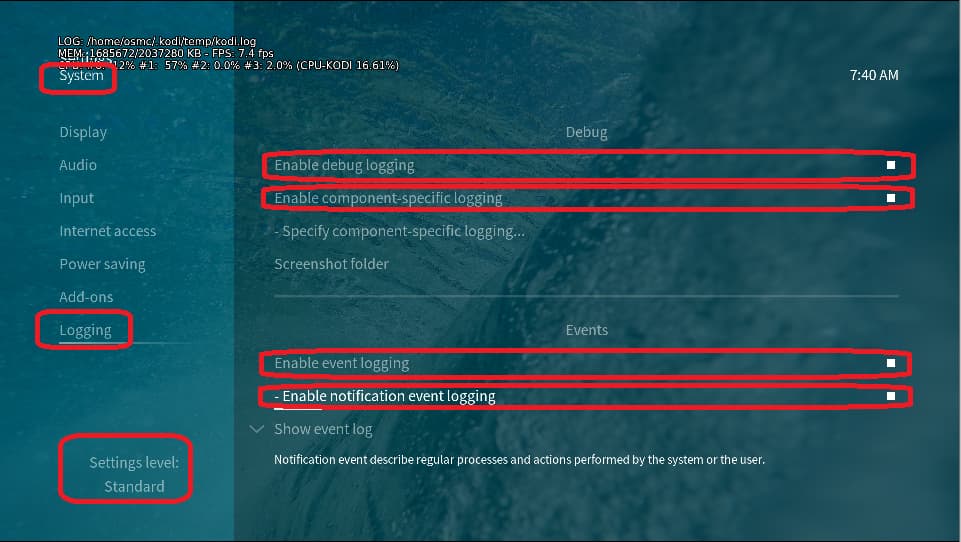
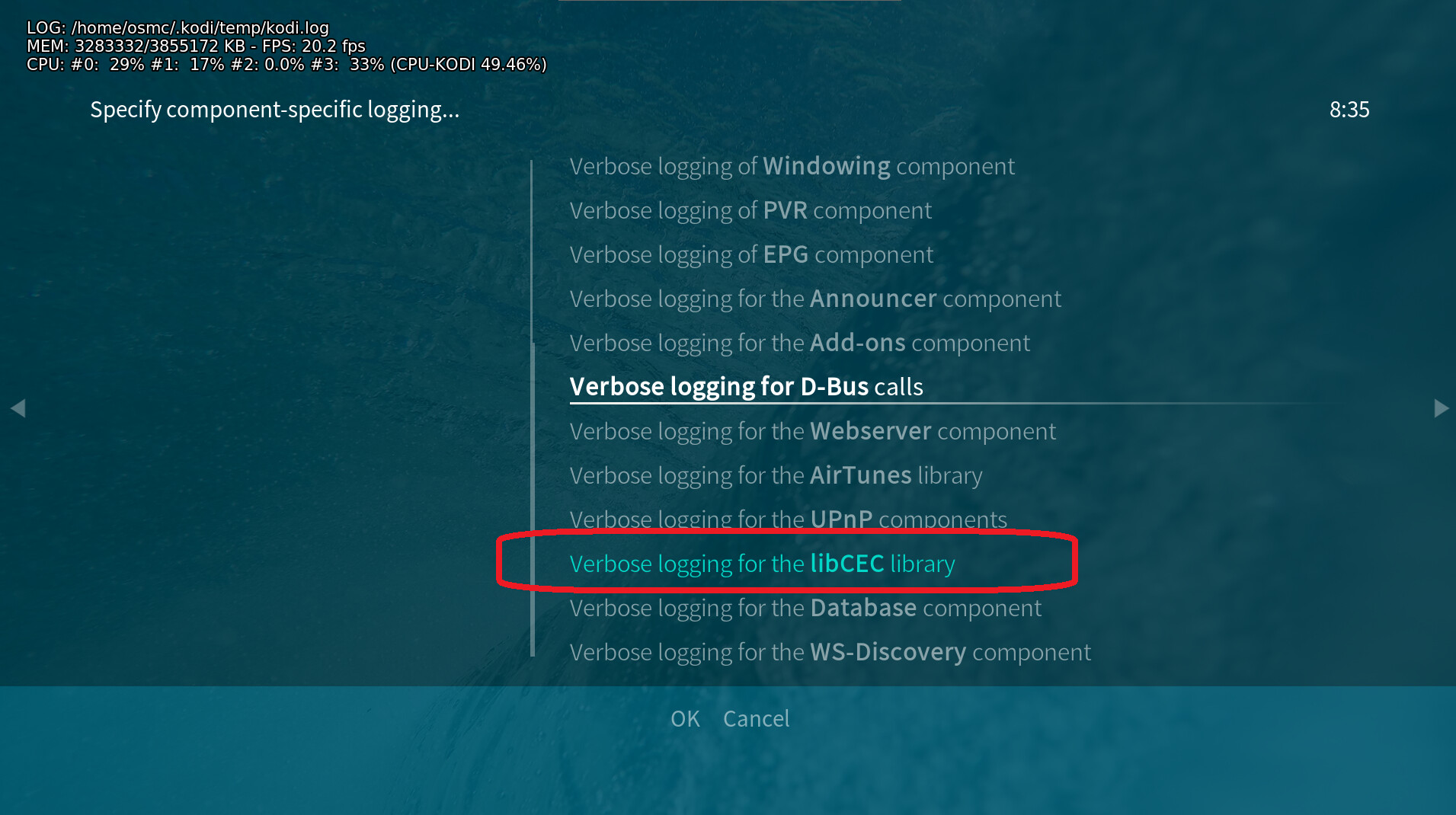
The displayed logs are of little use; more information about the CEC protocol’s activity is needed. For this, a corresponding component protocol can be enabled in Kodi:
Depending on the used skin you have to set the settings-level to standard or higher, in summary:
enable debug logging at settings->system->logging
enable component-specific logging for the libCEC library
enable event logging and notification event logging
reboot the OSMC device twice(!)
reproduce the issue
upload the log set (all configs and logs!) either using the Log Uploader method within the My OSMC menu in the GUI or the ssh method invoking command grab-logs -A
publish the provided URL from the log set upload, here
However, there’s no guarantee that this will help anyone understand the cause of the observed behavior. Theoretically, all devices can see all communication on the shared bus, but debugging is limited to the data provided by libCEC. If certain events/actions aren’t logged, they’re missing from the understanding of what’s happening on the bus.
Can you state when the issue of the soundbar switching to earc occured? I’ll spend some time tomorrow but cannot guarantee anything since cec is new to me since I’ve never used it till now. Let’s see what I can find, others are welcome.
Looking at these logs it’s hard for me to tell… My guess is here:
Mar 08 11:28:06.121184 osmc-Algernon kernel: hdmitx: sysfs set hdmi_ch to 0
EDIT - I was way wrong about this lol. It look like this is from the startup sequence.
but I don’t have any programming experience. However I can say the only thing I did was reboot (twice) and then navigated to the CEC peripheral settings and toggled a setting (I think it was devices to power on during startup?) and it kicked the soundbar to eARC, I switched the soundbar back to HDMI input 2 and then navigated to the OSMC Menu > Log Uploader.
EDIT - just to say thank you Jim and all who can help!
I do believe that port “0” means no assignment so CEC can assign whatever it wants. You can change this to something else but a full power cycle of all connected devices may be required to fully reset the CEC bus in case this manual assignment caused a conflict.
When the Vero is plugged into a soundbar/AVR that connected to setting needs to set as such as otherwise the TV can start switching inputs instead of the AVR. I don’t get how Kodi would have just magically changed that setting though. Normally the only time that file would get modified outside of user interaction that I’m aware of is if it gets corrupt somehow at which point kodi will replace a corrupt setting line with a default value. The only other time that comes to mind where someone says I set a setting to ‘something’ and went back in later and found it no longer set as such, Is when they mistakenly use the back/exit button on their remote to exit that settings screen instead of pressing the OK button. Most of Kodi’s settings screens save regardless, this one does not. Also some of the CEC settings take effect after hitting OK, some do not. You best bet is to make changes, press OK, exit from the settings screen, then power and reboot.
It might also not be the worst idea to click on the “default” button on that screen to get to a clean slate then make your changes. I’ve actually seen hitting default change what options appear on that screen.
Also, and don’t take this as being insulting as I’ve done it myself… Have you double checked to make sure that you have a HDMI 2.1 cable going from your TV’s eARC port to your soundbars eARC port and that it didn’t accidently get plugged into the next port over? Also made sure that in your TV’s sound settings you currently have it set to output to eARC.
I understand, and I set it to the appropriate AVR & HDMI 2 choices when those settings appear, but the settings themselves frequently disappear - “Connected to HDMI Device” and “HDMI Port Number” are no longer available settings.
I’m aware of this quirk - This is not the cause of the issue.
I’ve tried this too - no dice.
No offense taken! I have verified the cables, connections, and settings.
I appreciate your time taken to try and sort this out with me, Mr. Design!
The provided protocols therefore cover a different scenario. Before I begin decoding the HDMI-CEC frames (which is very time-consuming), I would like to ask you to correct your CEC settings, as your data is exhibiting different behavior.
First and foremost: Do not change the HDMI port number under any circumstances! The CEC protocol has a collision detection and avoidance mechanism that is automatically activated at 0 or 1. You should not interfere with this mechanism under any circumstances.
I suggest to do the following setps:
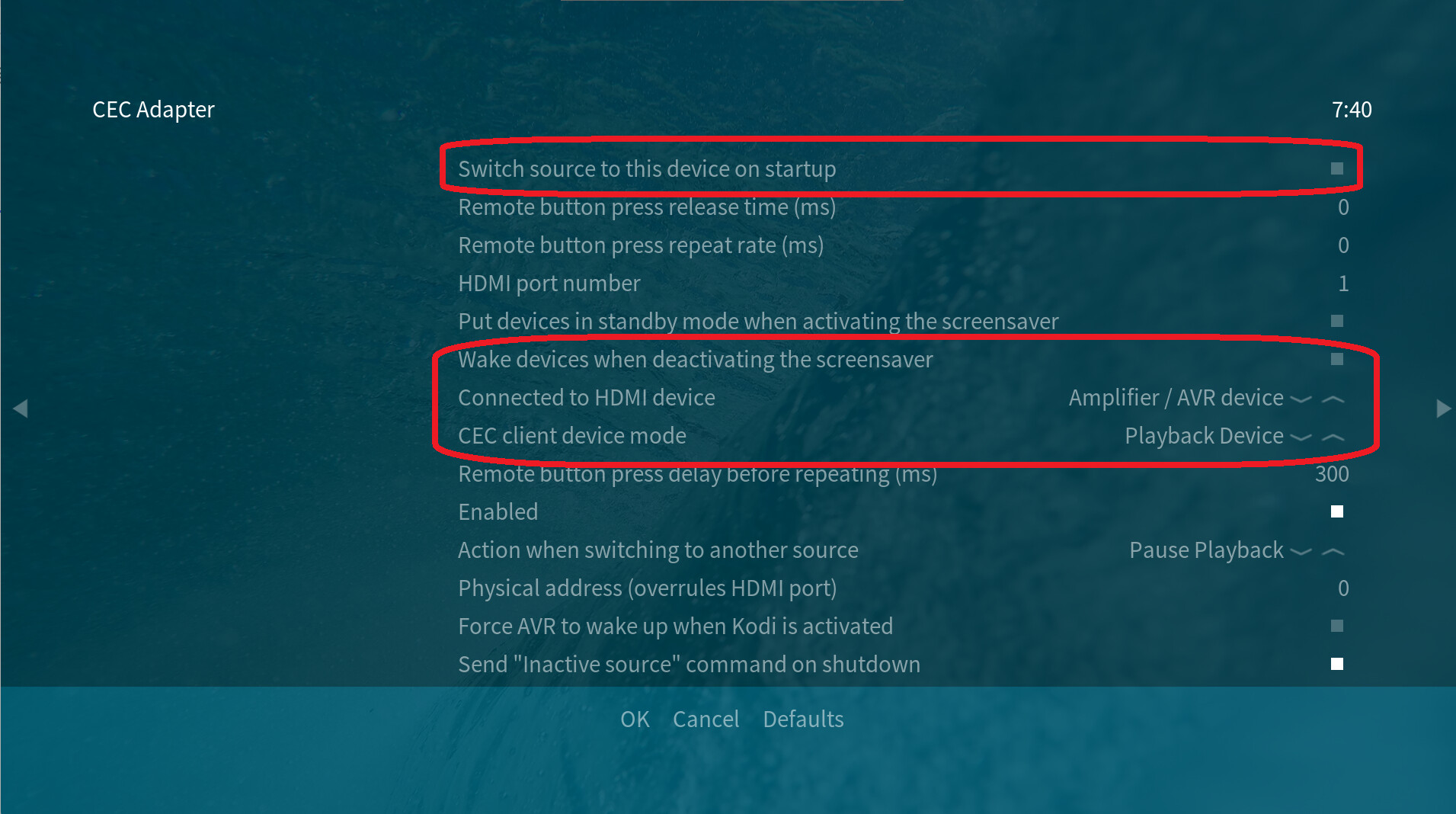
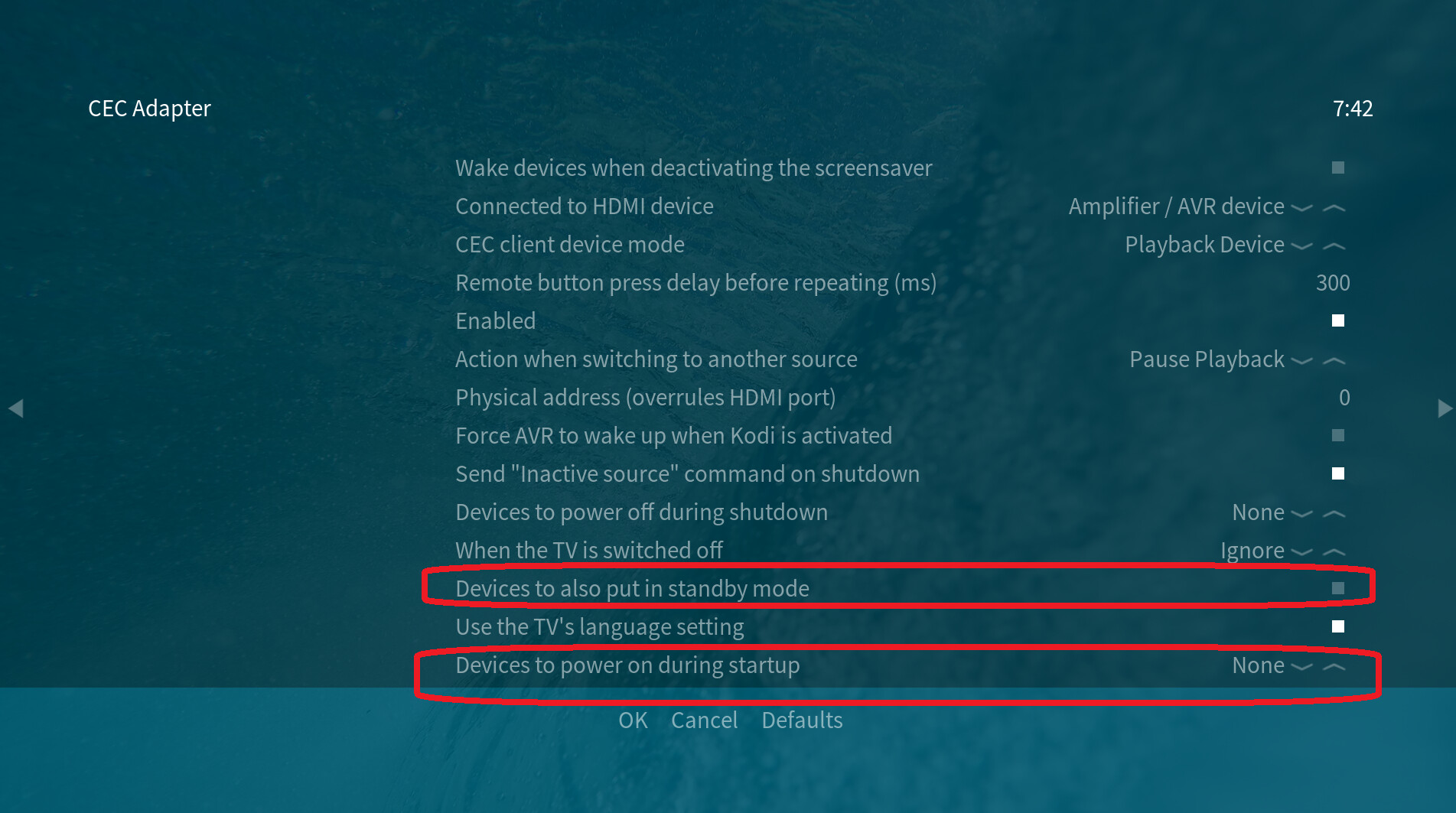
reset the CEC settings to defaults on the CEC client (in the menu at right bottom)
adapt your settings to the follwoing configuration in the pictures shown
power off all devices (including your SONY device!!!) for some minutes and power on your environment again
now prepare things, reproduce the issue mentioned in your initial post and then upload the log set and the CEC configuration as instructed in a previous post from me. Note the timestamp when the problem occured!
Interesting… I wonder if this is it! I followed your instructions and was unable to reproduce the issue. I did, however, navigate to the CEC settings and initially the HDMI Port Number and Connected to HDMI Device settings were not visible. I went and played and SDR and an HDR video and went back and they appeared. I did not change the HDMI Port Number but the Connected to HDMI Device had reverted back from “Amplifier / AVR device” (from before I powered everything off) to now set to the default “TV”. I changed it from TV to Amplifier / AVR Device and was still unable to get it to reproduce the eARC input switch phenomenon… It seems like that HDMI Port Number setting was the culprit. Maybe we change the name of that setting to “HDMI port number (DONT CHANGE!!!)?
I will keep monitoring (don’t want to get my hopes up), but it looks like you might’ve caught it Jim!
If you make changes like that, it immediately restarts the cec client which is another context than the issue you started this topic for.
Why you want to activate this feature?
I don’t need that feature, I was just attempting to reproduce the eARC switch behavior. It looks like we’ve managed to stabilize my CEC experience by not changing the port number and disabling all the input switching features. My Samsung AnyNet+ (CEC) is recognizing the Vero now! I suppose we could call this resolved?