My issue is a little different - when it doesn’t play which is 90% of the time, there is no audio or video, with the denon avr showing neither in the hdmi stream coming from the Vero (whereas it normally shows the audio and video details while playing from any device) and of course the tv screen is black with no video signal.
1 Like
Thanks, guess I’d better cut and paste it into a new thread.
Update: we sorted out @augur42’s problem which had nothing to do with HDR10+. There’s an upgrade to OSMC coming shortly or you could try upgrading from staging now using Sam’s instructions above.
Please let us know if that fixes your issue and if it doesn’t can we get a clip of Guardians?
1 Like
Hi mate - sorry been away from the computer. I will try now. I have a clip that can be uploaded - I just dont know where you guys want me to upload it…
The OSMC uploader is not functioning atm. Can you use Google drive or similar?
OK, I have uploaded a Dune snippet to Dune 2 snippet hdr10+ – Google Drive
Update:
The latest staging changes do not help the current issue.
Guardians often plays more readily than Dune 2 (which is also a DV stream unlike the guardians one I believe).
I have turned off video conversion completely on the Denon avc-X8500HA and the titles will play by the looks of it every time.
So it would seem to be a “me” problem however something is still obviously not right with the latest version of kodi (or OSMC I suppose) and this really shouldn’t be happening.
It ONLY happens with 4K HDR10+ items.
The TV will accept up to 4K 100/120Hz HDR10+/HLG/DV signals. The denon hdmi information page correctly shows the signals that the tv will support.
The denon will process virtually anything up to 8K 60Hz or 4K 120Hz (but is not trying to convert anything to this). https://www.denon.com/en/product/av-receivers/avc-x8500ha/AVCX8500HA.html
When video conversion is on and the titles successfully play there is NO video conversion going on anyway (i.e the input from the vero is what’s going to the TV - 4K 24hz HDR10+). The signal sent to the TV is exactly the same with video conversion off.
So for example yesterday:
- turned video conversion off, played both titles a few times successfully. TV shows 4K 24hz hdr10+ signal.
- turned video conversion back on, restarted Vero.
- played guardians once successfully, then wouldn’t play dune or either title again. TV shows 4K 24hz hdr10+ signal.
The trick is to know what is going on with dealing with HDR10+ signals between Kodi 20.2 and 21.2 - and that’s way beyond me.
If the chain is “trying” to convert the signal, why would the denon show no video or audio information coming from the vero? and why is it so intermittent.
Without video conversion on you dont get any interactive menus/volume etc from the denon superimposed on the signal, which is a bit of a pain.
Unfortunately that does not have Dolby Vision metadata after copying (with VLC, apparently). Does the snippet have the same issue as the original? FWIW it plays fine here with HDR10+ on my Philips OLED.
yes it does - it’s most definitely (well, I think so) the fact that they’re hdr10+ rather than with/without DV.
If I do logs with and without the denon’s video conversion turned on? But you guys have already said there’s nothing in the logs so maybe no help…
I can take the 4+ back to kodi 20.2 for testing- would there be anything of value in this?
General
Complete name                            : vlc-record-2025-07-04-17h46m16s-Dune.Part.Two.2024.2160p.WEB-DL.DDP5.1.Atmos.DV.HDR.H.265-FLUX.mkv-.mp4
Format                                   : MPEG-4
Format profile                           : Base Media
Codec ID                                 : isom (mp41/avc1)
File size                                : 57.8 MiB
Duration                                 : 25 s 856 ms
Overall bit rate mode                    : Variable
Overall bit rate                         : 18.8 Mb/s
Encoded date                             : UTC 2025-07-07 04:50:48
Tagged date                              : UTC 2025-07-07 04:50:48
Writing application                      : vlc 3.0.21 stream output

Video
ID                                       : 3
Format                                   : HEVC
Format/Info                              : High Efficiency Video Coding
Format profile                           : Main 10@L5@High
HDR format                               : SMPTE ST 2094 App 4, Version 1, HDR10+ Profile B compatible
Codec ID                                 : hev1
Codec ID/Info                            : High Efficiency Video Coding
Duration                                 : 19 s 144 ms
Bit rate                                 : 24.3 Mb/s
Width                                    : 3 840 pixels
Height                                   : 1 606 pixels
Display aspect ratio                     : 2.40:1
Frame rate mode                          : Variable
Frame rate                               : 24.028 FPS
Minimum frame rate                       : 11.905 FPS
Maximum frame rate                       : 1000 000.000 FPS
Original frame rate                      : 23.976 (24000/1001) FPS
Color space                              : YUV
Chroma subsampling                       : 4:2:0 (Type 2)
Bit depth                                : 10 bits
Bits/(Pixel*Frame)                       : 0.164
Stream size                              : 55.4 MiB (96%)
Language                                 : English
Encoded date                             : UTC 2025-07-07 04:50:48
Tagged date                              : UTC 2025-07-07 04:50:48
Color range                              : Limited
Color primaries                          : BT.2020
Transfer characteristics                 : PQ
Matrix coefficients                      : BT.2020 non-constant
Mastering display color primaries        : BT.2020
Mastering display luminance              : min: 0.0050 cd/m2, max: 1000 cd/m2
Maximum Content Light Level              : 880 cd/m2
Maximum Frame-Average Light Level        : 475 cd/m2
Codec configuration box                  : hvcC

Audio
ID                                       : 1
Format                                   : E-AC-3 JOC
Format/Info                              : Enhanced AC-3 with Joint Object Coding
Commercial name                          : Dolby Digital Plus with Dolby Atmos
Codec ID                                 : ec-3
Duration                                 : 25 s 856 ms
Bit rate mode                            : Constant
Bit rate                                 : 768 kb/s
Channel(s)                               : 6 channels
Channel layout                           : L R C LFE Ls Rs
Sampling rate                            : 48.0 kHz
Frame rate                               : 31.250 FPS (1536 SPF)
Compression mode                         : Lossy
Stream size                              : 2.37 MiB (4%)
Language                                 : English
Service kind                             : Complete Main
Encoded date                             : UTC 2025-07-07 04:50:48
Tagged date                              : UTC 2025-07-07 04:50:48
Complexity index                         : Not present / 16
Number of dynamic objects                : 15
Bed channel count                        : 1 channel
Bed channel configuration                : LFE

Text
ID                                       : 2
Duration                                 : 2 s 611 ms
Duration_FirstFrame                      : 2 s 611 ms
Bit rate mode                            : Variable
Bit rate                                 : 67 b/s
Stream size                              : 22.0 Bytes (0%)
Language                                 : English
Forced                                   : No
Encoded date                             : UTC 2025-07-07 04:50:48
Tagged date                              : UTC 2025-07-07 04:50:48
The file doesn’t have DV metadata.
yeah looks like VLC strips it out, but it’s exhibiting the same behavior so it seems the DV flags/metadata (?) are not causing this.
Can we get a snippet of the original content?
Sam
Is there something else I can use to make a snippet?
You can use something like mkvtoolnix
1 Like
To help you out, these are the steps to cut a video with MKVToolnix.
Note that MKVToolnix can input other extensions than MKV, but output will always be MKV and changing the extension may not produce the same issue.
1. Download and install MKVtoolnix
- Click the link below if you don’t already have MKVToolNix
MKVToolNix Downloads – Matroska tools for Linux/Unix and Windows
2. Open video with MKVToolNix
- Start MKVToolNix
- Drag-n-drop video file to the “File name” box
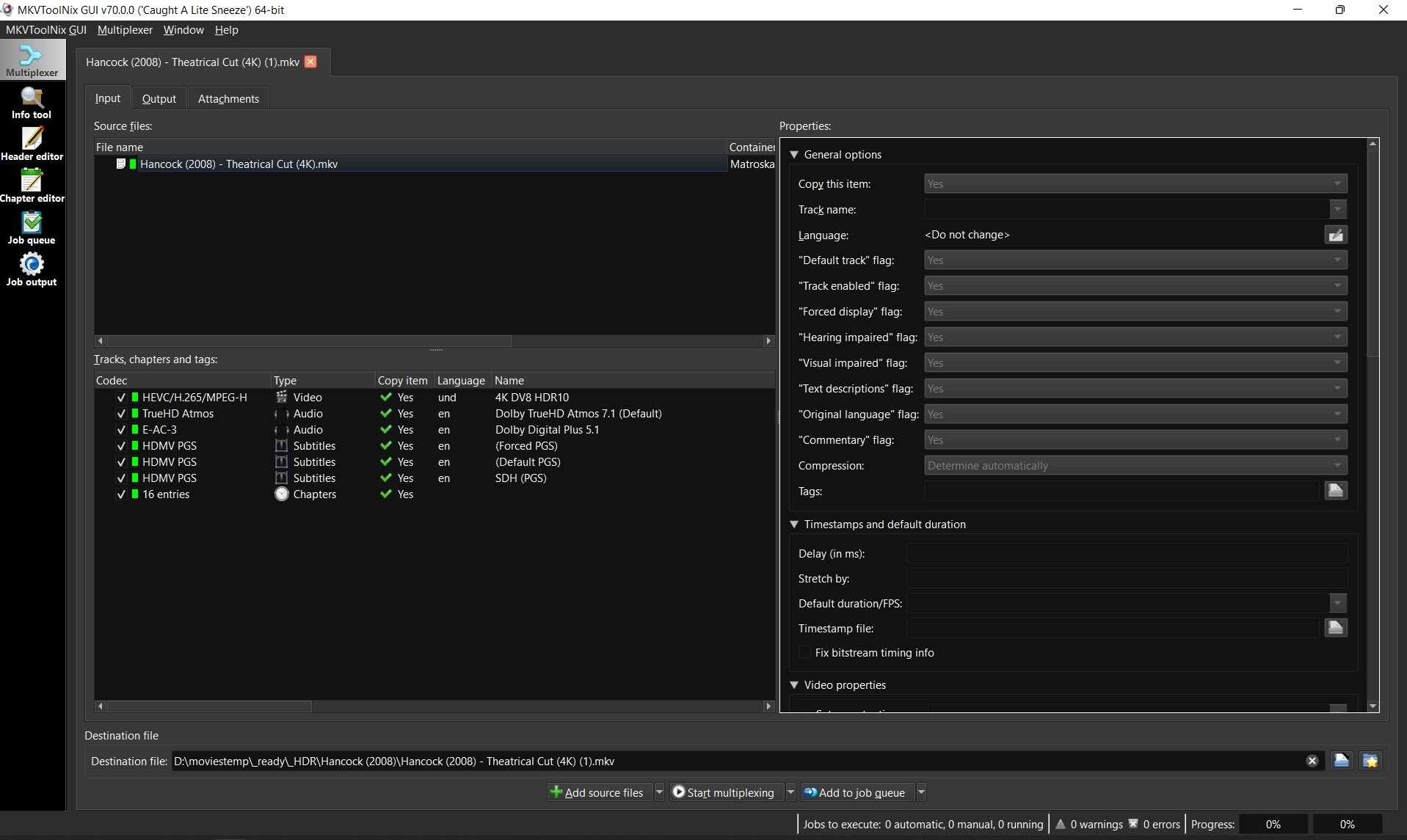
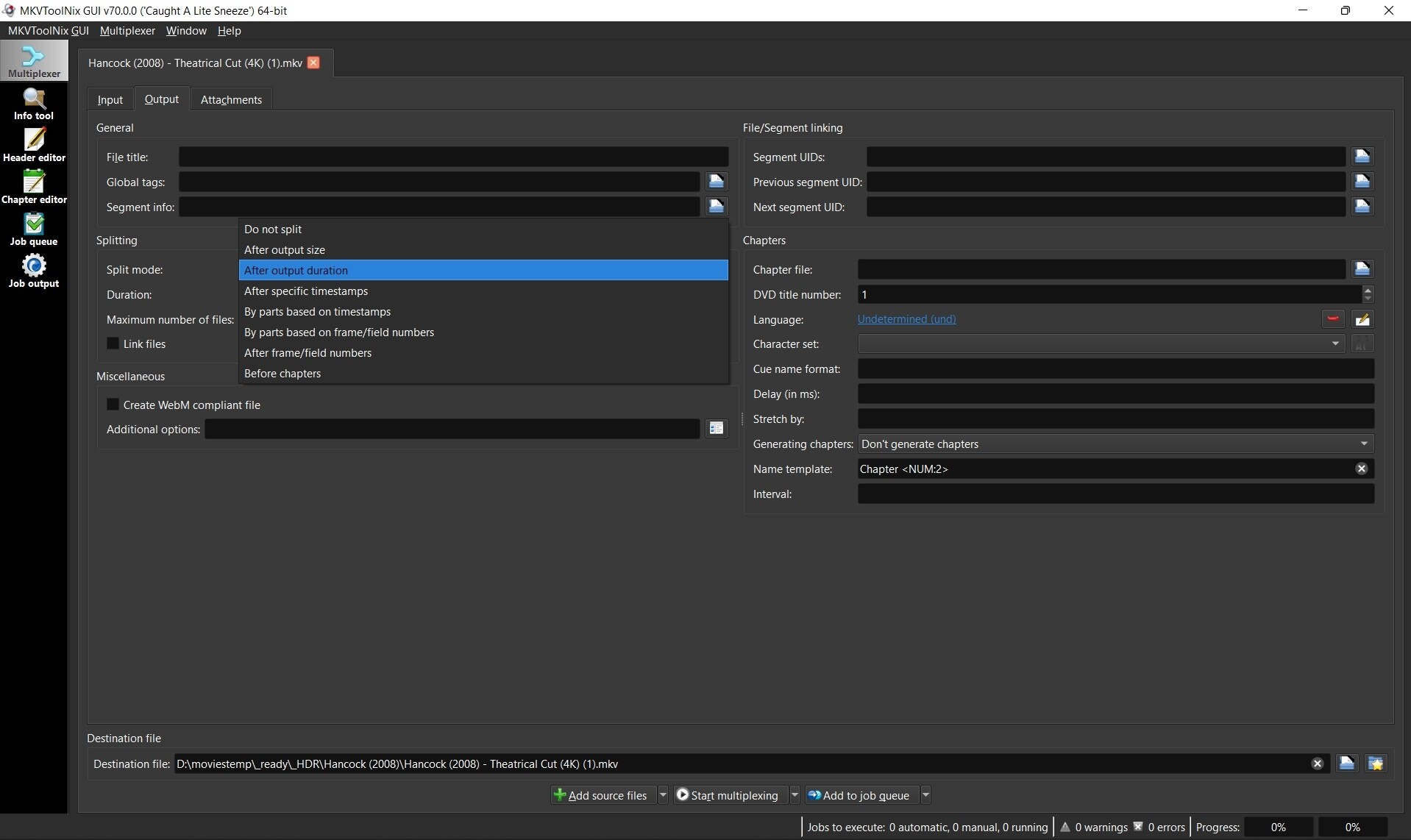
3. Choose method to split video
- Click the “Output” tab
- Click the dropdown box next to “Splitting” and choose to split by output size or duration depending on what you think will be just enough video to troubleshoot your problem.
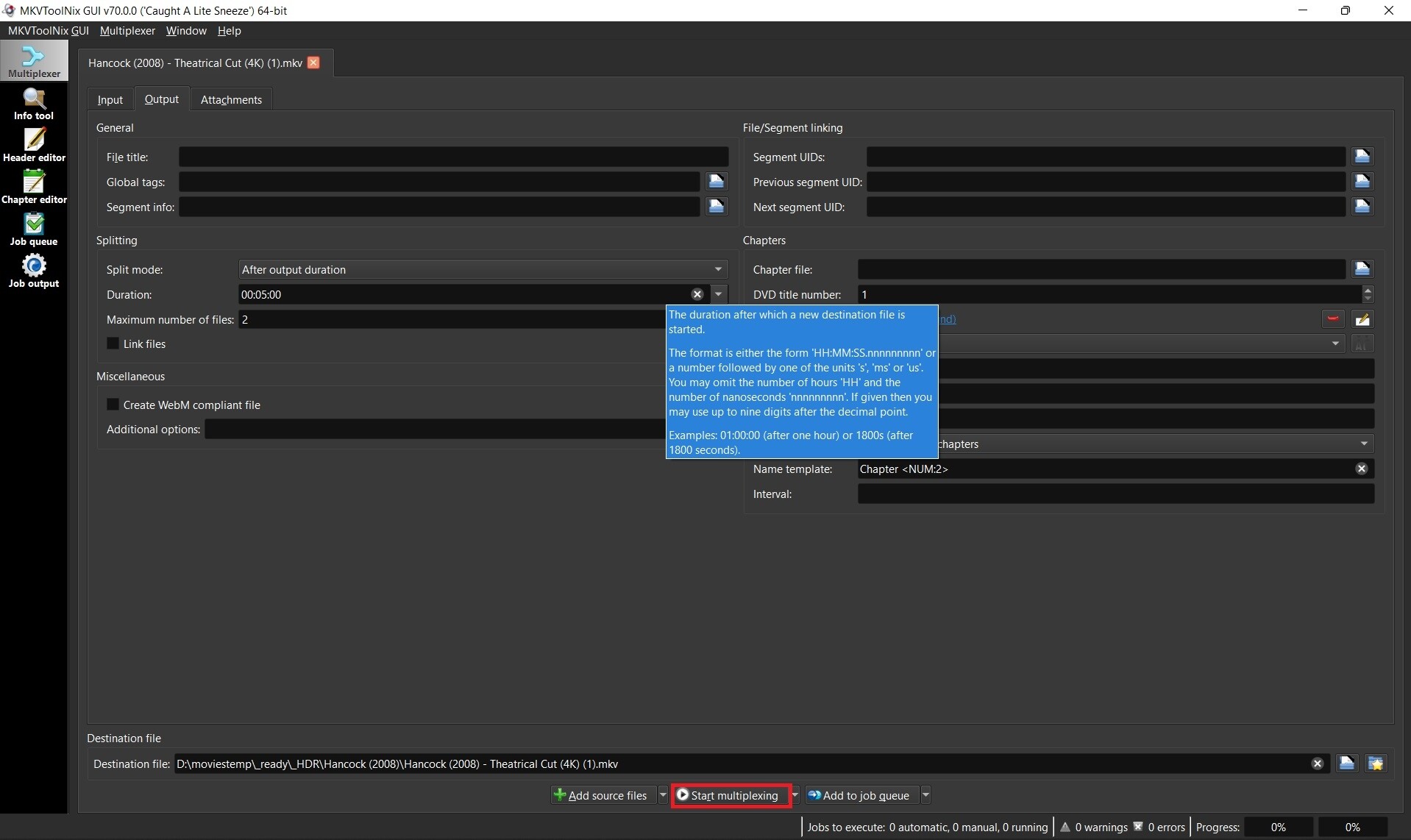
4. Enter size or duration and max number of files before multiplexing
- place mouse over the size or duration box to see a popup for format of options. Ex: 00:05:00 for 5 minutes
- Set max files to 2. You only need the first file so you can abort after the second file starts to be created if you want.
- Click “Start multiplexing”
5. Test your sample file
- Test it before submitting. Ex: Hancock (2008) - Theatrical Cut (4K) (1)-001.mkv
- It’s very possible that remuxing while splitting your file fixed the problem and then sending your sample won’t help.
Tip: If your sample plays good, then try just remuxing the original file and testing that. Remuxing sometimes fixes problems with bad headers, etc.
Nb. I took this info from Emby where they also need this type of samples 
3 Likes
OK, new snippet video link: HDR10+ snippets for no video and audio – Google Drive
1 Like
Thanks for the clips. I can’t reproduce your issue. Both play perfectly as DV or HDR10+ on my Philips TV, direct or through my old Yamaha AVR. The Yamaha doesn’t try to do anything with the video signal.
They also play fine from Vero 4k+ running Kodi 21.1 to my Panasonic EX700 (as HDR10 only). There was no 21.2 release for Vero 4k.
Unless someone else on the team can reproduce the problem, it’s going to be tough to find when the behaviour changed so what might have caused it. 20.2 was 2 years ago so there’ve been lots of updates since.
Is your Denon avc-x8500HA firmware upto date ?
most assuredly.
The weird thing is that when this happens the denon shows no audio or video info in the stream at all from the Vero. So there is some weird disconnect happening where the vero streams nothing.