But if you connect your Vero directly to the TV this ‘disconnect’ doesn’t happen ?
The Vero might be streaming, but the AVR won’t accept it.
By the way I cannot reproduce the problem on my set up - Vero-V > YamahaAVR > LG CX TV.
From what I have read, it does look like your AVR does not ‘like’ this particular HDR10+ video.
Probably. I dont really know enough about how the handshaking happens.
Did you manage to update the Vero 4k+ cleanly or did you reinstall? If you didn’t reinstall, can you upload logs for us?
It was on 20.2 and updated to the latest seamlessly enough I think. I will try this. Do you mean did I install the latest from scratch? No.
I want to know which 20.2 you were on. I’ve put the July 2023 release on a vero 4k+ and can’t see any differences (in HDMI) from the last (21.1) vero 4k release. But there were a couple of releases after July 2023 before we went to 20.3. A log will tell us what you upgraded from.
So just a normal debug log or a special log?
Just upload a log via My OSMC and we can see what you upgraded from as @grahamh. The Kodi debug log won’t be significantly relevant.
Log from the 4K+: https://paste.osmc.tv/aqitulisim
Interestingly, a little play with the 4K+ while I had it connected (yes running an upgraded 21.1),
100% success out of 5 playing the guardians, 1 out of 5 with Dune 2.
Put the 5 back in, 0% success playing either. (without turning anything else on/off).
The Dune 2 file is most definitely the one with the least success through this whole thing.
Your latest log indicates that either your AVR or TV are not set to accept HDMI2.0 signals. If you set the output from the vero4k+ to YUV422, does that restore sanity?
In HDMI 5 on the Denon (same as vero 4k+)? If so, does setting 422 on that change anything?
1 Like
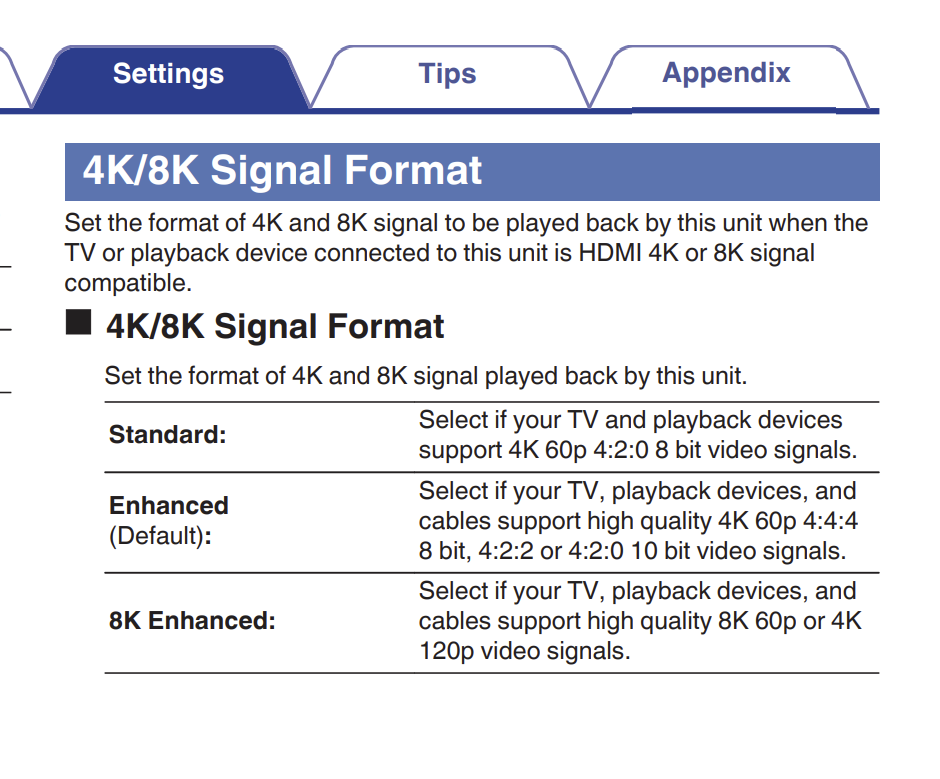
Also, according to the User Manual for your AVR
(https://www.denon.com/on/demandware.static/-/Library-Sites-denon_apac_shared/default/dw4c0b9dea/downloads/avc-x8500ha-owners-manual-en.pdf)
Page 209
What signal format do you have set for the Vero input ? I’d suggest Standard (4K HDMI 2.0), but try the others if you haven’t already.
[Your Panny TV supports upto 4K so HDMI 2.0]
Also, if you do change the signal format do a complete restart (power cycle at the wall) of everything.
Indeed. ‘Standard’ seems to refer to HDMI 1.4. In @floatingkiwi’s first log HDMI 5 input was set to Enhanced but the log from the vero 4k+ indicates Standard. Standard would need 422 output, which should be selected automatically by both veros but setting it manually may help.
1 Like
Sound like good advice though I thought it was only swapping devices between inputs that needed this. Here, if I move a device from, say, HDMI 1 to HDMI 2 of the TV, the GUI shows fine but if I start a video the TV will switch back to HDMI 1. I can’t imagine who thought that was a good idea but it seems to be a ‘feature’ of CEC.
No sorry I meant putting the Vero 5 back in place of the 4K+
THe vero 4K+ was set to SDR only I think, but most assuredly the TV and avr are both at least 2.0, the avr is 2.1.
I’ve tried all the different permutations of the 4K/8K settings in the avr.
Force YUV422 seems to work, but of course there is no HDR 10+ transmitted in that scenario (so that’s why it works…) Or at least the TV shows no HDR content in the signal.
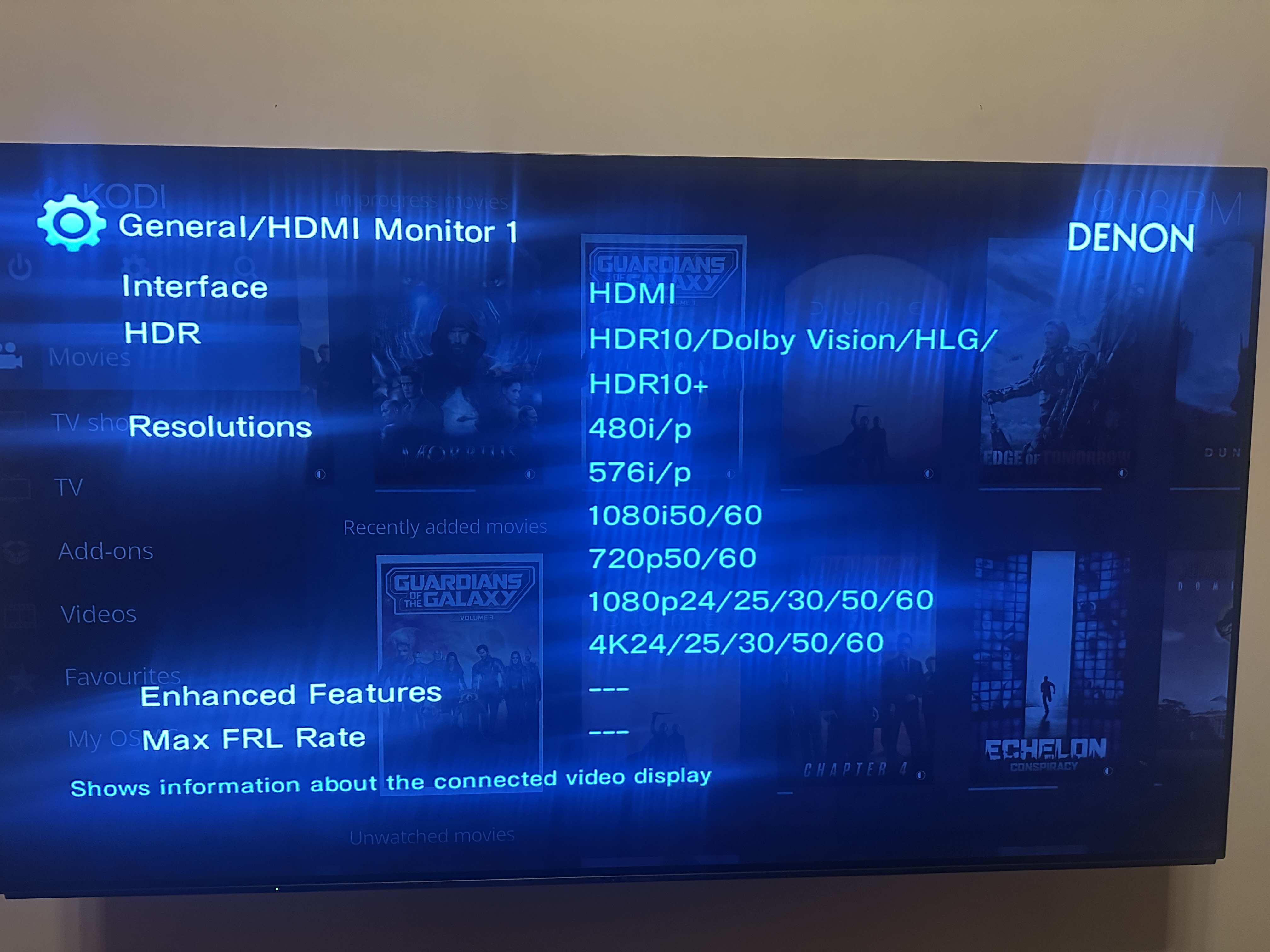
Mate this might be getting close to the issue - both devices are most certainly set to accept 2.0 signals. min of 2.0b in fact from the tv and 2.1 from the AVR. THe vero should not be showing this.
This is the tv capabilities as reported by the avr.
Try connect it directly, so we can see what it shows via a log
Apologies if done so already
Yes, I understood that. Just saying re-starting all devices is not normally needed for that but won’t do any harm.
No. There’s no reason why HDR10 or HDR10+ cannot be carried by a 422 signal. You could check that by connecting Vero direct to the TV again.
That wasn’t the case for the log from vero4k. You can check with cat /sys/class/amhdmitx/amhdmitx0/edid. If you see MaxTMDSClock2 600 MHz you should be good for 4k24Hz at YUV444. But still, some users find 422 more reliable - especially for LGs.
I’m running out of ideas.
If the log from the Vero is showing incorrect hdmi/edid data, is this a place to start looking? I’ll do logs connected directly to the TV soon.
(Panasonic TV)
I’m assuming the vero needs to try and play something during the edid request string?
That’s not how it works. The EDID is read on boot and whenever the HDMI physical connection changes (eg swapping inputs on an AVR). It is unknown for Vero to get the EDID info ‘wrong’ - it either reads the full EDID or fails to read it. But the EDID depends on which sockets are being used and what are the settings for those sockets (eg ‘Standard’, ‘Enhanced’ in Denon-speak, Modes 1 and 2 on a Panasonic). Usually those settings can be different for each socket. That’s not clear in the Denon manual.
So it’s important to check those settings carefully and to make sure logs are uploaded immediately after playing a problem video so we know what the EDID said at the time.
As you have had some success with YUV422 I recommend you keep that setting. Please send a log so we can check that the HDR10+ metadata is being sent and, yes, a (second) log when connecting direct to your TV would be useful.