Hi I’m still running Kodi 18.5 on both my Vero 4K+ and on Windows 10 with shared MySQL database. All was running well approximately until end of July. Then I added a few MKVs to my collection. These recently added files won’t play and will not show the “media info” icons (resolution/audio codec etc.) at the bottom of the movie details screen. When I select “Play” it just jumps back to the library view. When I select “Choose graphics” I get to choose poster, fanart etc. but when I select any of that Kodi crashes. However all of the movie info, plot, actors, graphics etc. are there.
I have changed avsolutely NOTHING in the setup. It also happens regardless of wether I scrape the movies on the Vero or in Windows 10, it is exactly the same effect. This tells me that maybe an updated addon causes this? I have updated all active addons to the latest version but no change.
Also these newly added files play fine in VLC and other media players.
Anybody got any ideas? Thanks!
Maybe something to do with the file name, file path, or a bad NFO perhaps. It would only be a guessing game without logs during the time this happens.
Sorry… how do I enable logging?
To get a better understanding of the problem you are experiencing we need more information from you. The best way to get this information is for you to upload logs that demonstrate your problem. You can learn more about how to submit a useful support request here.
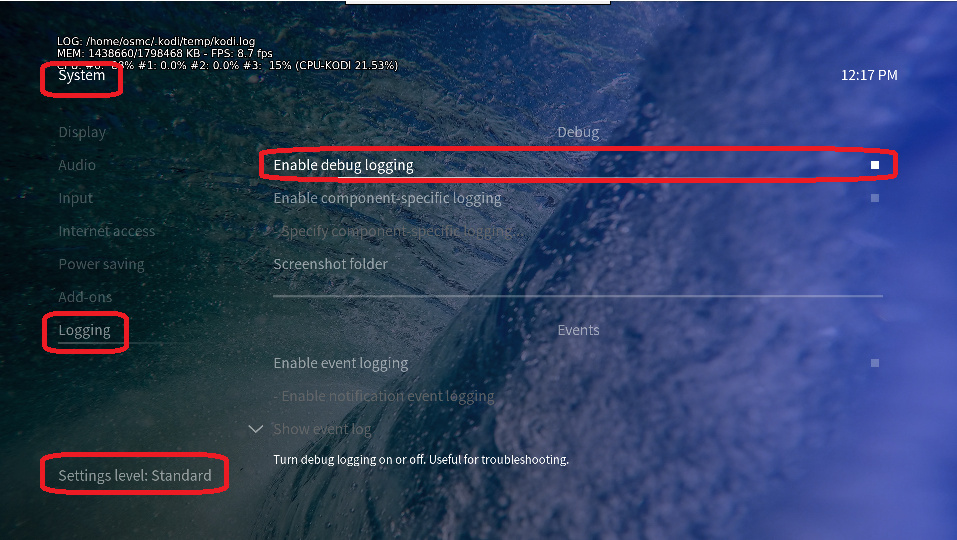
Depending on the used skin you have to set the settings-level to standard or higher, in summary:
-
enable debug logging at settings->system->logging
-
reboot the OSMC device twice(!)
-
reproduce the issue
-
upload the log set (all configs and logs!) either using the Log Uploader method within the My OSMC menu in the GUI or the ssh method invoking command grab-logs -A
-
publish the provided URL from the log set upload, here
Thanks for your understanding. We hope that we can help you get up and running again shortly.
OSMC skin screenshot:
Solved… somehow permissions on the windows server hosting the movies were screwed up. It is fixed now.
1 Like