Multiple Issues on Initial Setup

@sam_nazarko per our other conversation, I’ll start here.

So on initial setup, I wanted to utilize WiFi. I was able to pull an IP, but nothing would function. I changed my router to from 80 Mhz to 40 and 20 to see if that would clear up the problem. It made it marginally better, but still couldn’t get it to move data. I could see the identified device on my router (only on 20Mhz and 40Mhz), but it still wouldn’t load updates or the app store. I ended up adding a WiFi extender and hard-wiring to clear it up.

The Kodi Plex app is really old, and won’t even open. I can dig up the logs if that helps. It looks like there were Python issues. Plex HTPC is on version 1.108.1.307 and the Kodi app was on 0.3.5 (abandoned 2018)… so not sure if it’s even worth trying to get it to load. I tried looking for a work around, but Plex’s HTPC App doesn’t work on ARM. Their “linux” support starts and ends with Flatpak or Snap, and neither have an ARM version. There are Android app versions, but I didn’t go down that train.

I spun up a Jellyfin instance on my Plex Server, and downloaded the Jellyfin for Kodi app. My library is too large, and everything times out within the Jellyfin app. I was only able to get the Ramdom Picks menu to work, as it randomly grabs 25 movies to display.

Lastly, this is probably out of your control, but I really want to use Steam Link. I was able to get it installed, and spent hours adding in all of the missing pieces. The last thing I couldn’t make work was the following error:

shell: error while loading shared libraries: libvcos.so: cannot open shared object file: No such file or directory
screenblank: error while loading shared libraries: libvcos.so: cannot open shared object file: No such file or directory

Most people suggest upgrading their “Raspberry Pi” to Bookworm to solve this issue. I’m willing to try and troubleshoot further to try and make those things work. I’d prefer to use Plex if there is a way to make it happen. Jellyfin is clunky.

Thank You!
Chris
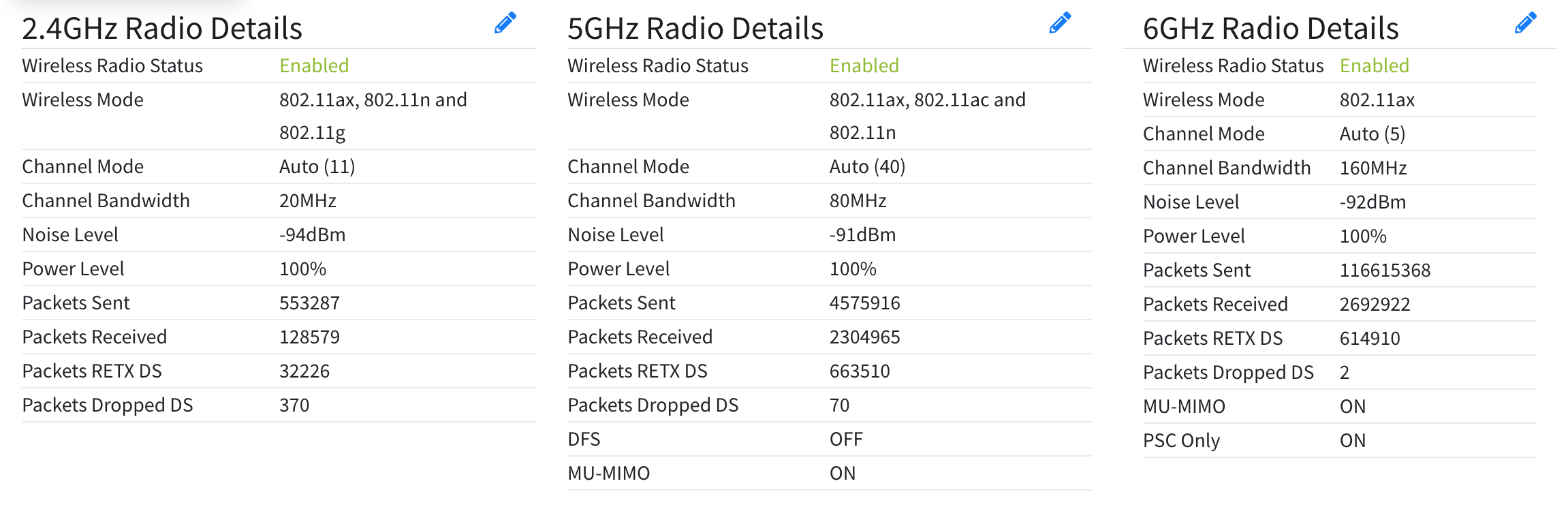
To note, I did browse the forum on the WiFi issue… which was why I thought to change bands. I have a Calix 10GbE WiFI 6 router. Some variation of settings is not making the Vero happy.

My manual changes so far:

$ sudo apt-get install emacs-nox mlocate software-properties-common cec-utils libavcodec58:armhf libpulse0:armhf libusb-1.0.0:armhf libxkbcommon-x11-0:armhf 
$ sudo add-apt-repository 'deb http://archive.raspberrypi.org/debian/ bullseye main Packages'
$ curl -O 'https://archive.raspberrypi.org/debian/pool/main/r/raspberrypi-archive-keyring/raspberrypi-archive-keyring_2021.1.1+rpt1_all.deb'
$ sudo dpkg -i ./raspberrypi-archive-keyring_2021.1.1+rpt1_all.deb
$ sudo apt-get install libraspberrypi0:armhf 
$ sudo apt-get install steamlink

Steam link isn’t supported. There is no hardware video acceleration.

Adding Raspberry Pi repositories will cause unexpected behaviour.

Some logs (attach Ethernet after experiencing an issue with WiFi) should give clues re WiFi. I’d focus on that first.

I de-prioritized it to only get the one package, but it’s been removed now since it was just for Steamlink troubleshooting.

So I think the October 2024 update fixed my WiFi issue. I swapped to WiFi and rebooted twice to start getting my logs and everything seems to work with my normal WiFi settings. On the shipped firmware it would connect and not pass traffic. After witching to ethernet, I performed all of the updates… so that must have cleared whatever bug was in there.

I also got Composite working for Plex, and tested out a 4K remote stream and it held quite well. The interface really sucks, but at least it’s functional. I haven’t tried loading my main library folders yet, but that was the huge limitation with Jellyfin. I have 1 PB of content, and it takes a lot of cache to load my main folders.

There have indeed been some WiFi improvements that may not have been in the image you would have received on the device.

After the next update I’ll bump the factory image to latest.