Both of my Veros are currently able to ping 8.8.8.8 (using putty to SSH) which they have been unable to do for the last 3 months while connected to a wired connection.
this afternoon when i have a little time, i will update them and see how it performs. should all be working, then i will update this thread to resolved
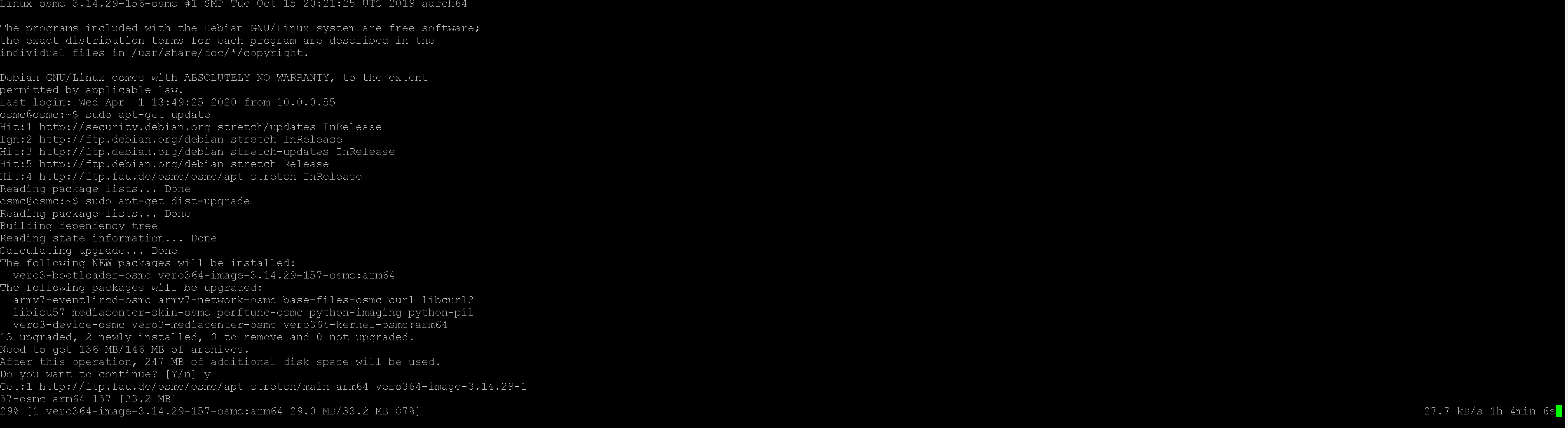
Unfortunately life isn’t getting easier on this front, a few days ago the undersea cable between Southern Africa and the EU was damaged and we have limited connectivity until it is repaired. some things work and others don’t. so while i can ping 8.8.8.8 from the vero (SSH), it gives me an error when trying to update (i’m hoping it is due to the above cable problem).
hopefully once this issue is resolved later this week, i should be able to confirm resolution.
Again, Thank you @mtv and @fzinken for all the help thus far.
as you can see my current speed to wherever this is being downloaded from is really bad.
a simple fast.com speedtest shows i have a 200Mbps speed, but that it only to a local exchange. some downloads and files are fast. netflix is pretty good. but i’ve noticed that somethings are really slow
static IP addresses set by the router seems to have been the solution.
previously I had set the Vero to use a staic IP, and the router was set to DHCP, that obviously caused some confusion.
my Veros are now set to DHCP, and so is my router, however I have a static DHCP configuration table where I have set all devices that I want a static IP.