I have just got a new Vero V. Unmodified, straight out the box-
It plays video and looks good. There is no audio at all though. It also plays MP3 but there is no sound. There is no sound when browsing the menu either, even if I switch the gui sounds to always on.
I have used the same HDMI cable as my old vero+ and there is no sound. I use the new cable that comes with it and there is no sound. I swap only the box from vero + to vero V, using same cables and there is no sound on the menu even (I swap power supply so new supply always with new veroV). Swap back to vero + and there is sound on the menu and everything else.
I’ve tried all the settings for audio and nothing makes any sound. Also, the fact the menu does not click when browsing probably means its not the files, but the same files all work on the vero V+ anyway
I have switched on TV first, then switched on the Vero V. It makes no difference with any other way of switching things on.
I have a 3 y.o. sony bravia tv. It all works with vero+ on hdmi input 1 but no sound with vero V on hdmi1. I take sound from the headphone socket into an amplifier. Have same problem if I use tv speakers only. Volume up/dn on vero remote shows numbers changing but no volume on vero v. Check info on TV and it shows audio channel same as if it was playing on vero+, but no actual sound.
Summary:- Swap vero boxes but keeping the same input/cables (with power off, power on tv then power on vero)- Vero + has sound, Vero V gives no sound. The new vero V has never made any sounds. I updated to the latest software and it made no difference. I think I put a debug log here. https://paste.osmc.tv/wuwivexuqo
Any suggestions? The fact there is no sound when browsing the menu should rule out a lot of settings I think.
Hi! Yes, here is the suggestion:
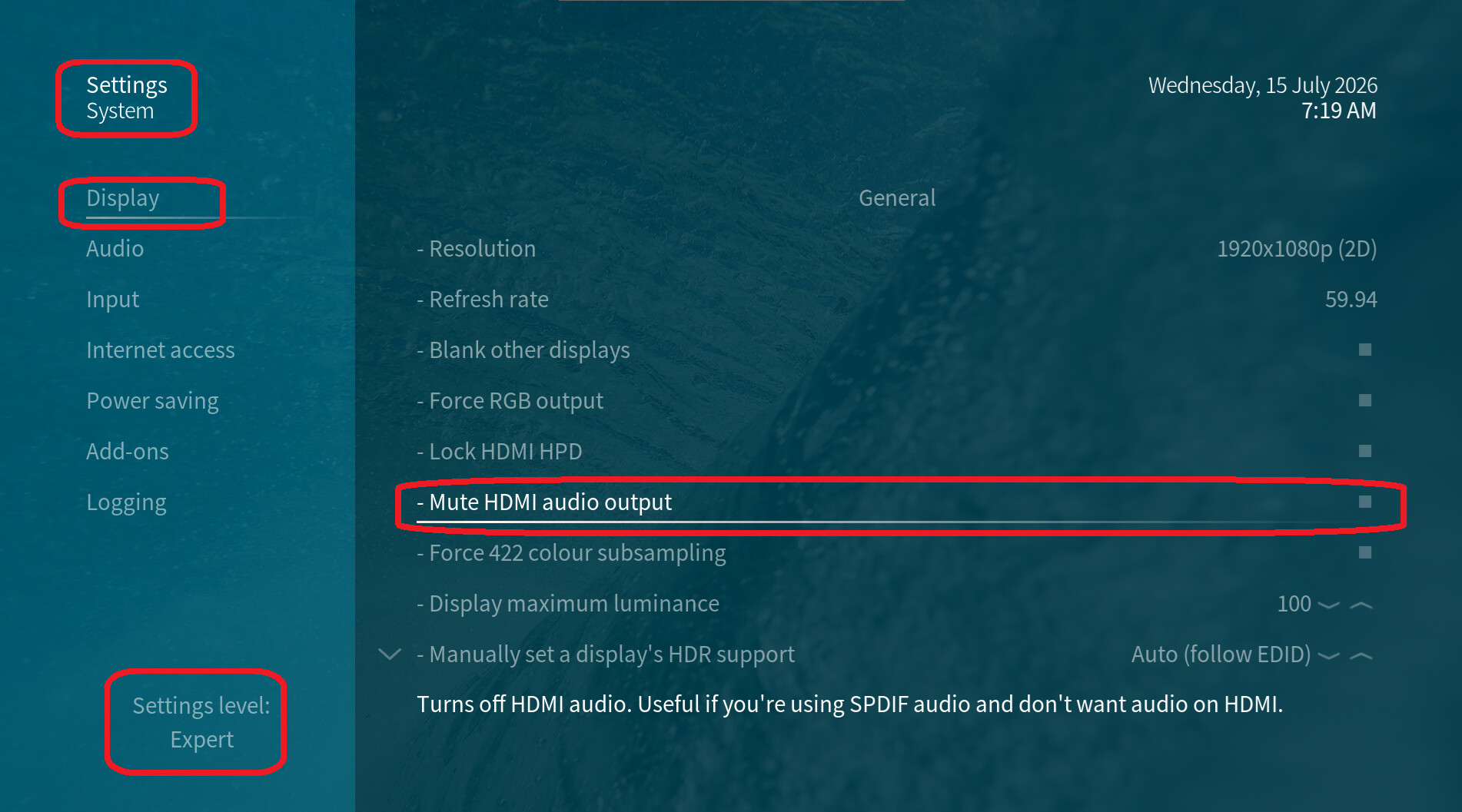
Audio-over-HDMI has been globally disabled in your video settings. This is NOT the default setting. Either reset all settings in this menu to their defaults (see the very bottom of the menu) or disable the ‘Mute HDMI audio output’ option again—please refer to the attached screenshot:
Addition:
====================== Audio Cap =================== k3dRrf31
CodingType MaxChannels SamplingFreq SampleSize
PCM, 6 ch, 32/44.1/48/88.2/96/176.4/192 kHz, 16/20/24 bit
AC-3, 6 ch, 32/44.1/48 kHz, MaxBitRate 640kb/s
DTS, 6 ch, 32/44.1/48 kHz, MaxBitRate 1504kb/s
Dobly_Digital+/ATMOS, 8 ch, 44.1/48 kHz, AFCDepValue 0x1
MAT, 8 ch, 48 kHz, AFCDepValue 0x3
Your TV indicates that it supports AC3, E-AC3, and DTS audio formats. It likely supports Dolby TrueHD as well, but apparently not DTS-HD.
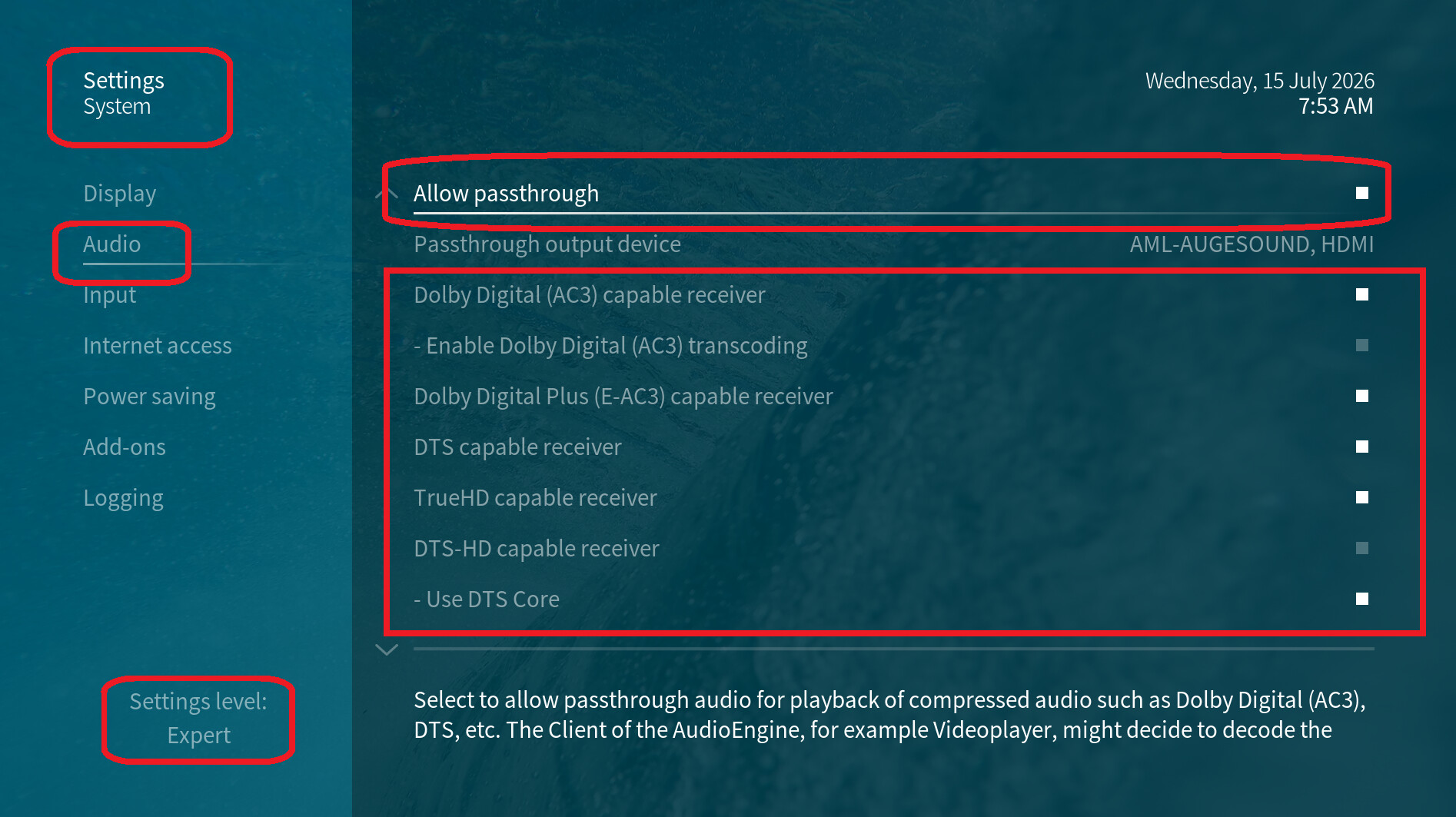
You should configure the ‘allow passthrough’ setting under ‘Settings > System > Audio’ so that these formats are passed directly to your TV without conversion:
Thanks so much, I’m feeling very old for making a silly mistake! I tried all the settings in audio menu but didn’'t notice I must have switched off audio in hdmi.
All working great now, thanks again
1 Like
The advantage of “allow passthrough” would be better quality audio? But the disadvantage seems to be I can’t use the vero v volume control to vary the sound volume, is that to be expected? I barely hear over about 5Khz so sound quality is a “mute” point to me 
If a TV or stereo soundbar is where the sound is coming out of there likely won’t be much sound quality difference.
That is expected if a TV or non-CEC soundbar is your output device. To put is simply, Kodi can adjust the volume if it is controlling the audio signal. When you tell it to do passthrough then Kodi is sending the original file unmodified down the chain. If it sees an amplifier on the CEC bus (ie a CEC enabled AVR or soundbar) it then switches from the regular adjusting PCM audio to sending CEC commands to the amplifier device to adjust its volume. It does not work with CEC TV’s as that isn’t something that is normally supported by displays so Kodi doesn’t even try.
1 Like
Thanks for explaining. I was seeing some files i could control sound, and some that I couldn’t when i had the passthrough on. That must be some files were just plain pcm sound anyway and others were allowing passthrough of some other format in that particular file, and no control of volume.
Your logic is pretty close. Anything that isn’t getting passed through gets converted to to PCM and thus allows for Kodi to adjust volume. It isn’t a matter of source audio format per se.