I did a fresh vero install and run into that problem as the new Debian seem to have shipped 3.9 exclusively…
ciao
Anthrax
I did a fresh vero install and run into that problem as the new Debian seem to have shipped 3.9 exclusively…
ciao
Anthrax
So I’m just seeing old packages. Thought as much. Thanks for the heads-up.
Hello hissingshark.
Did you plan a new release with hyperion 2.0.14 and latest osmc release ? Thanks for your answer.
Hello @hissingshark,
I tried building from source via your install script on a fully updated vero 4k.
The build fails due to multiple missing dependencies of python libs and others.
The official release from hyperion.ng installs fine and works, but lacks amlogic grabber for me, so tried your script to build from source, because the pre-built binaries won’t work (see the issue in your github repo)
I’m getting bit more time to myself now, so I’ll take a look.
EDIT: See the follow up by @hissingshark, installing python libs might not be needed, changing the constant def isn’t
I managed to compile the latest (2.15 stable) with the following changes:
pip3 install jsonschema & sudo pip3 install jinja2 - sudo is necessary because the install script asks to be run as sudoSTABLE_COMMIT constant in install.sh to 24a00e3
I built it fine from that commit on Wednesday. No additional libraries were needed.
As my system is not a clean install it may be I already had them, but as I don’t even have pip installed it’s less likely.
You don’t need to edit the script to build from a specific commit. You just specify it on the command line when you run it. Otherwise it defaults to the last good commit I’ve tested.
I’m just making testing the builds and making some fixes to the installer before I update the repo.
Perfect, then I will remove the link to my builds when that is done.
Updated to 2.0.15
Would it make sense to utilize another device (RP3 with HA) as decoder (with a USB grabber) and leave the Vero only as media player?
Currently I run 320 LEDs on an ESP32 with WLED at the TV (1080p only), and I cant approximate possible performance issues …
Hello Everyone!
First of all, thank you for this thread and all the input here, with the help of everything here I managed to install HyperionNG on my Vero 4k+  I would like to ask for some help because there is something I have not managed to solve.
So I have the Vero 4k+ with Hyperion installed. I have WS2812B LEDs installed on the back of my TV controlled by WLED (on an ESP8266). It works fine, Hyperion gets the data it needs from the Vero, sends it to WLED and my LEDs work. I wanted to complicate things and installed the Android grabber on my TV (Bravia Android TV). The Android grabber found Hyperion but I did not manage to get the lights work with that setup so I installed Hyperion on an Rpi 3+. I works, gets data from the grabber and LEDs work.
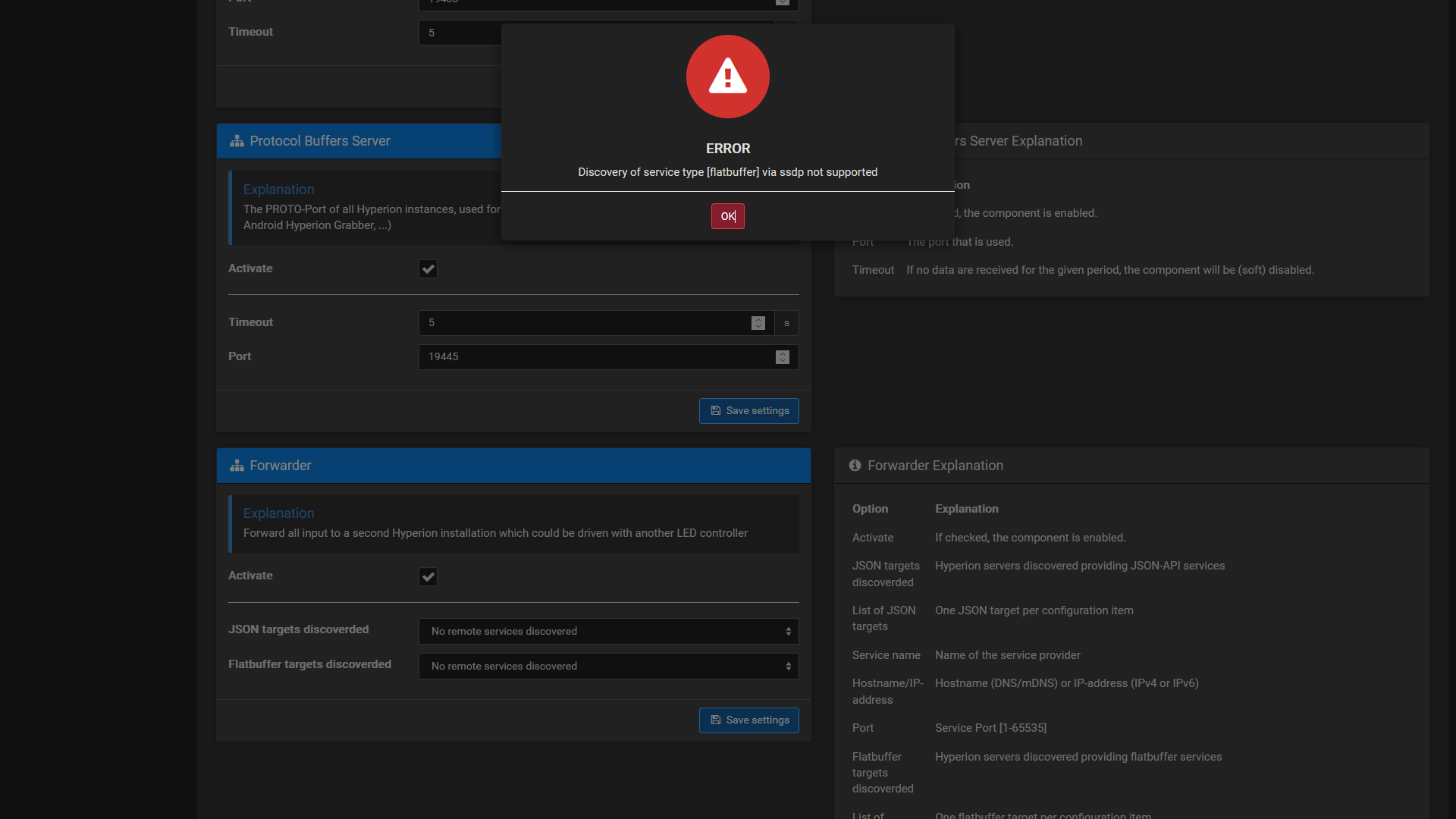
I thought why not have only one Hyperion sending data to WLED and found the forwarder functionality in Hyperion. That is where problems began. When I enable forwarder in Hyperion on the Vero I get an error message saying 'Discovery of service type [flatbuffer] via ssdp not supported. the other problem is that I cannot even change the value of the two fields where Hyperion says that no services were discovered. I thought it was a problem with the Hyperion I installed on the Vero and tried forwarder on the Pi as well. The result is almost the same: there is no error message but I cannot change the no services discovered part there either.
Could you please help me to be able to get the forwarder working on the Vero or let me know whether it is even possible to get it working?
Thank you very much for all the replies and help!
Hmm. I don’t seem to be able to update to 2.0.15. What am I doing wrong?
I issued these commands:
cd hyperion-vero4k
sudo systemctl stop hyperion.service
git clone https://github.com/hissingshark/hyperion-vero4k.git
sudo ./install.sh
Installed from binary, then
sudo systemctl start hyperion.service
Cleared my browser cache but it is still showing:
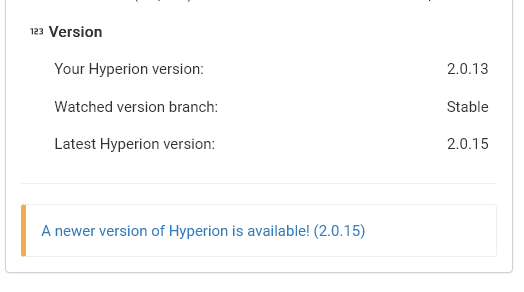
That is odd. The installer and pre-built binaries were updated to 2.0.15 in February 2023.
I’ll have a look.
Hang on. If those are literally the commands you used, then you would have to had an existing copy of the repo, which you first entered:
cd hyperion-vero4k
So you then re-cloned a new version of the repo inside the old one:
git clone https://github.com/hissingshark/hyperion-vero4k.git
But you didn’t go into that new nested folder before running the installer.
So you ran the old installer inside the parent folder…
sudo ./install.sh
You need to delete the original, start again, and run the installer it contains. I mean you could go into the nested repo and then run it in there, but that’s just getting multiverse and I hate to think what will happen next time around.
sudo rm -r hyperion-vero4k
git clone https://github.com/hissingshark/hyperion-vero4k.git
cd hyperion-vero4k
sudo ./install.sh
Ah. That makes sense. Thanks.
Any way to keep my settings before deleting?
Could I just delete the nested repo?
No need to keep the repo. Your settings are stored elsewhere
In fact, when they’ve made a major revision we’ve actually had to go and find them and delete them due to incompatibility.
After executing the commands above I can no longer start hyperion:
osmc@osmckodi:~/hyperion-vero4k$ sudo systemctl enable hyperion.service
osmc@osmckodi:~/hyperion-vero4k$ sudo systemctl status hyperion.service
* hyperion.service - Hyperion ambient light systemd service  for user osmc
   Loaded: loaded (/etc/systemd/system/hyperion.service; enabled; vendor preset: enabled)
   Active: inactive (dead) (Result: exit-code) since Mon 2023-07-17 17:13:54 AEST; 5min ago
 Main PID: 7204 (code=exited, status=127)

Jul 17 17:13:53 osmckodi systemd[1]: hyperion.service: Failed with result 'exit-code'.
Jul 17 17:13:54 osmckodi systemd[1]: Stopped Hyperion ambient light systemd service  for user osmc.
osmc@osmckodi:~/hyperion-vero4k$ sudo systemctl start hyperion.service
osmc@osmckodi:~/hyperion-vero4k$ sudo systemctl status hyperion.service
* hyperion.service - Hyperion ambient light systemd service  for user osmc
   Loaded: loaded (/etc/systemd/system/hyperion.service; enabled; vendor preset: enabled)
   Active: activating (auto-restart) (Result: exit-code) since Mon 2023-07-17 17:20:28 AEST; 746ms ago
  Process: 7503 ExecStartPre=/bin/sh -c exec sh /usr/share/hyperion/bin/drmctl.sh start (code=exited, status
  Process: 7508 ExecStart=/usr/bin/hyperiond (code=exited, status=127)
  Process: 7509 ExecStopPost=/bin/sh -c exec sh /usr/share/hyperion/bin/drmctl.sh stop (code=exited, status=
 Main PID: 7508 (code=exited, status=127)
I’m assuming something went wrong with the installation.
What is in:
ls -al /usr/share/hyperion/bin/
And:
ls -al /etc/systemd/system | grep hyperion
Will the daemon run with:
hyperiond
osmc@osmckodi:~$ ls -al /usr/share/hyperion/bin/
total 26588
drwxr-xr-x 2 root root     4096 Jul 17 17:17 .
drwxr-xr-x 4 root root     4096 Jul 17 17:17 ..
-rwxr-xr-x 1 root root      817 Jul 17 17:17 drmctl.sh
-rwxr-xr-x 1 root root  2352952 Jul 17 17:17 flatc
-rwxr-xr-x 1 root root    16916 Jul 17 17:17 flathash
-rwxr-xr-x 1 root root  2603432 Jul 17 17:17 hyperion-aml
-rwxr-xr-x 1 root root  2593696 Jul 17 17:17 hyperion-framebuffer
-rwxr-xr-x 1 root root  2631120 Jul 17 17:17 hyperion-remote
-rwxr-xr-x 1 root root  2711696 Jul 17 17:17 hyperion-v4l2
-rwxr-xr-x 1 root root 10758844 Jul 17 17:17 hyperiond
lrwxrwxrwx 1 root root       16 Jul 17 17:17 protoc -> protoc-3.21.12.0
-rwxr-xr-x 1 root root  3524604 Jul 17 17:17 protoc-3.21.12.0
osmc@osmckodi:~$ ls -al /etc/systemd/system | grep hyperion
-rw-r--r--  1 root root  434 Jul 17 17:17 hyperion.service
osmc@osmckodi:~$ hyperiond
hyperiond: error while loading shared libraries: libpython3.9.so.1.0: cannot open shared object file: No such file or directory
Always with the python… That should be fine at our current Debian version.
apt-cache search libpython
then
apt-cache policy libpython3.9