I’m running the basic version of OSMC on a raspberry Pi3b using the default skin. Beside movies I have several TV series in my library: “Columbo”, "Murder, She Wrote " … I just got the “Diagnosis: Murder” series which I would like to add, but so far I have not been successful.
Using “Columbo” as my example: I had a single folder “Columbo (1971)” with subfolders “Season01”, “Season02”, … but no TVSHOW.NFO file. The folders have references to each of that season’s episodes:
Columbo.S01E01 -Murder by the Book.m4v
Columbo.S01E02 -Death Lends a Hand.m4v
…
and no episode.NFO files.
When I added this to my system about 5 years ago, it all worked perfectly.
Now with “Diagnosis: Murder” this process is not working and I suspect it is something simple that I’ve missed. Here is what I have now. A folder titled “Diagnosis Murder (1993)”, but with no “:” as that symbol is not allowed in a file name. And sub folders for each season: Season01, Season02, … and no TVSHOW.NFO file.
In the season’s folders I have included entries for each episode:
Diagnosis Murder (1993).S01E01 -MiracleCure.m4v
Diagnosis Murder (1993).S01E02 -Amnesia.m4v
… and no episode.NFO files.
These files are on a SSD attached to the OSMC Pi in the “/mnt/medialib” folder/partition / Medialib/ TVSHOWS folder. From the main screen I move the cursor down to and select “VIDEOS”. Then “FILES” and the reference to the folder where the above folders are stored. Clicking the “INFO” icon, I select “Scan for new content”. Unlike before with Columbo nothing happens and no shows are added.
Has something changed since I added “Columbo”. “Murder, She Wrote”,… or am I doing something fundamentally wrong? I have also tried the episode names without the " (1993)" with out success.
To get a better understanding of the problem you are experiencing we need more information from you. The best way to get this information is for you to upload logs that demonstrate your problem. You can learn more about how to submit a useful support request here.
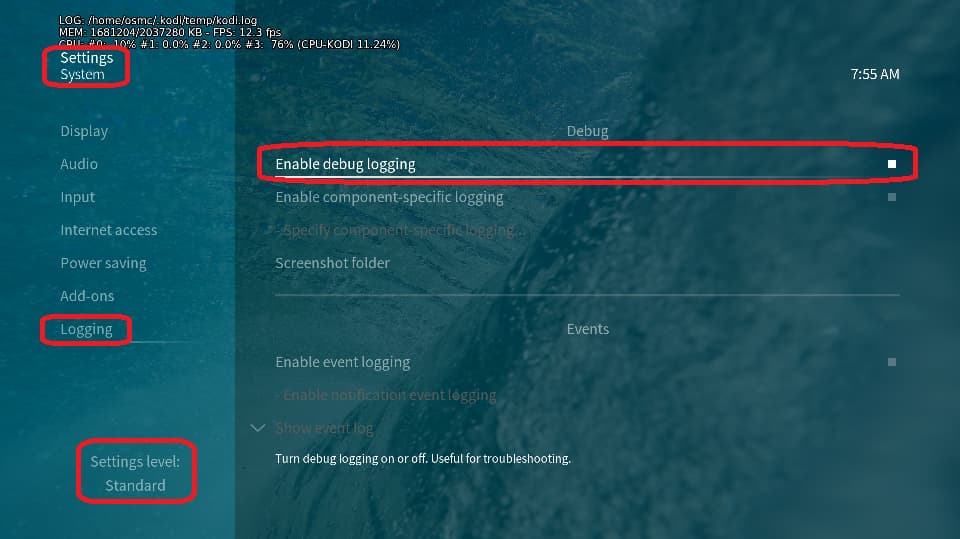
Depending on the used skin you have to set the settings-level to standard or higher, in summary:
enable debug logging at settings->system->logging
reboot the OSMC device twice(!)
reproduce the issue
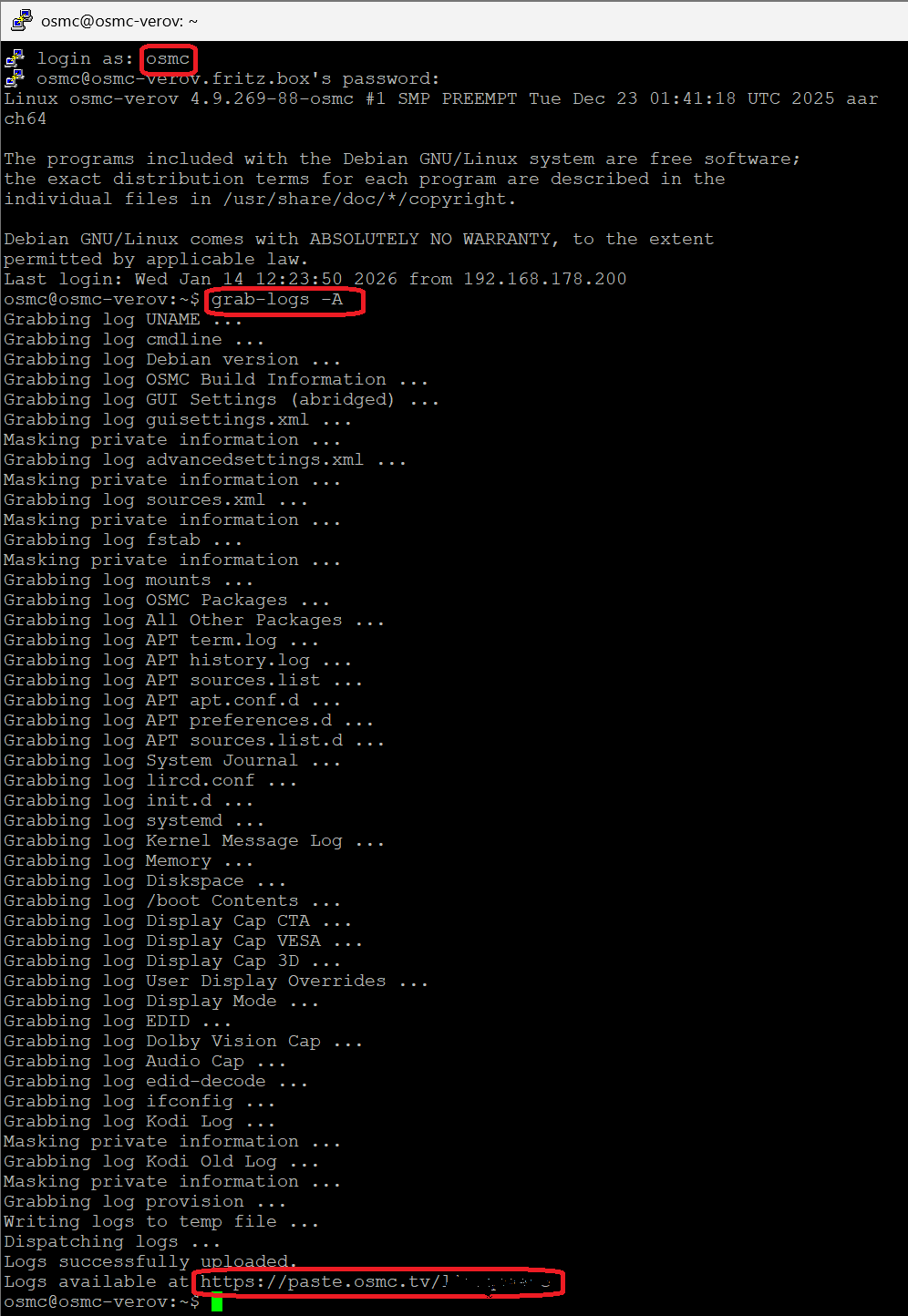
upload the log set (all configs and logs!) either using the Log Uploader method within the My OSMC menu in the GUI or the ssh method invoking command grab-logs -A
publish the provided URL from the log set upload, here
Thanks for your understanding. We hope that we can help you get up and running again shortly.
The debug log mentioned will definitely help, but I will note that colons in file/folder names can be problematic on some systems and can sometimes cause headaches in unexpected ways with Kodi. It might be worth renaming the folder Diagnosis_ Murder and see if that helps any.
@JimKnopf I have tried again, but with only 2 seasons and tried pkscout idea using “_” in the name. Still no success. Here is the URL to the debug log: https://paste.osmc.tv/ugitiyudar
You are on an old version of Kodi (18.9, 21 is current) and using a scraper that has been depreciated (the old XML ones, all current scrapers are written in Python). I’m surprised you’ve gotten any TV shows to scrape at all with that setup.
At a bare minimum you need to change your sources to use the Python versions of the scrapers. For TV Shows that TMDb TV Shows. For movies, that’s The Movie Database Python. Both use The Movie Database as their source.
The used TMDb TV Shows information scraper isn’t used anymore. Actual we’re running kodi (21.3) with the metadata.tvshows.themoviedb.org.python version 1.7.4.
First you should bring your system to latest greatest software stand.
@JimKnopf …Well, I guess that identifies me as a USER and not a TECHIE
For some reason I thought I set it up for automatic updates - Guess not. OK, what is the best way to get our setup completely up to date? And to keep it that way? Is there a posting or tutorial somewhere? Thanks…RDK
@JimKnopf OK, what is the correct procedure to reinstall and not lose all of my current library, etc?
I’m aware of two backup procedures: one in MYOSMC and the other I guess is KODI.
Thanks…Rob
After that long time I think it is not possible to restore the configuration to the current release if you create a backup from the ancient version. It will for sure create problems if it is possible at all to restart the mediacenter then.
I strongly suggest to restart from scratch; make notes from the configuration of your current system.
Use a new SD card for the new installation, so you can easily rerstart the RPi 3B with the old SD card in case you need to look things up again.
In future react on the update symbol displayed on the main page of the GUI, if you see that updates are available. This icon will be displayed with the default settings.
All you need to know for a new installation you’ll find here.
@JimKnopf WOW, that sounds like a lot of work. At my age I have trouble remembering from last week, let alone 5 years ago.
If I try to experiment to reinstall and then recover from the backups, what is the correct procedure? Which backup get installer first, OSMC or KODI? Thanks…RDK
Under My OSMC -> Updates -> Backups you can define an external location for the backup of the configuration data including the kind of data you want to backup (typical all).
Under My OSMC -> Updates -> Manual Controls you can manually initiate a backupand a restore of the settings you specified above.
This concept is designed to restore settings to the exact same versions of kodi and the add-ons. Even the migration of the old databases version is not safe with the version you’re using besides the incompatibilities to expected with the add-ons.
Give it a try … but please, don’t keep us busy here with any follow-up errors/issues of such problematic settings restore. Good luck.
In the scenario in which one does a backup, clean install, and then restore with there being a Kodi version difference you will not have your libraries restored at this point. You would have to actually ssh into your OSMC device after the restore, stop Kodi, then delete the new version databases, and then restart Kodi so it will actually upgrade the databases you restored.
Given your response that this seems to be daunting I’ll offer up an alternative… don’t update, and deal with new media scraping by utilizing a media manager on a PC. Normally this isn’t something an experienced user would find to be the “best” option, BUT, you have A LOT of sources and I’m guessing not all of it has perfect naming and layout at the file level which likely would make recreation from scratch an elongated suckfest. Kodi will preferentially scrape local metadata if present which means that if you use an external tool to create local metadata alongside your files your existing outdated scraper will still be able to correctly ingest new media.
My personal preference for a media manager is tinymediamanager (aka tmm). Given you have old US series you will likely want to use TVDB as your scraping source (TMDB frequently frustrates me when it comes these old series) which means with tmm you would either need to pay for a subscription to their current version (as current free version only supports the TMDB scraper) or dig into their site to find version 3.1.18 which is the last free version that supports both scrapers (old but still works perfectly fine for me). There is going to be a little bit of a learning curve setting up the preferences for how you want it to work, but once you’re past that it would just be a matter of plugging in a drive and setting that as a source in the preferences and then tell it to scan the drive for media. It will populate a list of your media. You could then just click on a show and the search and scrape button and it will come up with options for what scraper you want to use and you select the correct match. It will fully populate metadata right in the program and then you will be able to see how well it matches up to the files. There is options to switch to DVD order if that issue come up and you can choose what artwork and modify anything you want. When you are doing this it is saving all this information along side your files on the drive. When you plug the drive back into Kodi and have it scan the drive it will ingest it exactly how you had it set in tmm. You can even do this for items that are already scrapped in Kodi to tweak them, you would just need to bring up an information window in your Kodi library and hit the “refresh” button to get it to rescrape using the new information.
@darwindesign Thanks for your time and ideas. I’m currently installing the latest version and trying to get it up with all of my add-on’s and configurations. It has been so long that I’m not sure that i can remember all. right now I’m trying to figure out which odd-on’s I actually installed. I know that I installed SAMBA and Backup.
If this goes without lots of problems then I will retire the old server. If not then I’ll investigate your ideas. Thanks again…RDK
@darwindesign@JimKnopf I have fresh installed OSMC and updated to the current release. And I have added music, some TV Shows and movies. However, seemingly randomly, the system stops and on a blue background show the Unhappy Face Icons and then restarts. This has happened on several occasions with no particular pattern. This prompted me to put the unit into debug logging mode so I could send the log. However, I am not able to reboot twice from the GUI as that triggers the same error contrition. Here is the URL to the log file: https://paste.osmc.tv/hiduzelibo
Thanks…RDK
You’re RPi 3b is running out of memory. Since you’re using Estuary skin and there seems to be an issue with that skin, I strongly suggest that you disableExtract thumbnails from video files and try to do some cleanup (don’t worry, missing things will be automatically rebuild):
If that does not help, you should try the OSMC skin instead of Estuary. Is there any other software running on this RPi except naked OSMC?
2026-02-28 15:59:54.214 T:1392    debug <CAddonSettings[0@script.module.osmcsetting.pi]>: trying to load setting definitions from old format...
2026-02-28 15:59:54.222 T:1392    debug <CSettingsManager>: requested setting (gpio-ir-overlay) was not found.
2026-02-28 15:59:54.222 T:1392    debug <CSettingsManager>: requested setting (gpio_in_pin) was not found.
2026-02-28 15:59:54.222 T:1392    debug <CSettingsManager>: requested setting (gpio_in_pull) was not found.
2026-02-28 15:59:54.222 T:1392    debug <CSettingsManager>: requested setting (gpio_out_pin) was not found.
2026-02-28 15:59:54.222 T:1392    debug <CSettingsManager>: requested setting (gpu_mem_1024) was not found.
2026-02-28 15:59:54.222 T:1392    debug <CSettingsManager>: requested setting (gpu_mem_256) was not found.
2026-02-28 15:59:54.222 T:1392    debug <CSettingsManager>: requested setting (gpu_mem_512) was not found.
2026-02-28 15:59:54.222 T:1392    debug <CSettingsManager>: requested setting (label10) was not found.
2026-02-28 15:59:54.222 T:1392    debug <CSettingsManager>: requested setting (label11) was not found.
2026-02-28 15:59:54.222 T:1392    debug <CSettingsManager>: requested setting (label12) was not found.
2026-02-28 15:59:54.223 T:1392    debug <CSettingsManager>: requested setting (label13) was not found.
2026-02-28 15:59:54.223 T:1392    debug <CSettingsManager>: requested setting (label14) was not found.
2026-02-28 15:59:54.223 T:1392    debug <CSettingsManager>: requested setting (label15) was not found.
2026-02-28 15:59:54.223 T:1392    debug <CSettingsManager>: requested setting (label16) was not found.
2026-02-28 15:59:54.223 T:1392    debug <CSettingsManager>: requested setting (label17) was not found.
2026-02-28 15:59:54.223 T:1392    debug <CSettingsManager>: requested setting (label18) was not found.
2026-02-28 15:59:54.223 T:1392    debug <CSettingsManager>: requested setting (label19) was not found.
2026-02-28 15:59:54.223 T:1392    debug <CSettingsManager>: requested setting (label2) was not found.
2026-02-28 15:59:54.223 T:1392    debug <CSettingsManager>: requested setting (label20) was not found.
2026-02-28 15:59:54.223 T:1392    debug <CSettingsManager>: requested setting (label21) was not found.
2026-02-28 15:59:54.223 T:1392    debug <CSettingsManager>: requested setting (label22) was not found.
2026-02-28 15:59:54.223 T:1392    debug <CSettingsManager>: requested setting (label23) was not found.
2026-02-28 15:59:54.224 T:1392    debug <CSettingsManager>: requested setting (label24) was not found.
2026-02-28 15:59:54.224 T:1392    debug <CSettingsManager>: requested setting (label25) was not found.
2026-02-28 15:59:54.224 T:1392    debug <CSettingsManager>: requested setting (label26) was not found.
...
Feb 28 15:42:04.558389 RDKMEDSRV2 connmand[264]: lo {newlink} index 1 address 00:00:00:00:00:00 mtu 65536
Feb 28 15:42:04.558769 RDKMEDSRV2 connmand[264]: lo {newlink} index 1 operstate 0 <UNKNOWN>
Feb 28 15:42:04.559433 RDKMEDSRV2 connmand[264]: enxb827eb918ea6 {create} index 2 type 1 <ETHER>
Feb 28 15:42:04.559769 RDKMEDSRV2 connmand[264]: enxb827eb918ea6 {update} flags 4098 <DOWN>
Feb 28 15:42:04.560054 RDKMEDSRV2 connmand[264]: enxb827eb918ea6 {newlink} index 2 address B8:27:EB:91:8E:A6 mtu 1500
This looks strange. Especially we’re not using predictable ifnames like enxb827eb918ea6with OSMC in the network area. Please, confirm that this is a clean new installation with latest greatest OSMC image on an empty SD-card and you did not try to restore any old settings file.
@JimKnopf … Thanks for your weekend reply. I really owe you folks a donation!!
This is/was a clean install from the Raspberry Pi Imager app. They are now distributing the November release but as I recall I got an earlier release on Wednesday? However after I got it installed and setup I ran the “UPDATE” so I assume it is full and complete.
Nothing else is running on the unit. I did install the BACKUP and SAMBA add-on’s. I manually ssh into the unit and added my ID and password and modified the OSMC password and changed the root password. I configured SAMBA with my ID and OSMC and modified the configuration using the smb-local.conf file.
Then I started to add stuff, first the music, then some personal videos (hiking trips, ski trips, family get togethers, …), which I manually coded in the TVShow format (They were working on the old server. That did not add cleanly so I manually removed them. Then i successfully added the “real” TVShow folder and my movies folder, all of which as far as I know went correctly.
I’ll try your suggestions and report back later. Not sure about the memory on these two Pi3b’s, I’ll check on that also. Thanks again…RDK
Why that? I do not know what this imager sw is doing. Please, use the OSMC installer software. Seeing predictable ifnames in logs is definitely wrong/unexpected.
@JimKnopf@darwindesign I followed your suggestions but they did not seem to have any effect, I still got the error condition display and the Pi would then hang.
Given your concern, I trashed that setup and stated over. I downloaded setup from YOUR site and used Etcher to convert the downloaded file to a bookable SDCard. The setup and configuration went smoothly - no errors. I did not add any add-ons nor make modifications to ID’s and Passwords.
As I’m familiar with the Estuary - KODI skin, I again chose it. I downloaded my TVShows and Movies without issues. The Movies library looks reasonable (almost 700) but was showing them by title and not also showing “sets” which I know can be configured. However, when I tried to see the TVShows content I got a display of spinning icons followed by the error display and a reboot.
After it restarted, it came up with the default OSMC skin. BUT, as I not familiar with that skin so further testing until I can study some docs about how this skin works. Initially it was not obvious or intuitive.
As I also have a Pi4 8GB available. I’m to to also see if it performs better that the Pi3B…RDK
PS…Maybe your should rename this question/thread as it no longer is concerned about adding TVShows, but rather getting OSMC to start on a Pi3b with the KODI skin…