Jellyfin is an addon which is directly manipulating the database to make Kodi load a URL.
Since it’s directly modifying the database it could be loading malformed URLs which cause cURL to crash which in turn restarts Kodi and reboots the device.
It’s just as susceptible to creating issues as any other addon.
Always best not to assume something isn’t an issue when you’re dealing with anything “added” to a standard installation.
In any case, since you already tried my suggestion I’ll bugger off now and leave you to the real support team.
To get a better understanding of the problem you are experiencing we need more information from you. The best way to get this information is for you to upload logs that demonstrate your problem. You can learn more about how to submit a useful support request here.
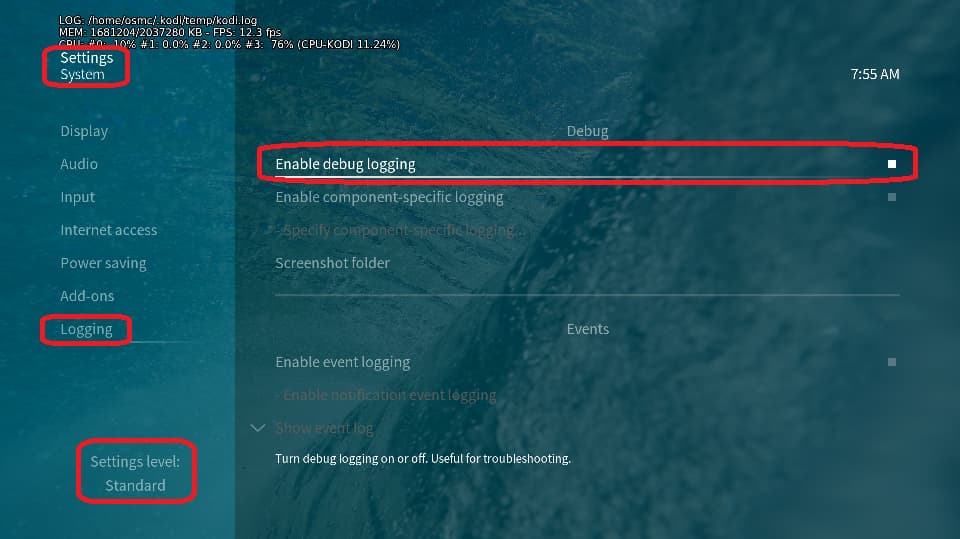
Depending on the used skin you have to set the settings-level to standard or higher, in summary:
enable debug logging at settings->system->logging
reboot the OSMC device twice(!)
reproduce the issue
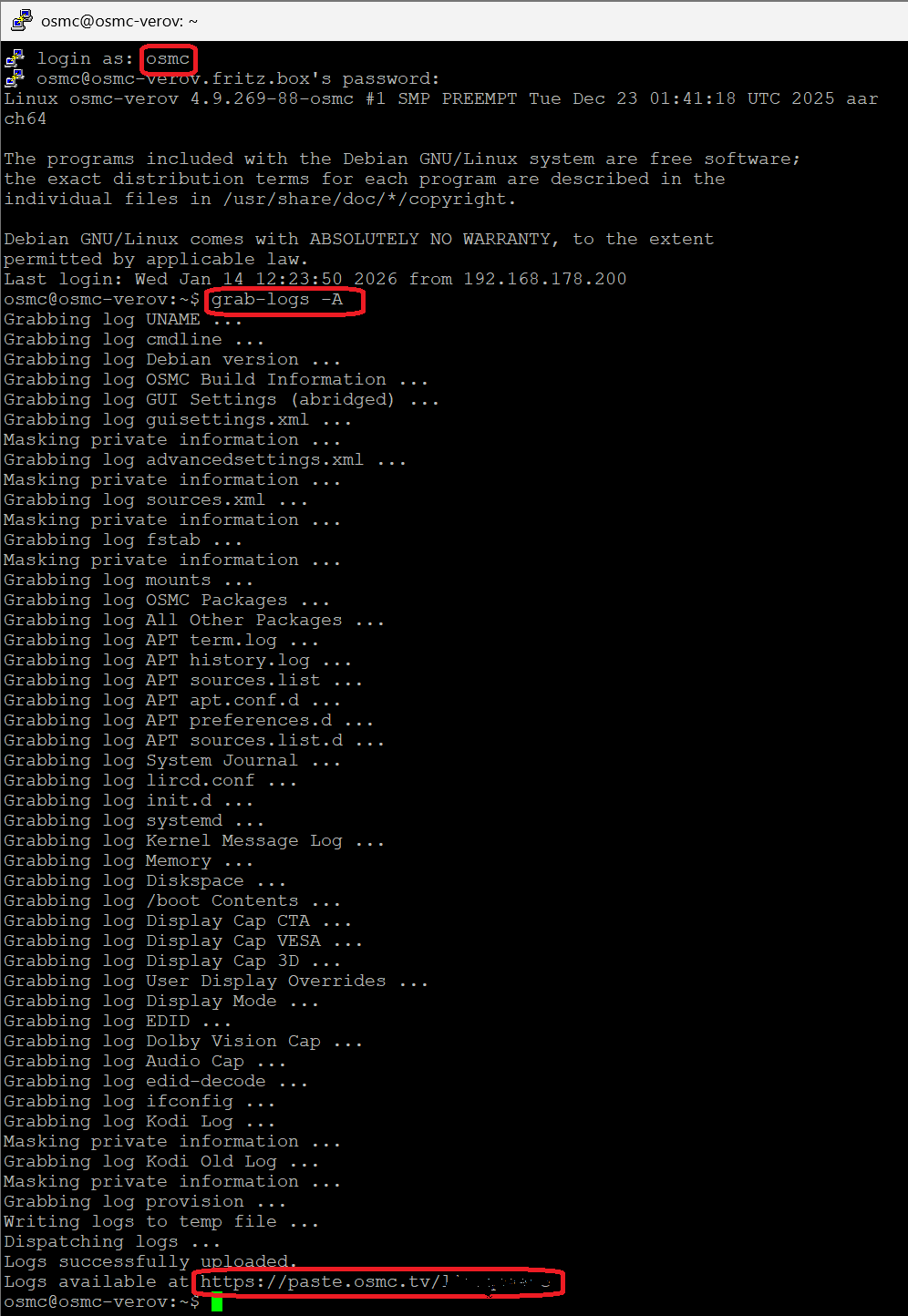
upload the log set (all configs and logs!) either using the Log Uploader method within the My OSMC menu in the GUI or the ssh method invoking command grab-logs -A
publish the provided URL from the log set upload, here
Thanks for your understanding. We hope that we can help you get up and running again shortly.
You would need to let us know what you did and what happend? E.g. did you play and OSMC rebooted? Also how do you define a “reboot”? Did you see frowning face and the GUI restarted?
Last entry in log doesn’t show any attempt to play anything
I did install the testing FEL version. Nothing more. I go to file manager, find the file, press to play and a few seconds later it just reboots as in screen turns black, osmc led lights up and I see the startup logo. It hard reboots, I don’t see the frowning face.
It’s really odd there is nothing in the logs after your succesfully play the previous movie.
As you you are on staging maybe we wait for the stable release to see if it fix your issue. Otherwise might need persistent logging enabled to dig deeper. Or if you can take a snippet of the file with which the you can replicate the issue you could also share that.
2026-04-29 10:03:39.596 T:4134     info <general>: Deleting settings information for files nfs://192.168.168.10/mnt/user/ColdStorage/Filmes/1917 (2019)/1917 (2019) - 7.1 TrueHD Atmos - Remux-2160p - HEVC - DV HDR10Plus.mkv
2026-04-29 10:03:39.604 T:2878     info <general>: VideoPlayer: finished waiting
2026-04-29 10:03:39.604 T:2878     info <general>: CVideoPlayer::CloseFile()
2026-04-29 10:03:39.604 T:2878     info <general>: VideoPlayer: waiting for threads to exit
2026-04-29 10:03:39.604 T:2878     info <general>: VideoPlayer: finished waiting
2026-04-29 10:03:39.622 T:2947     info <general>: CAESinkALSA::Initialize - Requested layout FL, FR
2026-04-29 10:03:39.622 T:2947     info <general>: CAESinkALSA::Initialize - set digital codec 0
2026-04-29 10:03:39.623 T:2947     info <general>: CAESinkALSA::Initialize - Attempting to open device "default"
2026-04-29 10:03:39.636 T:2947     info <general>: CAESinkALSA::Initialize - Opened device "default"
2026-04-29 10:03:39.636 T:2947     info <general>: CAESinkALSA::InitializeHW - Your hardware does not support AE_FMT_FLOAT, trying other formats
2026-04-29 10:03:39.636 T:2947     info <general>: CAESinkALSA::InitializeHW - Using data format AE_FMT_S24NE4
2026-04-29 10:03:39.671 T:2947     info <general>: CAESinkALSA::Initialize - speaker layout 0
2026-04-29 10:03:40.208 T:2878     info <general>: GLES: Maximum texture width: 8192
2026-04-29 10:03:41.208 T:3019     info <general>: Skipped 1 duplicate messages..
2026-04-29 10:03:41.208 T:3019     info <general>: JELLYFIN.jellyfin_kodi.player -> INFO::jellyfin_kodi/player.py:420 --<[ playback ]
2026-04-29 10:03:43.900 T:3019     info <general>: JELLYFIN.jellyfin_kodi.monitor -> INFO::jellyfin_kodi/monitor.py:105 [ playlist ] cleared
Here, this mp4 video sample lets crash a VeroV with current OSMC release, so it is NOT related to the current FEL version in staging.
More interesting: If I remux the clip from an mp4 to an mkv container using mkvtoolnix, it play fine on the official OSMC release as well as on the FEL testing version.
So, the issue is isolated to this specific mp4 file means, it is somehow corrupt or using something very special which the Kodi code or the hardware acceleration stack currently cannot handle.
Meanwhile I used VLC to remux the sample mp4 to a new mp4 container keeping the original video and audio tracks.
This file plays fine as HDR10+.
The big difference I see is/are special ‘menu’ items in the crashing mp4 which are detected by mediainfo.
Don’t know for sure that this is the root cause but I’ve never seen such items in mp4 samples I used for tests.
If mkvtoolnix fixes it, I might as well do the same but my memory tells me that I have watched this movie on osmc at the very least on the raspberry pi 4 before I got my very V. I’m positive I watched it either on the pi4 or the vero V.
But this is an interesting case because It plays on windows, linux, on the browser and my phone! The vero V is the only that fails.