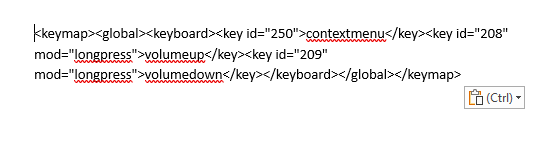
I’m using a third party remote controller for my TV and Pi Osmc system. I’ve just changed the audio setup and now need to control the volume from the Pi Osmc rather than the TV directly.
The remote connects to the Pi via a USB IR receiver. Some of the buttons control the TV directly and the Pi via CEC.
I’ve programmed two buttons on the remote for Volume Up and Down directly to the Pi. These work ok on a single press but I can’t seem to get the long press working.
I’ve modified the gen.xml files to include the following and placed them in /home/osmc/.kodi/userdata/keymaps/osmc
volumeup
volumedown
The remote receiver light flashes to indicate the repeated codes being sent but nothing happens.
Any help would be much appreciated.
Can you share your entire keymap please. Make sure you select the code and click the </>button so the xml posts correctly. Additionally, I’m not sure how that keymap would be loading unless your using an OSMC remote. Kodi loads keymaps normally only from the “keymaps” folder and specific subfolders are only loaded for very specific remotes when they are present.
Thanks for the reply. The following is the entire keymap
contextmenuvolumeupvolumedown
What you posted is not a keymap. I’m happy to try to help, but your going to need to give me a bit more to work with.
I appreciate your help.
Something is not right with this reply box because I pasted all the info in the keymap file but it seems to have stripped out all the non alpha characters.
This is a screen shot - maybe that will help
The preformatted text/code option I mentioned earlier is meant to deal with that exact issue where special characters get stripped out. You can click the button to switch the editor mode also which may make this a bit easier to deal with.
I see from that keymap your issue is that your trying to get key repeat from a long-press which is not something that Kodi supports, nor would that really be possible. When you hold down a key (on a input device that has supported for long-press) Kodi knows the key is repeating so has to either take that as a secondary function, or repeat the primary function after a delay. Therefore Kodi only sends repeats for keys that don’t have a long-press function set for them. If your remote is such that you are unable to dedicate buttons for volume then the only thing I can think to suggest is to change the volume step settings so there is only 10 (or whatever your preference) volume steps instead of 100 to reduce the number of button presses to effect change.
I’m not clear about some of your reply. According to these two links Kodi does support long press.
https://kodi.wiki/view/Keymap#Long-press
Although its not clear if all remotes can be used with this function.
I have dedicated buttons for volume and they do repeatedly send the codes to the Pi but results in only one press effect.
The tip about the volume step settings is very useful, thanks. I’ve changed that to make the volume step in increments/decrements of 5.
Thanks for your help
Kodi does support long-press with some input devices with support for some devices possibly varying by platform. That first link is specifically talking about OSMC brand remotes. I’m pretty familiar with it as I’m the one who wrote it.
Kodi can map keys/buttons to act in one of the following ways
- Do nothing
- short press with non-repeating action
- short press with repeating action
- long-press with non-repeating action (with supported remote)
The regular state for a mapped action is for it to repeat an action after a delay. If you assign a long-press action to that same button it makes the short press action non-repeating. As such, in order to make a repeating volume button it must be mapped as a short press AND if there is a long-press action for that button in ANY keymap then they must be removed. You might try the following in /home/osmc/.kodi/userdata/keymaps and see if that works for you…
<?xml version="1.0" encoding="UTF-8"?>
<keymap>
  <global>
    <keyboard>
      <key id="250">contextmenu</key>
      <key id="208">volumeup</key>
      <key id="209">volumedown</key>
      <key id="208" mod="longpress" />
      <key id="209" mod="longpress" />
    </keyboard>
  </global>
</keymap>
Note that you will need to reboot Kodi to reload the keymaps. If this doesn’t work how it should I will need you reboot kodi, turn on debug logging, press both volume buttons a couple times and the menu button as well, turn off debug logging, then upload at least the Kodi log via the My OSMC add-on.
I tried your keymap suggestions and it made no difference.
I’ve reconfigured my setup so that the volume is now controlled from the TV using CEC. So this issue has gone away for me.
Thanks for the help anyway.
I’m guessing the key id you provided isn’t correct then. It would be that or whatever key that id corresponds to has window specific mappings (default maps are almost exclusively done with key names and I’m not aware of a cross reference for id’s). If you wanted to get this working as you originally intended we can still do that. I’d just need you to provide a Kodi log where debugging was enabled when you pressed the buttons in question so I could see what buttons Kodi was picking up. Alternatively you could install the Keymap Editor add-on from Kodi’s repository and try mapping with that. That add-on should show the correct key id’s when you program buttons.