It’s not update related unfortunately. I wish it was.
This is quite easily verifiable (just reinstall an older version of OSMC), but the issue will persist.
Sam
It’s not update related unfortunately. I wish it was.
This is quite easily verifiable (just reinstall an older version of OSMC), but the issue will persist.
Sam
Hi Sam - I think the point we’re trying to make is that it’s not the content of the update which triggered the issue, it’s the process of instigating that seems to have resulted in exposing the fault.
This means that when you reinstall an old version, the fault still remains as it’s a h/w failure, which cannot be reversed by a s/w change. How else can you explain why nearly all of us affected by the issue reported it directly following a s/w install (Aug or Nov)?
I thought I explained this before but apologies if not.
A software update invokes a power cycle in most scenarios.
Otherwise people leave their device running.
This is why I initially suspected an update some time ago and rolled some things back to no avail before realising the inevitable conclusion.
Sam
I don’t remember reading anywhere that it was the power cycle causing the failure, but thanks for confirming.
Hi all…
HNY everyone! 
FWIW, also for me, I noticed that I had the remote not working soon after the august update…
Maybe I didn’t say that clearly and explicitly but, in my first e-mail to OSMC’s Support I mentioned that I was already on the latest OSMC Version.
Can’t actually say that the problem wasn’t there before, thou’, as I mainly rely on CEC to control the Vero V, and sometimes I use my Harmony Ultimate too, which is IR. I resort to use the original remote only when, for some reasons, CEC fails and I have at very least to restart my unit.
It could be that, after the update CEC control failed and I tried to use the original remote, but can’t remember for sure.
My initial suspect was on the update too but, at the time of my mail, I had already gone ahead and verified I had the internal USB port at fault, so I had no reason to point at the update as a possible cause.
Only for the sake of discussion… maybe details can help somebody else.
The support here has always been top notch and its the #1 reason I continue to buy devices.
Never denied that, Gary…
I’ve had all kinds of devices going back to the popcorn hours and these have always been the best.
Wow! Another veteran here! 
So, I’m sure you rembember the DVICO TViX!
Regards, everybody, and have a great 2026!
Joe
I seem to have the same problem with my Vero V, bought in June 2024. I primarily use a CEC remote, so I can’t say how long it’s been an issue. I first thought it was an empty battery, but changing it didn’t help. I also considered a bad update or accidentally breaking the battery latch.
I’ve confirmed the Vero remote itself works and tried re-pairing it with Home and OK (blue LED shows), but it still doesn’t work. I also noticed one of the external USB ports does not recognize my keyboard. My Vero V otherwise works fine in an ambient temperature of ~18°C.
Regarding warranty-void stickers, these are not legally binding in the UK. The seller must prove the customer caused the issue. This appears to be a manufacturing/component fault, which falls under statutory rights in the Consumer Rights Act 2015. This includes a warranty period of up to 6 years, applies to international customers, and requires the seller to cover shipping costs (CRA Section 23(2)(b)). A 20-week repair wait would likely be unreasonable (CRA Section 23(2)(a)).
My main concern is whether this issue could cause further hardware problems down the line, such as component failure or shorting. I haven’t opened my unit, and as it currently works for my needs, I’m not claiming my rights yet.
I’m also concerned about OSMC’s responses in this thread. I understand you can’t promise guaranteed fixes for all units, but statutory rights under the CRA should still be honored. And i also lack a good information page on the wiki about this potential issue (this thread is not a good read).
With all the negativity aside, you still do a great job, and I suspect you’re not getting rich from it, probably the opposite. I used to run a media PC with a customized Linux setup for many years, and I know how much of a hassle it is to keep everything working, updated, and consistent. Even built my own serial lirc device and VGA to SCART cables (which was then replaced by a ps3, vero 4+ and now vero v). Although i do recall most of the time i was still using the keyboard to operate it… So i really hope that you will be able to overcome this and be able to release an even better vero v+, vero vi and so on down the line.
reference: Consumer Rights Act 2015
This is not quite correct.
You would need to prove an inherent fault or report an issue within six months of ownership. After this point, the onus is on you to prove there is an inherent defect. And fortunately there really isn’t.
If you would like, I can provide our written service address for you to initiate a small claims court which we would defend completely.
Otherwise do get in touch with your order number so we can offer you a solution.
Have you got in touch with us about the issue to date? I couldn’t find any correspondence from you regarding this.
As always, if something isn’t right with your device you should report it as soon as possible.
Cheers
Sam
You are correct, and i would think that this thread and others showing the same defect turning up over and over should be enough proof for you to own up to it.
I have not contacted you about this issue, just found this thread today when i finally got time to investigate the issue a bit.
Its also a very silly stance to taunt me to take it to court as i already wrote that i will not take this further for my own sake. But i do still want to know what the issue is that you are repairing?
Please read my responses in this thread.
There isn’t an inherent problem. We had an inherent defect in 2018 on one batch when we launched Vero 4K +. We changed every affected device.
We will not shy away from a problem.
But I don’t think there is one here and there are options.
Please get in touch with me with your order number so I can check things for you.
Cheers
Sam
Did a bit more troubleshooting via ssh and USB3 is working with USB3 devices, just USB2 devices that are not recognized at all (nothing in dmesg nor lsusb).
People in the thread that have opened their device. Are any of you able to take high resolution photos of the motherboard and share?
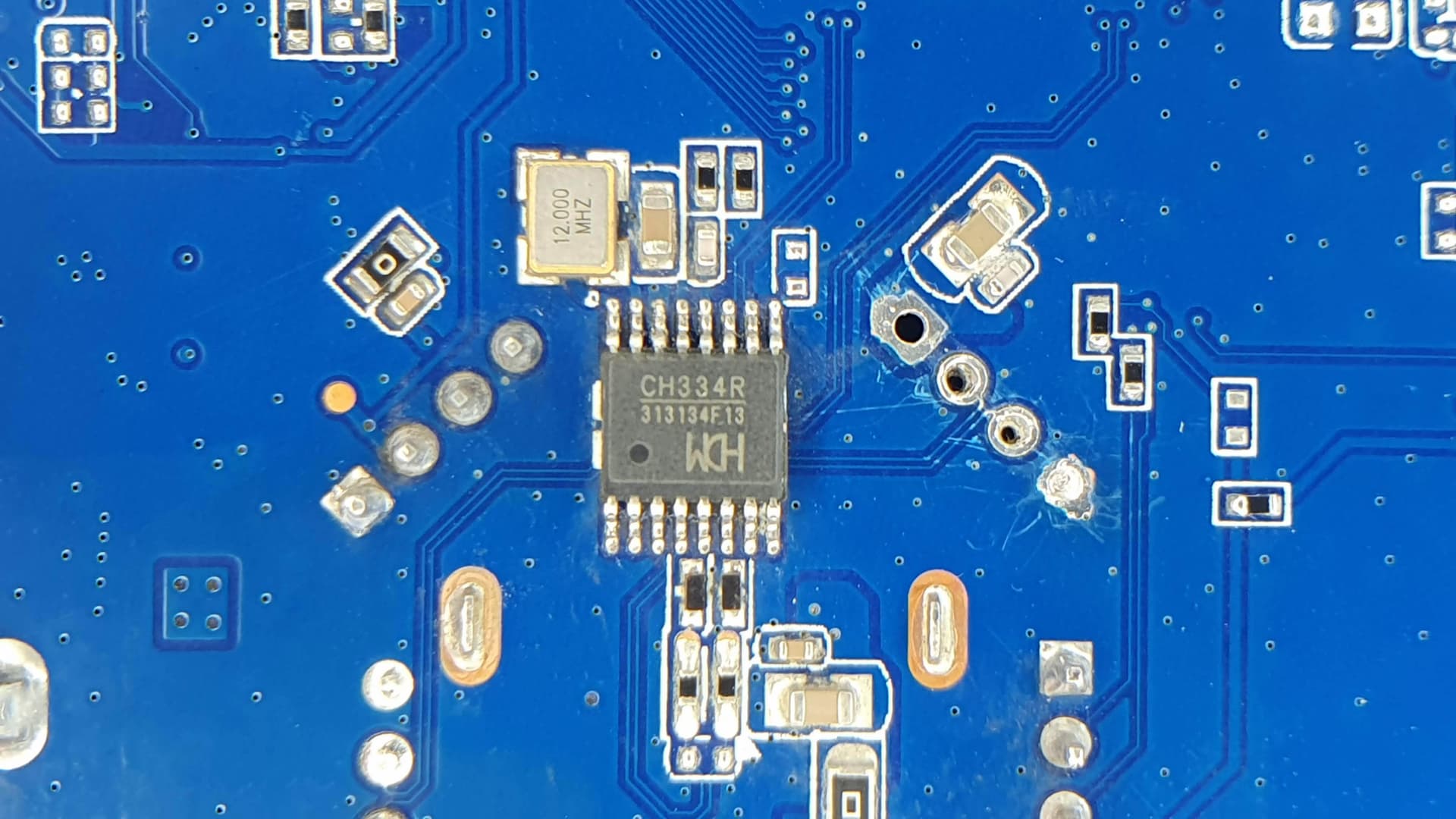
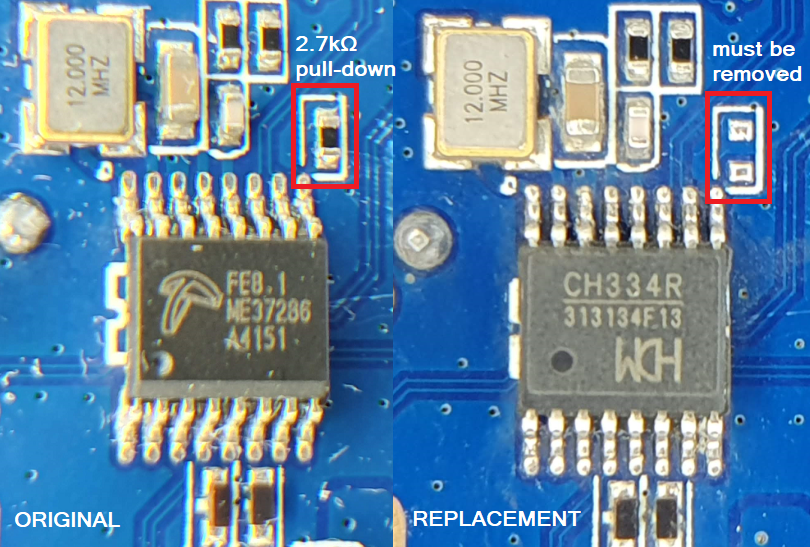
@dtech implemented a change recently and the FE8.1 with the CH334R.
You need to remove the pull down resistor from the reset pin.
But as you said in PM, you could attempt to reflow.
Alternatively, we can take care of it if you return it to us.
If you want me to investigate USB2 device not working on the USB3 port we can do that but I would suggest a separate thread.
Sam
The USB 2.0 compatible pins (DM/DP) of this USB 3.0 port also connect to this HUB chip, so replacing the chip will also solve that problem.
@JimL The HUB chip is on the back of the motherboard, so it needs to be flipped over, but pay close attention to the gap pad on the SoC to avoid contamination, as well as the wires of the wifi antennas.
After replacing the chip and reconnecting the remote dongle to the internal port, lsusb should show something like this:
osmc@Vero5:~$ lsusb
Bus 002 Device 001: ID 1d6b:0003 Linux Foundation 3.0 root hub
Bus 001 Device 003: ID 2017:1690 OSMC Remote Controller OSMC Remote Controller
Bus 001 Device 002: ID 1a86:8091 QinHeng Electronics USB HUB
Bus 001 Device 001: ID 1d6b:0002 Linux Foundation 2.0 root hub
Caution: The QSOP-16 chip is quite small, so only a trained technician should attempt to replace it, because the possibility of damage is quite high. After replacement, carefully check that no tin-bridge is formed between the pins.
That is awesome information @dtech really appreciate this, thank you.
I have handled QSOP in the past, so it shouldn’t be a problem if i chose to fix it.
Hi all…
I agree: the last few posts are Very Interesting…
@JimL Thank you for your first, detailed post…
Don’t want to keep this very long, so I’ll rather not comment the reply it received, but suffice to say that I didn’t like it much neither as it sounded unnecessarily passive-aggressive, as they use to say nowadays.
Anyway, your posts prompted very helpful replies to, so kudos to you for the posts and to Sam and dtech for their latest submissions giving details about what can be done to regain full functionality of our devices, and that is very good!
Best regards & have a nice weekend!
Joe
I came across this very long thread while searching for help. I’ve got a remote that suddenly stopped working in December and (I think) an inconsistent usb 3.0.
I haven’t opened the device and nor would, or indeed should, I as I don’t have the technical know-how to do that. The device is less than two years old.
I’ve reached out twice to support@osmc.tv (6-Jan and 12-Jan), but have received no response.
Is anybody here on this thread able to advise any workaround other than opening device?
Don’t open it!!! It is always helpful, if you mention your order number when you contact support@osmc.tv.
Hi Iain - as Jim says, don’t open it. If you’ve done all the usual checks (remote battery, re-booting device,etc) & pairing still fails, try testing the USB ports with either memory stick, USB keyboard,etc. If the USB3 port fails, but the devices work ok in the USB2 port, it does sound like you have the h/ware issue others here have encountered, in which case you certainly need to contact Support.
Thanks to both @mickb and @JimKnopf for replies. No way am I opening it.
Essentially, I have done all the usual checks. USB3 devices seems to be working on USB3 drive, but nothing else. USB2 port is okay. From what I can gather from this thread, the issue is the same as others have encountered.
I have already contacted Support (twice!), but they seem to be on sabbatical, as I have not had a reply. First email is now eight days ago.
A work around is to attach a keyboard and configure a CEC remote or just use the USB keyboard.
Too many emails and orders. Give me a couple days.
It won’t be ignored.
Sam