Hi, I wanted to download a new torrent, but after a few MBs downloaded I get a Broken pipe error. The target folder is on an external HDD that is shared from my TP-Link router and I believe is formatted as NTFS. There is an older torrent upload running that I added last week, but download started to fail now with this error, I tried 3 different torrents.
journalctl logs:
Apr 18 16:02:53 osmc kernel: CIFS VFS: Error -32 sending data on socket to server
Apr 18 16:02:53 osmc transmission-daemon[4263]: [2025-04-18 16:02:53.994] Captain.America.Brave.New.World.2025.2160p.iT.WEB-DL.DDP5.1.Atmos.DV.HDR.H.265.HUN.ENG-PTHD write failed for "Captain.America.Brave.New.World.2025.2160p.iT.WEB-DL.DDP5.1.Atmos.DV.HDR.H.265.HUN.ENG-PTHD/Captain.America.Brave.New.World.2025.2160p.iT.WEB-DL.DDP5.1.Atmos.DV.HDR.H.265.HUN.ENG-PTHD.mkv": Broken pipe (inout.c:>
Apr 18 16:02:53 osmc transmission-daemon[4263]: [2025-04-18 16:02:53.995] Captain.America.Brave.New.World.2025.2160p.iT.WEB-DL.DDP5.1.Atmos.DV.HDR.H.265.HUN.ENG-PTHD Broken pipe (/mnt/nas/_new_movies//Captain.America.Brave.New.World.2025.2160p.iT.WEB-DL.DDP5.1.Atmos.DV.HDR.H.265.HUN.ENG-PTHD/ (torrent.c:574)
Apr 18 16:02:54 osmc kernel: CIFS VFS: Error -32 sending data on socket to server
Apr 18 16:02:54 osmc kernel: CIFS VFS: Error -32 sending data on socket to server
Apr 18 16:02:54 osmc transmission-daemon[4263]: [2025-04-18 16:02:54.994] Captain.America.Brave.New.World.2025.2160p.iT.WEB-DL.DDP5.1.Atmos.DV.HDR.H.265.HUN.ENG-PTHD write failed for "Captain.America.Brave.New.World.2025.2160p.iT.WEB-DL.DDP5.1.Atmos.DV.HDR.H.265.HUN.ENG-PTHD/Captain.America.Brave.New.World.2025.2160p.iT.WEB-DL.DDP5.1.Atmos.DV.HDR.H.265.HUN.ENG-PTHD.mkv": Broken pipe (inout.c:>
Apr 18 16:02:54 osmc transmission-daemon[4263]: [2025-04-18 16:02:54.995] Captain.America.Brave.New.World.2025.2160p.iT.WEB-DL.DDP5.1.Atmos.DV.HDR.H.265.HUN.ENG-PTHD write failed for "Captain.America.Brave.New.World.2025.2160p.iT.WEB-DL.DDP5.1.Atmos.DV.HDR.H.265.HUN.ENG-PTHD/Captain.America.Brave.New.World.2025.2160p.iT.WEB-DL.DDP5.1.Atmos.DV.HDR.H.265.HUN.ENG-PTHD.mkv": Broken pipe (inout.c:>
Apr 18 16:03:06 osmc ntpd[2993]: 162.159.200.123 local addr 192.168.0.70 -> <null>
Apr 18 16:03:18 osmc transmission-daemon[4263]: [2025-04-18 16:03:18.997] Captain.America.Brave.New.World.2025.2160p.iT.WEB-DL.DDP5.1.Atmos.DV.HDR.H.265.HUN.ENG-PTHD Piece 305, which was just downloaded, failed its checksum test (torrent.c:3466)
Apr 18 16:03:21 osmc kernel: CIFS VFS: Error -32 sending data on socket to server
Apr 18 16:03:21 osmc kernel: CIFS VFS: Error -32 sending data on socket to server
Apr 18 16:03:21 osmc transmission-daemon[4263]: [2025-04-18 16:03:21.995] Captain.America.Brave.New.World.2025.2160p.iT.WEB-DL.DDP5.1.Atmos.DV.HDR.H.265.HUN.ENG-PTHD Piece 0, which was just downloaded, failed its checksum test (torrent.c:3466)
Apr 18 16:03:21 osmc transmission-daemon[4263]: [2025-04-18 16:03:21.995] Captain.America.Brave.New.World.2025.2160p.iT.WEB-DL.DDP5.1.Atmos.DV.HDR.H.265.HUN.ENG-PTHD write failed for "Captain.America.Brave.New.World.2025.2160p.iT.WEB-DL.DDP5.1.Atmos.DV.HDR.H.265.HUN.ENG-PTHD/Captain.America.Brave.New.World.2025.2160p.iT.WEB-DL.DDP5.1.Atmos.DV.HDR.H.265.HUN.ENG-PTHD.mkv": Broken pipe (inout.c:>
Apr 18 16:03:21 osmc transmission-daemon[4263]: [2025-04-18 16:03:21.995] Captain.America.Brave.New.World.2025.2160p.iT.WEB-DL.DDP5.1.Atmos.DV.HDR.H.265.HUN.ENG-PTHD Broken pipe (/mnt/nas/_new_movies//Captain.America.Brave.New.World.2025.2160p.iT.WEB-DL.DDP5.1.Atmos.DV.HDR.H.265.HUN.ENG-PTHD/ (torrent.c:574)
Apr 18 16:03:21 osmc transmission-daemon[4263]: [2025-04-18 16:03:21.995] Captain.America.Brave.New.World.2025.2160p.iT.WEB-DL.DDP5.1.Atmos.DV.HDR.H.265.HUN.ENG-PTHD write failed for "Captain.America.Brave.New.World.2025.2160p.iT.WEB-DL.DDP5.1.Atmos.DV.HDR.H.265.HUN.ENG-PTHD/Captain.America.Brave.New.World.2025.2160p.iT.WEB-DL.DDP5.1.Atmos.DV.HDR.H.265.HUN.ENG-PTHD.mkv": Broken pipe (inout.c:>
lines 3190-3270/3270 (END)
/etc/fstab contents:
//192.168.0.1/g /mnt/nas cifs x-systemd.automount,noauto,rw,iocharset=utf8,guest,uid=osmc,gid=osmc,file_mode=0770,dir_mode=0770 0 0
Any help would be much appreciated!
How is your network setup ? Ethernet, wireless ? Have you tried another hard drive ? How is the hard drive powered - from the router via USB 5V or from an external PSU ? Have you tried using Autofs for Mounting network shares with autofs (alternative to fstab) ? Autofs is generally the most reliable for mounting network shares. Have you checked the network timeouts associated with the Transmission torrnt client ?
Google says -
“Broken pipe” errors in Transmission usually indicate a disruption in the network connection, preventing data from being sent or received. This can be caused by factors like a fluctuating wireless signal, firewall interference, or the recipient closing the connection before the transfer is complete. Troubleshooting involves checking network stability, firewall settings, and potentially increasing connection timeout values.
Also, we might be able to help you if we have debug enabled logs.
To get a better understanding of the problem you are experiencing we need more information from you. The best way to get this information is for you to upload logs that demonstrate your problem. You can learn more about how to submit a useful support request here.
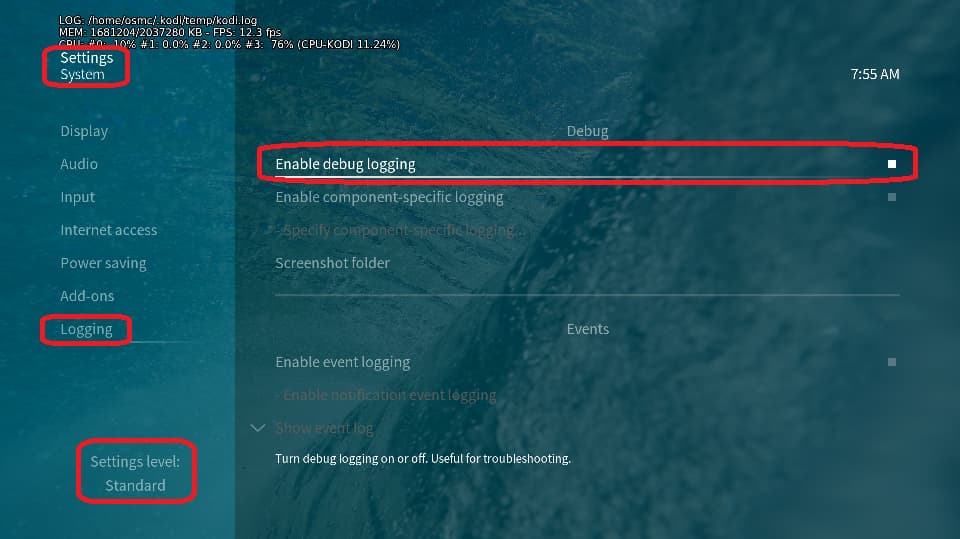
Depending on the used skin you have to set the settings-level to standard or higher, in summary:
- enable debug logging at settings->system->logging
- reboot the OSMC device twice(!)
- reproduce the issue
- upload the log set (all configs and logs!) either using the
Log Uploader method within the My OSMC menu in the GUI or the ssh method invoking command grab-logs -A
- publish the provided URL from the log set upload, here
Thanks for your understanding. We hope that we can help you get up and running again shortly.
OSMC skin screenshot:
The Vero V is connected to the router with a 1m long ethernet cable and the HDD is connected to the router via USB. The HDD is in a docking station, powered from mains. I haven’t had issues with this setup so far and I also watch movies from the same hard drive with this setup.
OSMC logs: https://paste.osmc.tv/usefanicud
Speedtest results come back good:
osmc@osmc:~$ speedtest-cli
Retrieving speedtest.net configuration...
Testing from Virgin Media (92.236.106.32)...
Retrieving speedtest.net server list...
Selecting best server based on ping...
Hosted by Lightning Fibre Ltd (London) [162.58 km]: 23.98 ms
Testing download speed................................................................................
Download: 213.13 Mbit/s
Testing upload speed......................................................................................................
Upload: 25.88 Mbit/s
Thank you for the help, it’s much appreciated.
Looks to me like the transmission-daemon has a file mount point and Vero-V is able to read (checksum test) but not write to your file on disk .
Some suggestions:
- Perform a R/W speedtest to/from the disk drive <> Vero-V, do you get the same errors ? (i.e. broken socket). There’s a couple of apps out there to test R/W speeds to/from disk.
- Try re-installing/reconfiguring the Transmission from the OSMC App Store ?
- If the disk R/W test is ‘ok’ try torrenting some different files - with shorter directory/filenames and smaller in size.
Chris.
I ran a quick write test and the result was slow:
osmc@osmc:~$ dd if=/dev/urandom of=/mnt/nas/ddtest bs=8k count=10k; rm -f /mnt/nas/ddtest
10240+0 records in
10240+0 records out
83886080 bytes (84 MB, 80 MiB) copied, 12.7106 s, 6.6 MB/s
When I increased block size and lowered count (bs=384k count=1k) I received a Broken pipe error.
In another test, instead of going through the router I connected the HDD directly to Vero and both HDD speed and the download was fine.
Next I will look into why I had a bottleneck with the router, so planning to try a different mounting method on OSMC-side and will check my Samba settings on the router too. A password protected sharing is probably better anyway.
Thank you Chris for your help!
Gabor
Great ! Let us know how you get on …
NTFS and Linux is never a goods combination sadly.
That TP-Link router will be running Linux.
If it does support exFAT, I suggest reformatting the drive.
And obviously if you are not dependent on a Windows compatible file system, consider something like ext4.
Sam
It turned out that the mounting configuration caused the bottleneck, more precisely the Samba version. After vers=3.1.1 was specified explicitly the speed returned to normal.
Here is my current config in case it helps someone:
osmc@osmc:~$ cat /etc/auto.smb.shares
/mnt/nas -fstype=cifs,rw,credentials=/home/osmc/.smbcredentials,iocharset=utf8,uid=osmc,gid=osmc,vers=3.1.1 ://192.168.0.1/g
PS: another lesson learned unrelated to OSMC is that the TP-Link Archer BE9300 router does support SMBv3 and is recommended to use.