How is your network setup ? Ethernet, wireless ? Have you tried another hard drive ? How is the hard drive powered - from the router via USB 5V or from an external PSU ? Have you tried using Autofs for Mounting network shares with autofs (alternative to fstab) ? Autofs is generally the most reliable for mounting network shares. Have you checked the network timeouts associated with the Transmission torrnt client ?
Google says -
“Broken pipe” errors in Transmission usually indicate a disruption in the network connection, preventing data from being sent or received. This can be caused by factors like a fluctuating wireless signal, firewall interference, or the recipient closing the connection before the transfer is complete. Troubleshooting involves checking network stability, firewall settings, and potentially increasing connection timeout values.
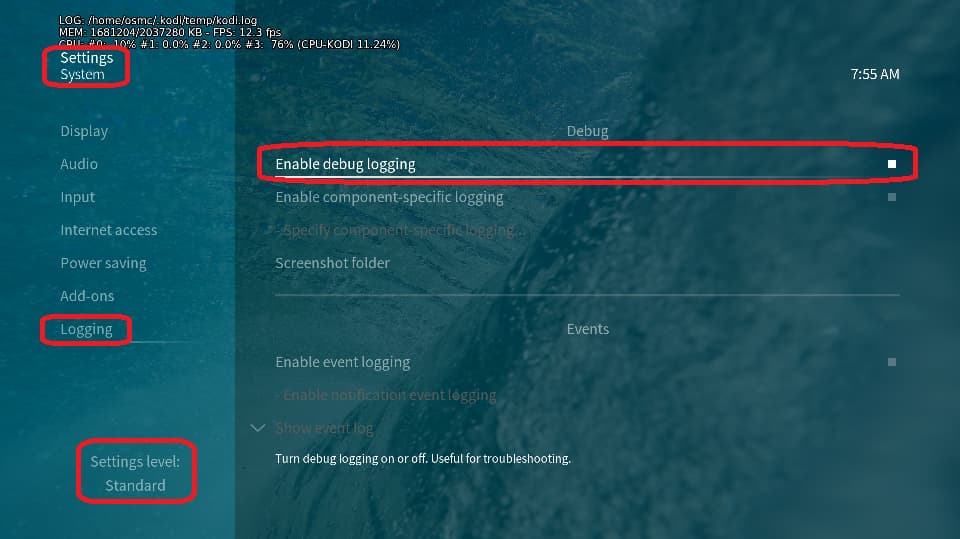
Also, we might be able to help you if we have debug enabled logs.
To get a better understanding of the problem you are experiencing we need more information from you. The best way to get this information is for you to upload logs that demonstrate your problem. You can learn more about how to submit a useful support request here.
Depending on the used skin you have to set the settings-level to standard or higher, in summary:
- enable debug logging at settings->system->logging
- reboot the OSMC device twice(!)
- reproduce the issue
- upload the log set (all configs and logs!) either using the
Log Uploadermethod within the My OSMC menu in the GUI or thesshmethod invoking commandgrab-logs -A - publish the provided URL from the log set upload, here
Thanks for your understanding. We hope that we can help you get up and running again shortly.
OSMC skin screenshot: