Trouble ugrading 1TB SSD to a 2TB SSD

I’m running the basic version of OSMC on a Raspberry Pi3b. I set it up over 5 years ago with a 1TB SSD drive and it is working fine. That drive is about full so I want to upgrade it to a 2TB SSD. I assumed it would be straight forward:

  1. format the new SSD as exfat
  2. copy the old files over
  3. modify the /etc/fstab file to use the new SSD coordinates
  4. reboot and done.

But no!!! As I will document below the original fstab file, using the UUID of the 1TB SSD (UUID=“B8EB-40DC”), loaded and mounted it in the /mnt/medialib folder and OSMC was happy.

Now with the new SSD drive (UUID=“9CBC-F267”) using the modified fstab as shown below, does not mount it to /mnt/medialib, but rather to /media/MS-2TB, and then of course OSMC does not find the media content.

I’m not able to see what I’m doing wrong. Can someone be of assistance?..RDK

A. Original fstab file and system checks:

me@MyMediaServer:~$ cat /etc/fstab
/dev/mmcblk0p1 /boot vfat defaults,noatime,noauto,x-systemd.automount 0 0

#/dev/mmcblk0p2 / ext4 defaults,noatime 0 0
#UUID=“9CBC-F267” /mnt/medialib exfat defaults,nofail,dmask=000,fmask=111 0 3
UUID=“B8EB-40DC” /mnt/medialib exfat defaults,nofail,dmask=000,fmask=111 0 3

me@MyMediaServer:~$ blkid
/dev/mmcblk0: PTUUID=“f3e8167c” PTTYPE=“dos”
/dev/mmcblk0p1: UUID=“31B8-68E5” TYPE=“vfat” PARTUUID=“f3e8167c-01”
/dev/mmcblk0p2: UUID=“9ae62005-25ad-436e-854e-8ca8f2f5e124” TYPE=“ext4” PARTUUID=“f3e8167c-02”
/dev/sda1: LABEL=“MS-1TB-2-21” UUID=“B8EB-40DC” TYPE=“exfat” PARTUUID=“32f37305-01”

me@MyMediaServer:~$ df -l
Filesystem 1K-blocks Used Available Use% Mounted on
devtmpfs 376680 0 376680 0% /dev
tmpfs 382312 9976 372336 3% /run
/dev/mmcblk0p2 15023024 2085800 12151048 15% /
tmpfs 382312 0 382312 0% /dev/shm
tmpfs 5120 0 5120 0% /run/lock
tmpfs 382312 0 382312 0% /sys/fs/cgroup
/dev/sda1 976759808 917709056 59050752 94% /mnt/medialib
/dev/mmcblk0p1 244988 29990 214999 13% /boot
tmpfs 76460 0 76460 0% /run/user/1001

B. Modified fstab file and system checks:

me@MyMediaServer:~$ cat /etc/fstab
/dev/mmcblk0p1 /boot vfat defaults,noatime,noauto,x-systemd.automount 0 0

#/dev/mmcblk0p2 / ext4 defaults,noatime 0 0
UUID=“9CBC-F267” /mnt/medialib exfat defaults,nofail,dmask=000,fmask=111 0 3
#UUID=“B8EB-40DC” /mnt/medialib exfat defaults,nofail,dmask=000,fmask=111 0 3

me@MyMediaServer:~$ blkid
/dev/mmcblk0: PTUUID=“f3e8167c” PTTYPE=“dos”
/dev/mmcblk0p1: UUID=“31B8-68E5” TYPE=“vfat” PARTUUID=“f3e8167c-01”
/dev/mmcblk0p2: UUID=“9ae62005-25ad-436e-854e-8ca8f2f5e124” TYPE=“ext4” PARTUUID=“f3e8167c-02”
/dev/sda1: LABEL=“MS-2TB” UUID=“9CBC-F267” TYPE=“exfat” PARTUUID=“99e5aa01-01”

me@MyMediaServer:~$ df -l
Filesystem 1K-blocks Used Available Use% Mounted on
devtmpfs 376680 0 376680 0% /dev
tmpfs 382312 5192 377120 2% /run
/dev/mmcblk0p2 15023024 2085784 12151064 15% /
tmpfs 382312 0 382312 0% /dev/shm
tmpfs 5120 0 5120 0% /run/lock
tmpfs 382312 0 382312 0% /sys/fs/cgroup
/dev/sda1 1953512448 918204416 1035308032 48% /media/MS-2TB
/dev/mmcblk0p1 244988 29990 214999 13% /boot
tmpfs 76460 0 76460 0% /run/user/1001
Need to see full logs.

Are both drives attached at once (suspect not)

@sam_nazarko Thanks for the reply. No, only one at a time were attached for my tests. I’m not real tech knowledgeable for OSMC/KODI, can you give me a reference or tutorial on how to setup, generate and send you the logs.

I also tried to attach to the new SSD to another Pi (version 4) with the fstab file and it mounted correctly, Thanks…RDK

To get a better understanding of the problem you are experiencing we need more information from you. The best way to get this information is for you to upload logs that demonstrate your problem. You can learn more about how to submit a useful support request here.

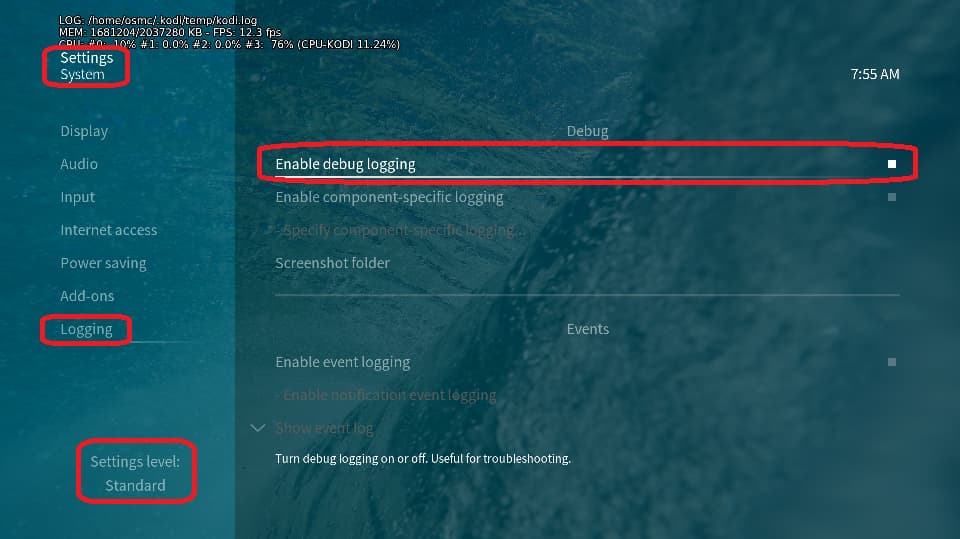
Depending on the used skin you have to set the settings-level to standard or higher, in summary:

  • enable debug logging at settings->system->logging

  • reboot the OSMC device twice(!)

  • reproduce the issue

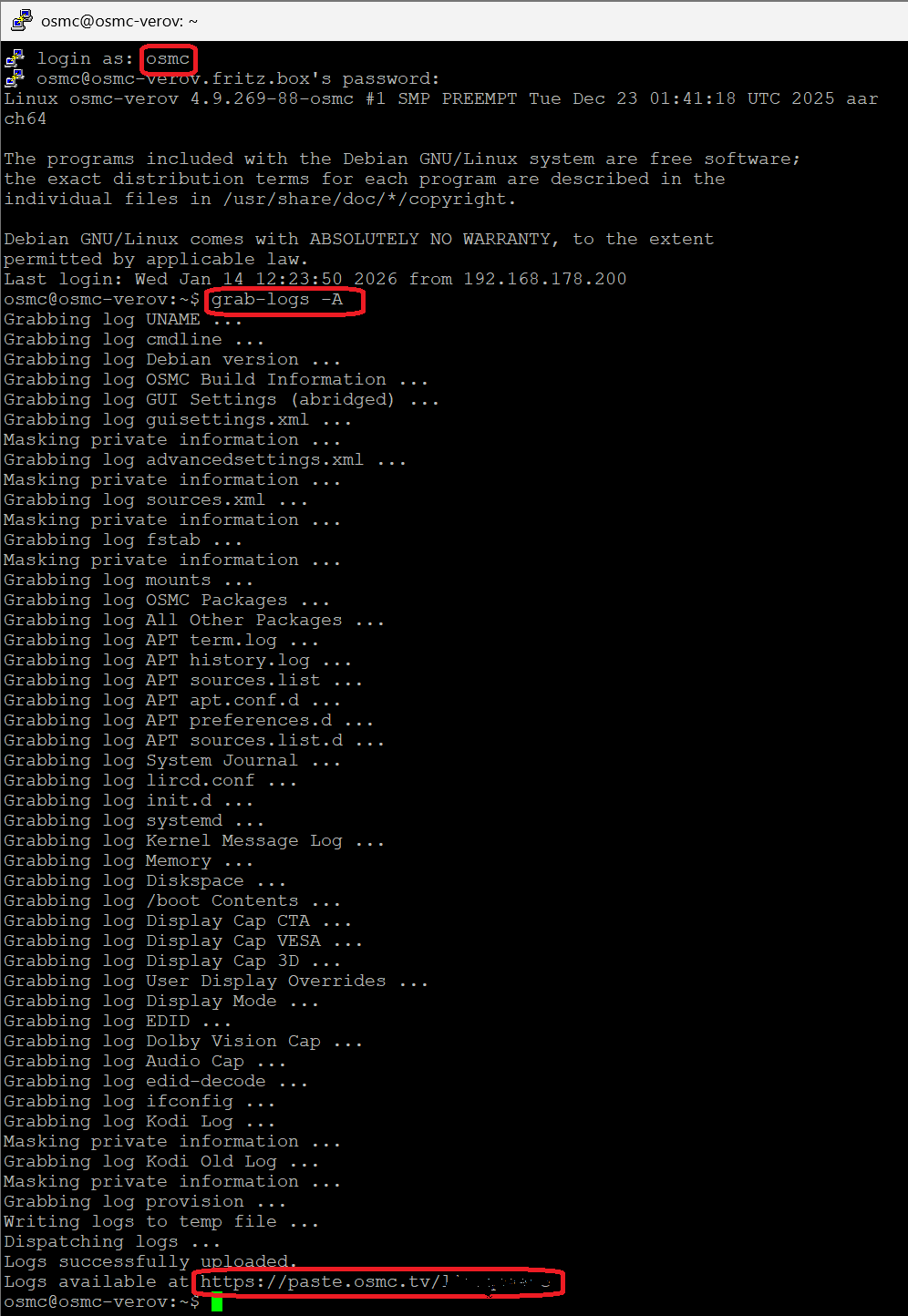
  • upload the log set (all configs and logs!) either using the Log Uploader method within the My OSMC menu in the GUI or the ssh method invoking command grab-logs -A

  • publish the provided URL from the log set upload, here

Thanks for your understanding. We hope that we can help you get up and running again shortly.

OSMC skin screenshot:

@sam_nazarko Many thanks. I have an appointment in an hour, I’ll try to get to this later today or tomorrow…RDK

@sam_nazarko OK, I think I have done as requested. Here is the URL: https://paste.osmc.tv/goharubevo

Maybe I’m too LINUX knowledgeable and not enough OSCM knowledgeable? The issue I reported was that I thought OSMC/KODI expected the new, 2TB video source device to be mounted in the same place (/mnt/medialib) as the old 1TB video source device. My experiments using SSH/PUTTY and the command line found that to NOT be the case, but rather it was mounted in /media/ folder.

Today after attaching the new 2TB SSD and following your debug logging notes, I successfully accessed a movie and a TVshow, which I “thought” did not work in, at least, one of my previous experiments. Today it worked, so evidently OSMC really does not care where the video source device is mounted?? Is there something in the GUI which I need to better understand?

For now it is working and I’m returning the logging to normal. Thanks for any comments or suggestions…RDK

PS…It is still not obvious why the OSMC-Pi os is not respecting the fstab mounting instructions…

It does respect your fstab.
Your current active fstab line is
UUID="9CBC-F267" /mnt/medialib exfat defaults,nofail,dmask=000,fmask=111 0 3
Which actually mount your 2TB Drive to /mnt/medialib which is the location you have defined in OSMC/Kodi as the sources for your Media therefore it work.
/dev/sda1 /mnt/medialib fuseblk rw,nosuid,nodev,relatime,user_id=0,group_id=0,default_permissions,allow_other,blksize=4096 0 0

The same drive is automatically also mounted by OSMC by it’s label under Media
/dev/sda1 /media/MS-2TB fuseblk rw,nosuid,nodev,relatime,user_id=0,group_id=0,default_permissions,allow_other,blksize=4096 0 0
Unless you want to switchusing the automount location for your media source you can just ignore it.

1 Like

OK. Thanks. Case closed…RDK