Video Disruption during 4K HEVC Playback - vdec reset and vidioc_qbuf skip

Hi Sam & Vero team!

Long time Vero 4K user, recently upgraded to Vero V and loving it but I am experiencing a recurring issue where video playback is disrupted.

This seems to primarily occur with 4K HEVC (H.265) content. During playback, the video will stutter or freeze for a moment, hang for a few seconds, after which it resumes. The audio also appears to stop and restart in sync with the disruption.

I have captured dmesg logs immediately after two separate occurrences of this issue.
Please let me know if there is a better way to capture and provide logs that are useful for the team.

Below is a Perplexity-assisted analysis of the dmesg logs, with the key finding appearing to be a full reset of the video decoder (vdec) mid-playback.

Hope this is useful! Thank you in advance for your assistance.


Analysis of the dmesg Logs

Based on the logs, the following key events seem to correlate with the video disruption:

  1. Video Decoder Restart: The HEVC decoder is completely released and re-initialized. This is shown by the sequence of vdec_release instance followed by vdec_create instance and vdec_init, dev_name:ammvdec_h265. This happens for a 3840x2160 stream.

  2. Skipped Video Buffers: There are numerous vidioc_qbuf skip: index:... messages, indicating that video frames are being dropped by the kernel driver. This would directly cause the visible stutter.

  3. Audio Re-initialization: The audio subsystem (specifically S/PDIF for a TrueHD stream) is disabled and then re-enabled around the same time as the video decoder reset. This appears to be a consequence of the video pipeline resetting, not the cause of the issue.

  4. No Critical Hardware Errors: The logs do not show any kernel panics, I/O errors, or other critical hardware failures. The issue seems to be confined to the video processing pipeline at the driver/software level.


Log Snippets

Here is the relevant section of the dmesg output captured immediately after a disruption event.
This pattern has occurred multiple times.

[883627.806743] PPMGRVPP: info: task: quit
[883627.806821] ppmgr local_init
[883627.806831] dim:ch[0]:di_receiver_event_fun,1:_UNREG
[883627.818041] vdec_disable_DMC input->target= 0x1
[883627.820339] vdec_release instance 0000000084c63283, total 1 id = 0
[883627.820588] the vdec clock off, ref cnt: 0
[883627.820654] the vdec clock on, ref cnt: 1
[883627.820730] vdec_create instance 00000000339a1ae8, total 1, PM: pd-sec-api
[883627.823018] vdec_init, dev_name:ammvdec_h265, vdec_type=VDEC_TYPE_FRAME_BLOCK id = 0
[883627.824892] [0]h265: ver (201602101,0) decinfo: 3840x2160 rate=4004
[883627.826507] [TEE], the fw (hevc_mmu) will be loaded.
[883627.861211] asoc-aml-card auge_sound: S/PDIF[0] Playback disable
[883627.865426] [0]Bit depth luma = 10
[883627.867828] [vdec_kpi][vh265_isr_thread_fn] First I frame coming.
[883627.881507] [vdec_kpi][post_video_frame] First I frame decoded.
[883627.886038] [0]cur lcu idx = 0, (total 2040), set error_mark
[883627.921214] audio_dsp: IEC958_mode_codec= 7, IEC958 type TrueHD
[883627.936275] asoc-aml-card auge_sound: S/PDIF[0] Playback enable
[883628.001171] vidioc_qbuf skip: index:1156315:1156314
Hi, to get a better understanding of the problem you are experiencing we need more information from you. The best way to get this information is for you to upload logs that demonstrate your problem. You can learn more about how to submit a useful support request here.

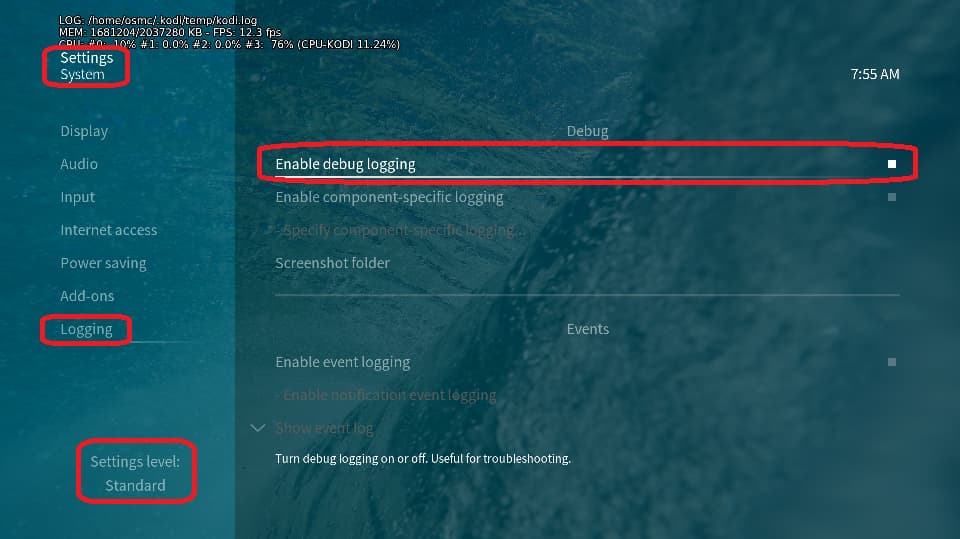
Depending on the used skin you have to set the settings-level to standard or higher, in summary:

  • enable debug logging at settings->system->logging

  • reboot the OSMC device twice(!)

  • reproduce the issue

  • upload the log set (all configs and logs!) either using the Log Uploader method within the My OSMC menu in the GUI or the ssh method invoking command grab-logs -A

  • publish the provided URL from the log set upload, here

Thanks for your understanding. We hope that we can help you get up and running again shortly.

OSMC skin screenshot:

Please upload a full log.

If you have a sample of a problematic file, then that’s even better

Sam

Thank you for providing instructions.

Below are logs that experienced a disruption at the 2025-11-06 21:07:52 timestamp.

https://paste.osmc.tv/kaxewotefi

Hope these are useful!

2025-11-06 18:03:36.463 T:2822     info <general>: VideoPlayer::OpenFile: /mnt/LACH_SERVER/Movies/Transformers.2007.UHD.BluRay.2160p.TrueHD.Atmos.7.1.DV.HEVC.REMUX-FraMeSToR.mkv
...
2025-11-06 18:12:17.358 T:3176     info <general>: CAEStreamParser::SyncTrueHD - TrueHD stream detected (8 channels, 48000Hz)
2025-11-06 18:12:17.358 T:3176  warning <general>: CPackerMAT::PackTrueHD: detected a stream discontinuity -> output timing expected: 24592, found: 55200
2025-11-06 18:12:17.359 T:3176     info <general>: CPackerMAT::PackTrueHD: seek detected, re-initializing MAT packer state
...
2025-11-06 20:07:59.616 T:3176     info <general>: CAEStreamParser::SyncTrueHD - TrueHD stream detected (8 channels, 48000Hz)
2025-11-06 20:07:59.619 T:3176  warning <general>: CPackerMAT::PackTrueHD: detected a stream discontinuity -> output timing expected: 39200, found: 56208
2025-11-06 20:07:59.619 T:3176     info <general>: CPackerMAT::PackTrueHD: seek detected, re-initializing MAT packer state
2025-11-06 20:07:59.622 T:3176     info <general>: CActiveAEStream::AddData - messy timestamps, increasing interval for measuring average error to 6000 ms
2025-11-06 20:07:59.685 T:2962     info <general>: CActiveAESink::OpenSink - initialize sink
...
2025-11-06 20:24:08.363 T:3176     info <general>: CAEStreamParser::SyncTrueHD - TrueHD stream detected (8 channels, 48000Hz)
2025-11-06 20:24:08.367 T:3176  warning <general>: CPackerMAT::PackTrueHD: detected a stream discontinuity -> output timing expected: 32248, found: 62704
2025-11-06 20:24:08.367 T:3176     info <general>: CPackerMAT::PackTrueHD: seek detected, re-initializing MAT packer state
2025-11-06 20:24:08.855 T:2962     info <general>: CActiveAESink::OpenSink - initialize sink


2025-11-06 20:32:20.880 T:2822     info <general>: VideoPlayer::OpenFile: /mnt/LACH_SERVER/TV/Stranger Things/Season 4/Stranger.Things.S04E02.Chapter.Two.Vecna's.Curse.1080p.NF.WEB-DL.x265.SILENCE.mkv
...
2025-11-06 21:07:41.089 T:3585     info <general>: CVideoPlayerAudio::Process - stream stalled
...

Not sure, but you connect the Vero V via wifi. Is there a chance that you connect the device for tests via an ethernet cable?

Another thing is that there seems to be persistent kernel logs active which we don’t want. Can you deactivate this and provide a further log set?

  • login via SSH
  • cd /var/log
  • sudo rm -R -f journal && sudo reboot (repeat this line if you get a ‘cannot remove’ error until it works and your ssh connection gets lost by the reboot)