This is after a clean install so not sure how or why the files would be corrupt or missing. This is from my log file. I am using a Vero V.
2025-01-10 18:59:52.137 T:5307 info : retrOSMCmk2 Launcher: “/home/osmc/.kodi/userdata/addon_data/script.launch.retropie/data.xml” missing or corrupt on this run
2025-01-10 18:59:52.137 T:5307 info : retrOSMCmk2 Launcher: “/home/osmc/.kodi/userdata/addon_data/script.launch.retropie/settings.xml” missing or corrupt on this run
2025-01-10 18:59:54.175 T:5222 info : Loading skin file: DialogAddonSettings.xml, load type: KEEP_IN_MEMORY
Any assistance I would greatly appreciate. Thanks in advance.
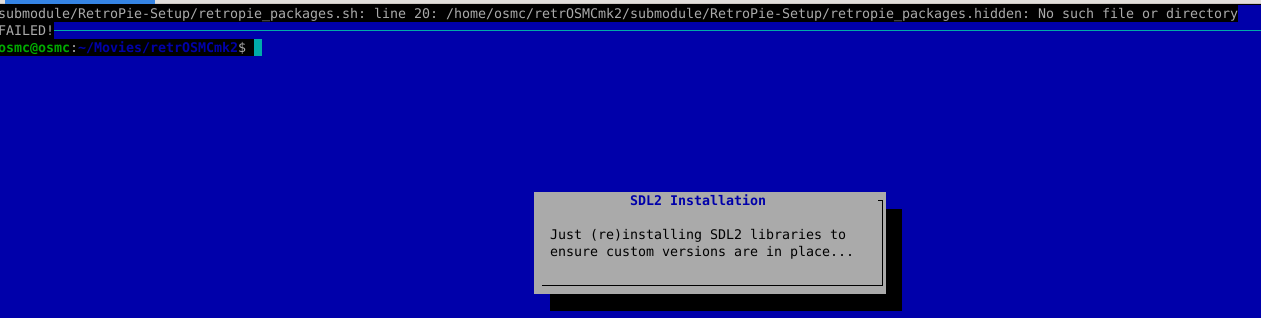
After another new install of OSMC and trying your script I receive the following error :
submodule/RetroPie-Setup/retropie_packages.sh: line 20: /home/osmc/retrOSMCmk2/submodule/RetroPie-Setup/retropie_packages.hidden: No such file or directory
FAILED!───
Interesting. Unclear why you got two different errors, despite using the same installer on clean OSMC installs. I’ll have a look when I’m back on the grid.
I’ve just:
Cloned and run my installer on my clean VeroV.
Performed the Basic Install from the RetroPie-Setup menu.
Put ROMs in the folder.
Installed the addon.zip in Kodi ( without the pyxbmct module error that is occasionally reported above).
Launched the addon from the games section.
Tested GB and SNES.
Your initial logs from the “failed open” were actually normal. It is just reporting that you haven’t saved any settings in the addon yet.
Did the addon fail to start at all? Or did the addon window open, and it failed then you clicked on “Launch!”?
The second error looked like it was when you were running the install script from the command line. As does the third/screenshot.
Strange you get this now - when you successfully installed it on your earlier attempt. The inconsistency makes it hard to diagnose.
This is where I did things differently. I exited the ssh session and in the GUI Power / Exit. When I see the blue screen with my keyboard attached to the VeroV I hit esc key. This dropped me to terminal and killed the OSMC media center.
Once there changed directory to the git installation folder.
cd retrOSMCmk2
Start the installation process.
sudo ./setup.sh
Doing it this way and not through ssh solved my issue.
Hi,
I know that the RPI 4 is officially not supported. But others have also tried. I apologize, but I stopped reading the thread after 50 posts or so - is there any way now to install tetrosmcmk2 on the RPI4? I did a fresh install of OSMC yesterday, but I struggled to install all cores / packages (due to gpg: assuming signed data - … - cant check signature no public key). I know someone tried to deactivate the fifo protection, but I would rather avoid this, since it can be a security risk…
Also, i installed the Addon, but I can’t launch it… It goes immediately back to the OSMC library. https://paste.osmc.tv/tinalomega
I had it point to my own fork due to the regularity of breaking changes that were occurring. Too much for me to stay on top of. And at no point did any of them actually seem to be changes that enhanced the available experience on the platform. So it made sense.
I don’t own an RPi4 to test so as it’s very YMMV. But I’m glad you’re getting some positive results there.
What’s the current best solution to have UAE (and maybe other game emulations) on a Vero V ? Is it the official Retropie Setup script, the retrOSMCmk2 or something else ?
(Oh how I dream about a simple “Add game emulators” option in the MyOSMC menu …)