Today we're happy to release OSMC's May 2026 update for all supported devices. This update continues to bring Kodi v21.3 as Kodi v22 becomes nearer to release.
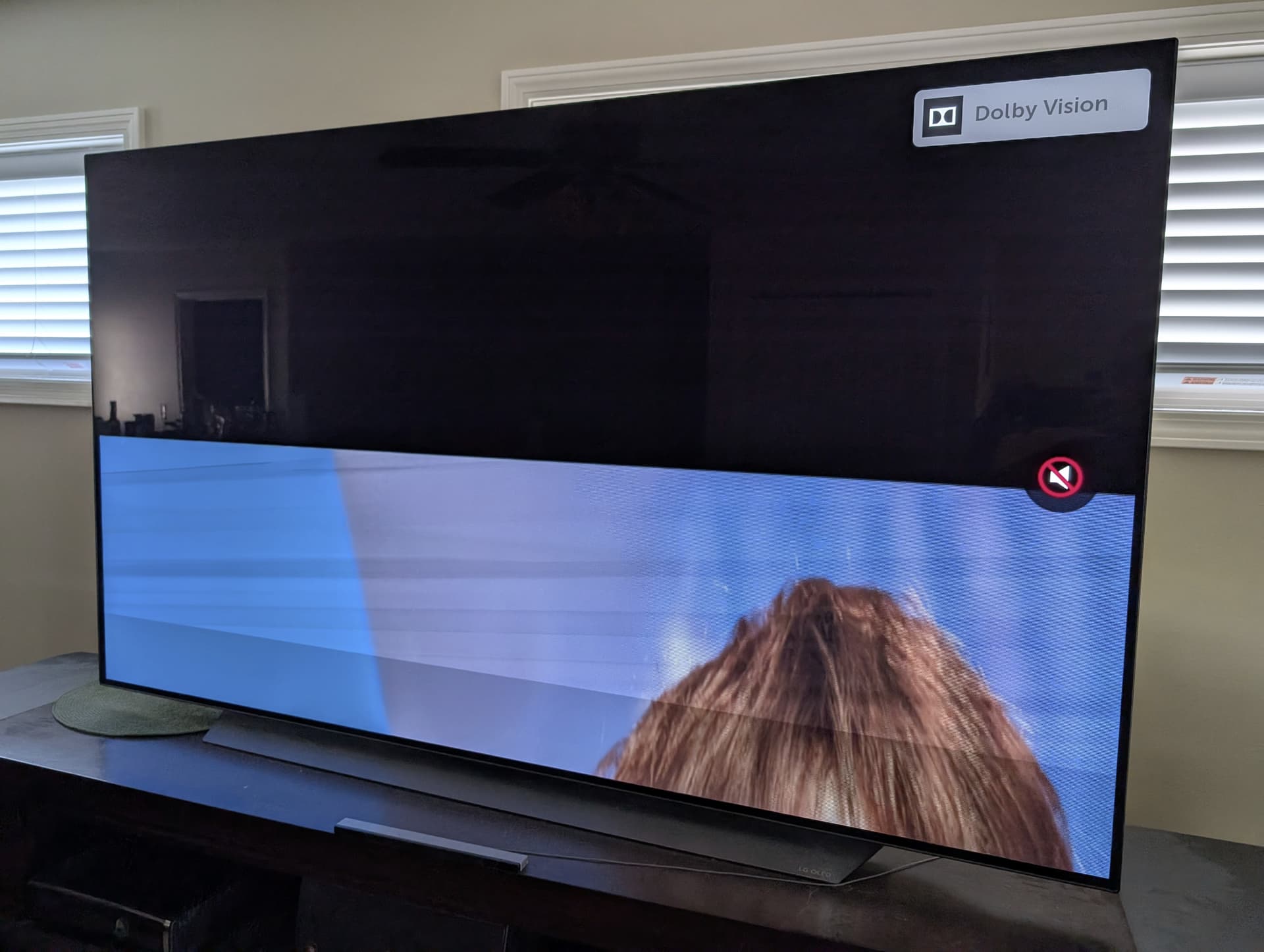
Ever since the May 26 update on our Vero V, any DV content is now garbly through our LG C9 OLED TV. On the November update, the TV-led DV (without FEL) worked great but now DV content is completely unplayable. Is there a way to revert the change to see if my TV just doesn’t support this version of DV? It’s triggering the DV mode on the TV but the content isn’t watchable. The video is cut in half and what is viewable has lines through it almost like the video is ghosted on top of itself.
Fantastic work. Thanks so much. I don’t suppose you would consider adding in support for the extended info available elsewhere in other hardware that supports FEL for the PlayerProcess screen? Or something like it. It’s great having access to all the data concerning DV, HDR10+ and so on. Not a biggie but it’s nice to have.
I’ve seen an update notification on my Vero 4k, (not V), I understand the device is unsupported, just wanted to check it was OK to run this update? Thanks
Thank you very much – Dolby Vision now looks even better on my Valerion VisionMaster Max projector.
Unfortunately, this seems to have caused issues with 3D playback: the right-hand image is completely pink and the left-hand image has pink edges (on both the TV and the projector).
That should be easy to reproduce, or do I need to start a new thread and provide logs?
Perhaps a case for @tanio99?
Does that only happen after playing a DV clip? Can you reproduce it after a Vero restart? I’d suggest a power cycle just to be sure that all the CPU regiters are cleared and that it’s not a leftover that survives a reboot. Unfortunately, I don’t have a DV display, so it’s hard for me to reproduce it if it’s related to DV.
Thanks, @tanio99, restarting helped – that’s a good workaround and I could have thought of that myself!
But after playing the next DV file, the issue reappeares with all 3D files.
Should I post logs without restarting, create a new thread, or just stay with it for now?
I hope all is well & I thank you (and the other folks) for this update.
1 small hiccup (with fix):
CEC Stopped working after updating OSMC (Vero V)
After first boot OSMC briefly displayed “can’t initialize pulse cec adapter”
Connected to: LG OLED EVO C4 (OLED55C4PUA)
Restore CEC:
1- Within TV’s CEC controls – delete HDMI Source 1 Device “LG DVD Player”
2- Unplug Power to TV, Unplug Power to OSMC, Unplug HDMI cable
3- Wait 10 minutes
4- Plug in TV, OSMC, and the HDMI cable to HDMI slot 1
5- Power on TV, set source to HDMI 1, then power on OSMC
6- Within TV’s CEC controls – add HDMI Source 1 Device. Set to “LG DVD Player” (this is so silly how LG does this, but nothing else searchable or selectable seems to work)
7- Now change the source from “HDMI 1” to “LG DVD Player”
8- With everything powered on unplug the HDMI cable and plug it back in
9- Change the source to “LG DVD Player”
10- When the LG Grey source floating box appears arrow key into it, and click on the source icon that looks like a small remote.