The issue with flashes when seeking should now be fixed.
Sam
The issue with flashes when seeking should now be fixed.
Sam
Do we need to add the staging repo again and update as stated in #1 to get the fix?
Yes, FEL is not yet in the stable builds.
Sam
I’ve just updated and the effect has almost disappeared.
I’ve tested with several movies. In most of them, when jumping through all the chapters, the effect is no longer there. However, in some cases it did appear, but only the first time. If I then jump back and go through the chapter again, it doesn’t show up anymore, before, it always did. Also, now the flash, on the few occasions it appears, lasts for a shorter time and retains the image less.
At the time of testing, I was also remuxing other large files onto the same hard drive I’m using for these tests, mentioning this in case the disk access time when jumping between chapters might be somehow related.
I’ll keep testing without the stressed hard drive and let you know.
Thanks.
With the newest build Daredevil S02 is not as bad anymore. It has a green tint, but it is possible to see faces and details.
Annoying flashes are also gone when seeking.
I’ve had a problem in recent days with some Dolby Vision files just showing a white screen (with sound continuing as normal). The same files display correctly on a different Kodi setup on an Android box (I assume they’re not profile 7 FEL).
This is very unusual, I haven’t encountered this problem before. I can share logs tomorrow if useful, but just so I’m clear, should I turn on full debugging before I do this? More to the point, is this a question that’s nothing to do with this thread?
I rarely skip around but very nice to see these kinks getting worked out!
Keep up the great work team!
If you have an issue with this testing build which you didn’t before, then it’s relevant. Just normal debug logs will do for a start
Ok, log is here
https://paste.osmc.tv/penudizuli
This version of the log is certainly very detailed!  I’ll be very interested to hear if you find anything.
I can report that opening the file gives the Dolby Vision logo onscreen, and sound works as normal, but the display is full white screen. If I try to open menus during playback I can’t see those either, but the on screen controls still work (e.g. press enter, move right, press enter stops playback, even if I can’t see the menu items onscreen).
Hi, these logs don’t show the actual kernel used in the dev staging. Your last system update was on March 20th. Please remember, the access to the dev staging will be automatically removed after 14 days. Follow the instruction in the first post, to make an update and post new logs in case the problem still persists. Thx.
Ha, I DEFINITELY installed the staging build more than 2 weeks ago, and I’d completely forgotten that it gets removed automatically. Let me install it again and see if the problem is fixed.
I’ve installed the staging build now, and the file in question continues to have the same problem.
So it’s apparently not “new” behaviour that has been introduced by this change, which is good. However, it’s the first time I’ve seen a DV file fail to display in this way (while working on an Android Kodi implementation), which is less good!
Sorry, I forgot to post the new log:
https://paste.osmc.tv/imobogagof
Edit: that looks like the same build information. Am I missing something here? I definitely installed the staging version from the first post.
It’s just the kernel that was updated to version 92. You are on the latest and greatest. But there’s one more fix in the repo right now. Can you update again and check you have 2.1.0-1 when you go dpkg -l | grep secureosmc. It might take a while to reach the mirrors. I doubt that fixes your issue though. If not, can you give us a sample from the file that doesn’t play?
That is indeed the version I have now, and problem persists.
The offending article is a fairly big file (about 8 GB) and I’m not too sure how to take a sample from it. Let me do some tinkering.
I think @JimKnopf can tell you. I’m a net receiver of clips so can never remember the best way to do it.
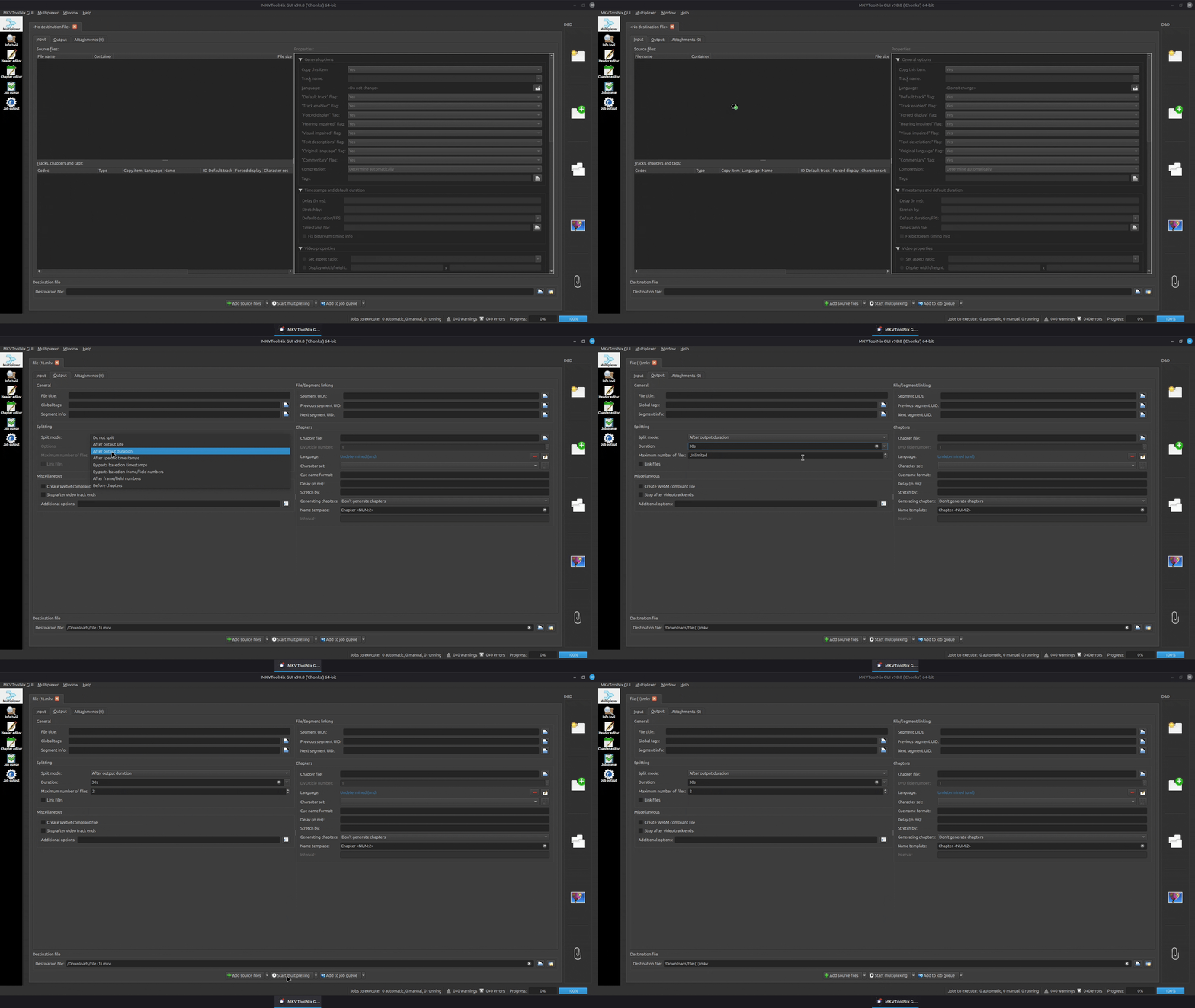
You can use MKVToolNix for that. I made a little clip and converted it to a gif file. Right click and open it in a new tab to see it at full size. The clip shows an mkv file being split into two files after a duration of 30 seconds. This will result in two new files, with the first containing seconds 0 - 30, and the second file containing everything from second 30 onwards of the original mkv file. If you hover over the input fields of MKVToolNix, it will show you a tooltip explaining all the different ways the options can be used, e.g. how to extract a specific section of a video, say from minute 10 to 12.
I dunno, I’m not having good results recently. I tried to watch Nobody 2 (with Dolby 7 FEL) and it was so dark as to be unwatchable. Going to my Android box the 8.1 fallback looked as expected. And if I use the Vero V but force it to use HDR with no DV it looks fine also.
The fact that I’m the only person complaining here suggests this is a local problem, but I just can’t figure out what that might be.
Edit: by “so dark as to be unwatchable” I mean that it seemed like black levels were lowered, crushing shadow details completely, so that dark scenes became almost comically dark.
My Version of Nobody 2 with FEL Looks fine (but i havent watched the whole movie in that Format). Do you have a timestamp where it is obvious?
The very first second of the opening scene will do it. On Dolby Vision Profile 8 fallback (Android) or forced HDR (Kodi) the right side of his face is deep in shadow but clearly visible. With the staging build the right side of his face is completely invisible, identical to the background.
At first viewing I thought this was an artistic choice, but within a few scenes it was clear that too much of the screen was full black too often for it to be a choice!