Vero 4k+ not booting red cross

Hi there,

This issue occurred occasionally in the past, but I was able to resolve it by repeatedly connecting the PSU until the red cross appeared, then flashing the device. However, now I am unable to get the red cross, and the Vero does not boot. If I plug in the PSU without the red cross, it still won’t boot. I do see a red light inside the Vero from the optical port at the back, but there is no boot process.

It seems similar to this issue: Vero 4K not booting with red cross.

I have also tried powering it using a cellphone charger through the white USB port, but the problem persists.

Given this context, how can i do some tests to identify the problem here?

Hi

Sorry to hear this.

Can you clarify what you mean by this?

A phone charger is never any good for powering a Vero.

Sam

By flashing the device i mean: reinstalling osmc. I’ve tried with pen drive, and sd card.

The cell phone charger was another test, to validate that the problem wasn’t the psu.

The red light doesn’t show at all? It should show up for a second or two then turn off to indicate a successful boot

Sam

Nop, the red light keeps on forever

Understood. Do you have a USB A to USB a cable?

Sam

Yes i do, and i’ve tried to boot with it, no success

Does it show up as a device on your PC when you plug it in to the white USB port?

No, it doesn’t show up on the computer when I connect the USB port.
Edit: I’ve tried both Windows and Linux, but there’s no sign of any new device or storage being detected.

An interesting fact: I have a KVM switch on my monitor, and I connected the Vero to the HDMI input and powered it on. Normally, when the KVM recognizes a new video source, it switches to that source automatically. However, when I powered on the Vero, nothing happened initially. Here’s the interesting part: when I connected the USB cable, the KVM switched to the “Vero” HDMI input, but there was no video signal.

USB is probably just asserting HDMI as the 5v PHY is shared.

If the device is not showing up at all there are a few possibilities:

  • Bad cable / connection issue with PC
  • Device isn’t actually failing in early stage boot so doesn’t present itself for re-flashing via USB (it could be opened and eMMC pins shorted to confirm)
  • The device has failed to an extent where it is not working at all

Sam

Hi Sam,

Thank you for your help so far. Do you have any guidance regarding the second point: “it could be opened and eMMC pins shorted to confirm”? Which pins should be shorted exactly?
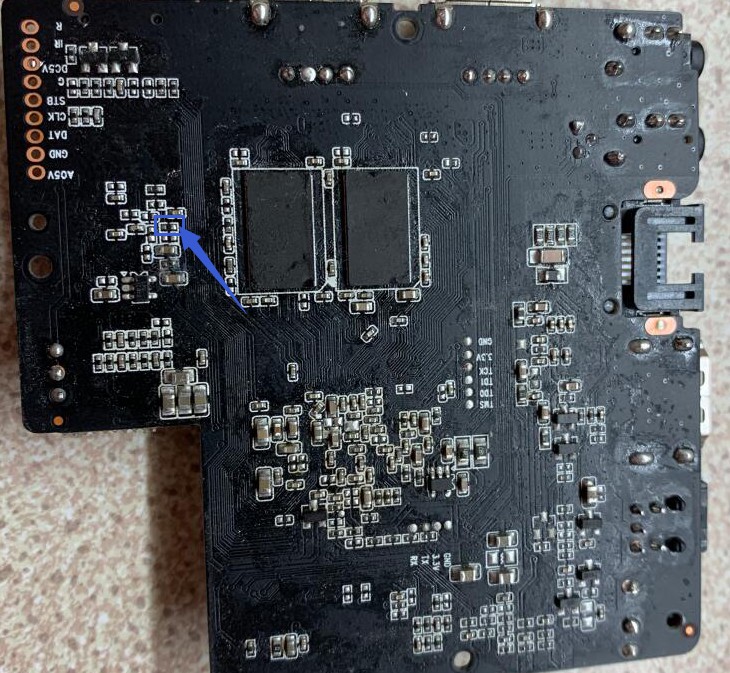
The pins by the eMMC can be shorted.

But if the device is in a solid red light state, then it should be in burn mode already

First of all, thanx for all support on this situation
I understand. With this approach, I shouldn’t be making the situation any worse, correct?

In case that i want to try the short solution, wich pins should i short/shunt?
I’ve just found this thread on another forum: Installing Armbian on Vero 4k, does not boot from SD Card - Amlogic CPU Boxes - Armbian Community Forums
Is there any good thing to be “reused” or applied on my case?

No – you can’t get worse than not booting…

Please clarify if it’s a 4K or 4K + model for certainty re pins.

It’s a 4k+

Hi @sam_nazarko any guidance here, on how can i short the pins on my vero 4k+?

Sorry, I missed this. Had to dig up my notes as it varies on 4K vs 4K+ and I always mix them up.

This is pin layout for 4K+

Don’t worry about the joints, this is a sample built by hand :laughing: in early 2018.

Sam

No worries, thank you very much for your response. As soon as I test it, I will share the results here.

Sorry for the late response.
I tried shortening those pins, but unfortunately, it didn’t work. The vero board couldn’t be revived.

Did it appear as a USB device at all?