I’m trying to upgrade from my old Vero 4k to a new Vero V, but I’m having HDMI issues when trying to output 4k.
If I’m trying to play a 4k video or even set the UI to 4k (I know this isn’t recommended, but it’s an easy replication without an example video), then the HDMI signal drops out and the status light on the hdmi switch starts flashing. None of this happens on my Vero 4k - it just plays the exact same source file (network share), and the UI can handle 4k @ 60fps without any signal dropouts.
Both devices are set up identically - Vero > HDMI switch > TV. I’ve tried switching the cables between the vero and the switch, and the same issue happens. Yes I know the switch could be the issue, but if it’s working fine on my Vero 4k, then it seems like something needs configuring on the Vero V. The settings on both Veros look identical (expert level display).
I’ve tried toggling the relevant whitelist option in said settings, didn’t seem to help.
Edit: I didn’t see much difference in the kodi.log files, but I do note that in dmesg output, I get lines like
[Mon Jan 12 16:46:35 2026] hdmitx: Colourspace is set to Y444 but display does not support it
[Mon Jan 12 16:46:35 2026] hdmitx: Bitdepth is set to 10 bits but display does not support deep colour
...
[Mon Jan 12 16:46:35 2026] hdmitx: video: Video output
                                Bit depth: 10-bit, Colourspace: RGB
                                Colour range RGB: limited, YCC: limited
on the Vero V that do not appear on the Vero 4K - but I do see
[Mon Jan 12 16:51:07 2026] hdmitx: video: Video output
                                Bit depth: 10-bit, Colourspace: YUV444
                                Colour range RGB: limited, YCC: limited
To get a better understanding of the problem you are experiencing we need more information from you. The best way to get this information is for you to upload logs that demonstrate your problem. You can learn more about how to submit a useful support request here.
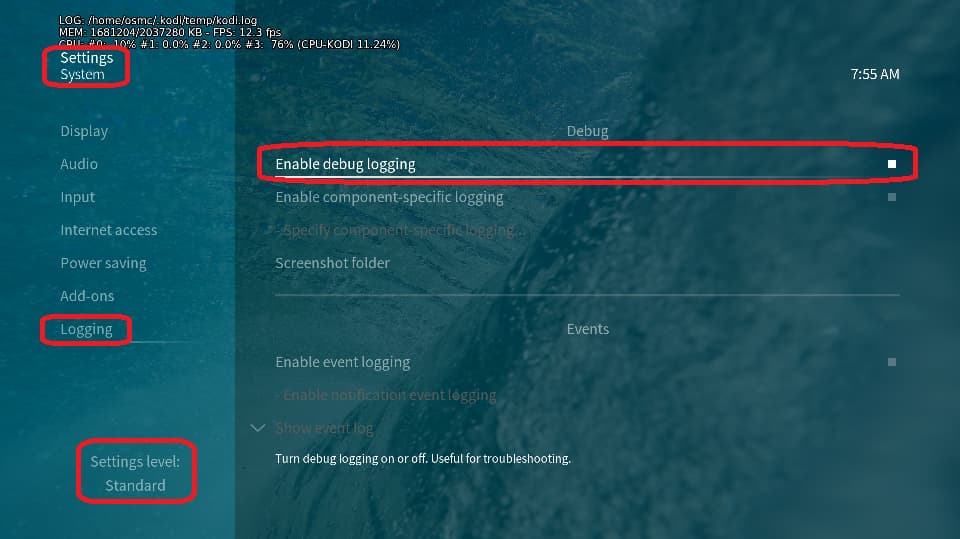
Depending on the used skin you have to set the settings-level to standard or higher, in summary:
enable debug logging at settings->system->logging
reboot the OSMC device twice(!)
reproduce the issue
upload the log set (all configs and logs!) either using the Log Uploader method within the My OSMC menu in the GUI or the ssh method invoking command grab-logs -A
publish the provided URL from the log set upload, here
Thanks for your understanding. We hope that we can help you get up and running again shortly.
The plugin/plugout is the HDMI dropping out - that’s a symptom, not the cause.
I expect the audio config to be the same thing as the above missing Y444 warnings. Both of those things work on the Vero 4k plugged into the same switch, so while I’m not saying it’s blameless, it is something that used to (and still does!) work on the old Vero but not the new one
That works, but the switch is necessary in my setup (and the same thing happens with a different switch), and that this still works with my Vero 4k means it’s overall a regression for the Vero V
@pratstercs Besides new debug logs @grahamh requested, it’s now time to tell us what hdmi switches you are using (brand, model) and whether these are hdmi 2.0a or 2.1 or higher certified. Thx.
This isn’t something stupid like the Vero V attempting an HDMI 2.1 handshake, failing, and defaulting to an HDMI 1.x connection? Which would explain the difference if the Vero 4k and everything else is consistently HDMI 2.0?
I’ll post debug logs when I’m back on a pc tomorrow morning
2026-01-12 17:27:21.793 T:2965     info <general>: VideoPlayer::OpenFile: smb://MJOLNIR/nas/Videos/--TEMP--/Youtube/[Mia Mulder-20240301] (1-38-09) What's Wrong With Democracy [63914ccb-311c-4420-849e-3cb4c9a56d40].yt-dlp.mp4
...
Jan 12 17:27:23.868935 osmc kernel: hdmitx: audio: Audio Type: PCM
Jan 12 17:27:23.869059 osmc kernel: hdmitx: video: VIC: 96 (96) 3840x2160p50hz
Jan 12 17:27:23.869494 osmc kernel: hdmitx: video: Video output
                                            Bit depth: 10-bit, Colourspace: YUV420
                                            Colour range RGB: limited, YCC: limited
Jan 12 17:27:23.869738 osmc kernel: hdmitx: video: Gamut
                                            Colorimetry BT709
                                            Transfer SDR
Jan 12 17:27:23.869913 osmc kernel: hdmitx: video: PLL clock: 0xc000029a, Vid clock div 0x000b0000
Jan 12 17:27:23.870043 osmc kernel: hdmitx: system: update rx hdr info d
...
2026-01-12 17:27:34.248 T:2965    debug <general>: HandleKey: stop (0xf0bc) pressed, window 12005, action is Stop
Vero V:
2026-01-12 17:20:03.998 T:2992     info <general>: VideoPlayer::OpenFile: smb://MJOLNIR/nas/Videos/--TEMP--/Youtube/[Mia Mulder-20240301] (1-38-09) What's Wrong With Democracy [63914ccb-311c-4420-849e-3cb4c9a56d40].yt-dlp.mp4
...
Jan 12 17:20:05.183222 verov kernel: hdmitx: audio: Audio Type: PCM
Jan 12 17:20:05.183316 verov kernel: hdmitx: video: VIC: 96 (96) 3840x2160p50hz
Jan 12 17:20:05.183408 verov kernel: hdmitx: video: Video output
                                             Bit depth: 12-bit, Colourspace: YUV422
                                             Colour range RGB: limited, YCC: limited
Jan 12 17:20:05.183502 verov kernel: hdmitx: video: Gamut
                                             Colorimetry BT709
                                             Transfer SDR
Jan 12 17:20:05.183592 verov kernel: hdmitx: video: DV type Not DV
Jan 12 17:20:05.183679 verov kernel: hdmitx: video: PLL clock: 0xdb1004f7, Vid clock div 0x000a739c
Jan 12 17:20:05.183787 verov kernel: hdmitx: system: update rx hdr info d
(this block repeats 10 times)
...
2026-01-12 17:20:28.099 T:2992    debug <general>: HandleKey: stop (0xf0bc) pressed, window 12005, action is Stop
So, although using the same VIC 96 of the TV is used which is capable using chroma subsampling 4:2:0, the VeroV uses 12-bit colour depth and higher 4:2:2 chroma subsampling.
Good spot! I can’t recall the logic changing since Vero 4k kernel was frozen. In theory, 422 should be higher quality than 420 - maybe we changed it. But it means a 600MHz HDMI character rate. It seems those switches are struggling with that.
That definitely seemed to help! Tested with a few videos starting with the problematic one in my previous logs, and it looked fine in some quick testing: https://paste.osmc.tv/axufezikun
I did see some stuttering with one 1080p video (but not dropouts), but I think that’s an unrelated problem.
I’m also sure you’re aware that that setting didn’t survive a reboot, but as you say it needs testing then I’m sure it’s not final by any means.