I have 2 Vero V’s both connected to a headless Kodi + MariaDB setup running on docker on OMV. Yesterday it all stopped working and I can’t determine why. Both the Vero V’s boot to the main Kodi interface, but stop responding to their remotes yet do respond to the TV remote (over eARC). Both are running 2025.11-1. I can log into the MySQL database with the same credentials using HeidiSQL and can see data as expected, plus I’m not getting any MySQL access errors in the Kodi log. I’ve turned on logging in Kodi one one of the Vero V’s and that’s not showing anything useful either. I have SSH’d in and exported the logs:
If the VeroV could not connect to the db in general, you would see messages like
error <general>: Unable to open database: MyVideos131 [2002](Can't connect to MySQL server on '192.168...
in the logs. But your log shows
2026-02-08 10:59:53.845 T:2988 info <general>: MYSQL: Connected to version 11.4.8-MariaDB-log
Can you take logs in debug mode as this is the way we want such data:
To get a better understanding of the problem you are experiencing we need more information from you. The best way to get this information is for you to upload logs that demonstrate your problem. You can learn more about how to submit a useful support request here.
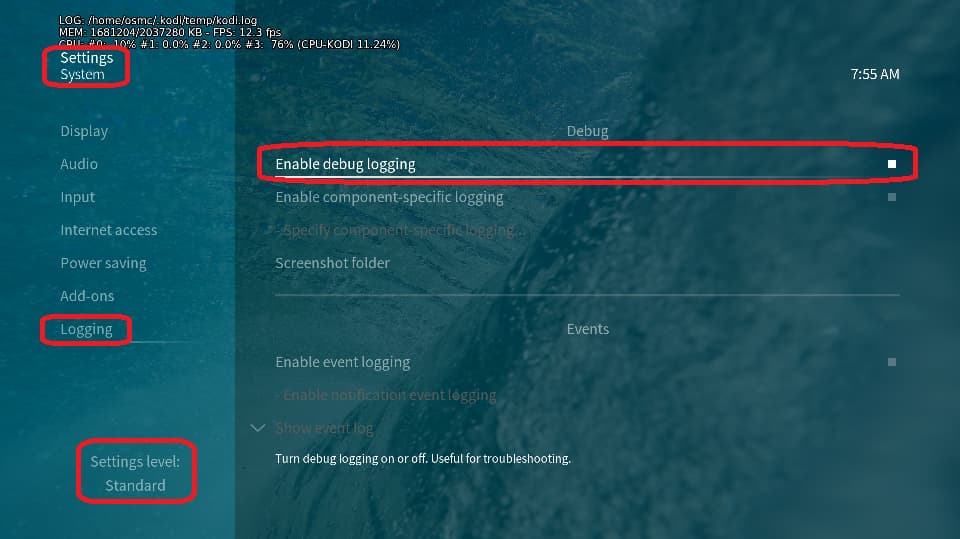
Depending on the used skin you have to set the settings-level to standard or higher, in summary:
enable debug logging at settings->system->logging
in this menu also activate the component specific logging, only activate the Verbose logging for Database item
reboot the OSMC device twice(!)
reproduce the issue
upload the log set (all configs and logs!) either using the Log Uploader method within the My OSMC menu in the GUI or the ssh method invoking command grab-logs -A
publish the provided URL from the log set upload, here
Thanks for your understanding. We hope that we can help you get up and running again shortly.
Only Videos, music is fine. Connecting to the DB directly with HeidiSQL shows it is called “MyVideos131“. All the tables inside of MyVideos131 have data as expected.
And as I also noted at the start, for whatever reason the Vero remote isn’t working either (but the eARC control is)
Has anything changed on the database system that might be affecting access rights? You seem to be using the db user ‘root’, and the password doesn’t appear to be the problem.
Yeah I know using the root user isn’t ideal but this is solely used for this purpose, so I didn’t change that. Nothing has changed apart from an OMV docker-compose update I applied on Friday, but this problem started Saturday and all was well for the ~36h in between.
All I can think of is possibly there’s been a clash of DB changes between the 2 Vero V’s and the headless-Kodi and something has gotten corrupt? But IO can’t see anything obviously wrong, nor am I seeing any error that’s helping me diagnose this.
Is the MySQL database something you have recently moved to or? Do you have Kodi installed on a PC or other device that connects to this same database and if so is the video library working there? Did this happen with an update to a Kodi major version? Additionally you might try removing the name tags from your advancedsettings.xml. I’ve seen where adding a name tag which is the same as what Kodi already uses can sometimes lead to odd issues.
As for the remote can you power off and unplug both Vero V’s and then plug one of them back in and see if the remote starts working. If not try re-pairing the remote by holding down the home and OK buttons simultaneously for a number of seconds till the light on the remote starts blinking.
Nope, this setup has not conceptually changed in about 18 months, other than watchman updating the docker instances (no changes recently), updates to the OMV version (2025.11-1 was last) and patches to OMV (around weekly, but nothing aligns), and I use Kodi solely from these 2 Vero Vs so there’s no PC instance laying around. The name tags have always been there, assumed they were required.
I’ve tried re-paring the remotes on both devices (and changed the battery’s for fresh ones) and they will not re-pair.
Are you running heidiSQL-client from another (Windows) system or on the VeroV?
Otherwise, my idea is to run a cli mariadb-client from the VeroV itsself and see, where the problem lies:
apt update && apt install mariadb-client
mysql -u root -p -h 192.168.50.50        <user and ip taken from the provided logs>
show databases;
use MyVideos131
show tables;
select c00 from movie;
\q
Regarding the missing remotes, please, open a separate thread in the category ‘Help and Support’ and sub-category ‘Vero V’. Please, do not open the boxes!
If the name tags are not included it just uses the default name which happens to be the same as what your already using. You might try a quick and dirty to see if your video database got corrupted and just change the video db name tag to something like “test” and, after rebooting Kodi, try updating the video library. This will make a new video database without affected the original one.
Thanks basically what I have now done, I’ve cloned the docker setup and kodi config but not the media data (db content) and rescanned the sources and they are now showing up… however the remotes are still not pairing.
I find it highly suspicious that this issue affected both devices remote functionality at the same time - the DB I get as its shared (although I still do understand what’s wrong) but I don’t understand how/why the remotes would be affected
Power surge? Did you power down and unplug both Vero’s for a full hardware reset? If not, please do, and then post logs from both devices (they don’t need to be debug).
To be clear, when you started with a new fresh video database then your setup worked as expected? If so then I would just write off the original and start with a new one.